Jhaymes Clark N. Caracuel
January 23, 2026
5
min. read
and updated on:
February 25, 2026

"According to Gartner, nearly 75% of all digital interactions will be AI-powered by the end of this year."

The Death of the Search Bar: Why Generative UI and Voice-Based UX are Dominating 2026 Apps is happening right now. According to Gartner, nearly 75% of all digital interactions will be AI-powered by the end of this year. The familiar search box you've relied on for decades is being replaced by interfaces that understand your intent before you finish typing—or even without typing at all.
Here's what's replacing the traditional search bar in 2026:
The old model was simple: you hunt through menus, type keywords, and sift through results. The new model? Your app knows what you want and builds the interface around that intent in real-time.
This isn't science fiction. It's happening because AI can now run locally on devices (thanks to AI PCs), eliminating the latency that once forced us into clunky chatbox interfaces. The screen adapts to you, not the other way around.
For founders and business leaders building the next generation of digital products, this shift changes everything. Your users won't tolerate static menus and search bars when competitors are serving them personalized, adaptive experiences. The companies that accept Generative UI and voice-first design now will define the standard for 2026 and beyond.
The search bar had a good run. But in a world where AI can read your intent from behavior patterns, context, and natural language, asking users to hunt for what they need feels increasingly outdated.
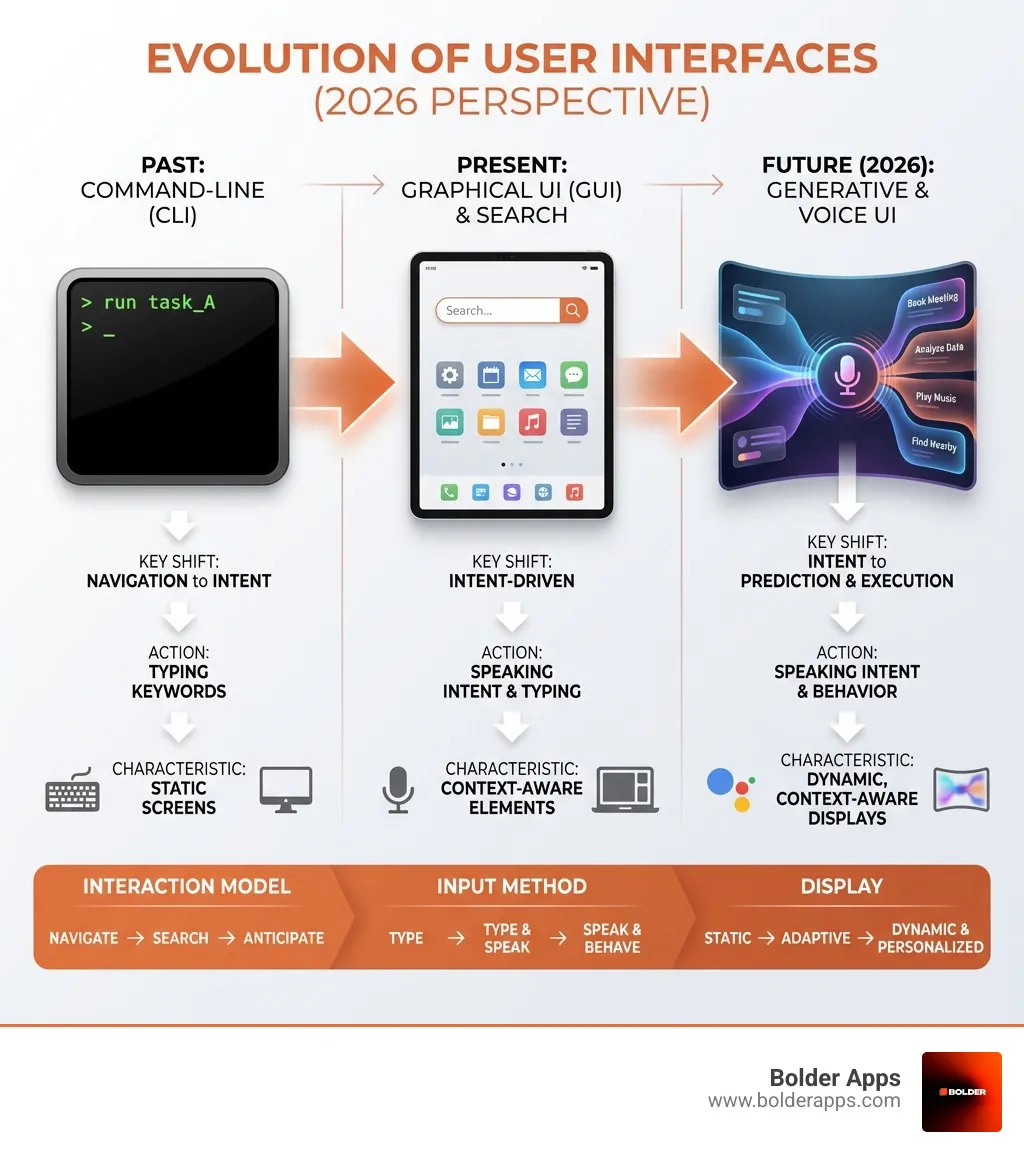
We've all been there: staring at a static interface, navigating endless menus, or trying to phrase our thoughts perfectly into a search bar, only to be met with irrelevant results. This experience, once the norm, is rapidly becoming a relic of the past. The traditional static UI forced us to "go hunt" for what we needed, creating what we call "cognitive sprawl" and user fatigue. It was a one-size-fits-all approach that simply doesn't fit anyone perfectly.
Imagine an app where every user sees the exact same navigation, regardless of their needs or past behavior. That's the tyranny of the static menu. It leads to significant cognitive load as users try to decipher where to go, resulting in analysis paralysis and wasted screen real estate. The "one-size-fits-all" navigation menu is dying, and honestly, the "one-size-fits-all" design is basically dead.

The problem with traditional search, as highlighted in Mobile UX Design: User-Friendly Search, was that it relied on us, the users, to articulate our needs perfectly. But our needs are dynamic, our contexts change, and sometimes, we don't even know what we're looking for until we see it. Static UI serves content, but Generative UI serves intent. It's the difference between a library where you have to know the Dewey Decimal System, and a librarian who knows your reading habits and hands you the perfect book before you even ask.
For a while, the chatbox seemed like the answer. It became dominant because it was the cheapest interface that could ship fast while the model lived somewhere else, on a server farm, behind a latency tax. It was a utilitarian solution, but ultimately, a bridge, not a destination.
The core problems with current chat interfaces are clear: text-only responses are overwhelming and hard to follow. Imagine trying to review a complex contract or compare dozens of product features through a wall of text. As the Generative UI Report 2026 points out, users leave AI apps when outputs lack structure, credibility, and supportive visuals. The high interaction cost of carefully crafting prompts, often feeling like a "skill test" rather than a conversation, led to user frustration and task incompletion. We learned that while conversational AI is powerful, simply displaying text in a chat window was a mistake.
The shift we're witnessing is profound. It's about moving from interfaces that react to our explicit commands to ones that anticipate our needs and proactively shape themselves around us. This is where Generative UI and voice-based UX step in, powered by AI and often leveraging local compute on advanced devices like AI PCs.
At its heart, Generative UI is about creating bespoke, dynamic interfaces on the fly. Unlike traditional static UI, which presents fixed menus and layouts, Generative UI treats the screen as a composable system built from parts, reassembled in real-time based on your intent and context.
How does it work? Generative UI runs on a continuous feedback loop. Every click, hover, hesitation, and detour becomes a signal. Those signals become insights, and those insights trigger interface changes which, in turn, alter what you do next. For example, if you consistently check your analytics dashboard at 7:23 AM, a Generative UI might surface that dashboard, pre-filtered, before you even open the app. It's helpful, yes, but also "kinda creepy" in the best possible way.
This dynamic generation requires serious processing power. Interfaces need to react within 100 to 200 milliseconds, and that includes behavior analysis, component selection, layout optimization, and rendering. This is where AI PCs, with their integrated NPU (Neural Processing Unit), become game-changers, enabling local compute that significantly reduces latency. The Generative UI Report 2026 emphasizes that Generative UI reduces the effort of using AI effectively, enhancing task efficiency by providing structured, usable outputs instead of overwhelming text.
The rise of voice-based UX goes hand-in-hand with Generative UI. Typing is honestly becoming a secondary input. Between voice-based interactions and eye-tracking, we’re designing for hands-free navigation. Conversational AI, paired with natural language processing, allows us to simply state our intent, and the system responds, often by generating a custom interface or executing a task directly.
This multimodal consistency is key. Whether we speak, gesture, or eventually, just think, the system understands and adapts. We're moving towards a world where our devices are always listening (with privacy in mind, of course), always ready to assist. This dramatically accelerates our interactions and frees us from the constraints of keyboard and mouse.
The most exciting development is that AI is finally leaving the screen. We're entering an era of "physical AI" and ambient computing, where intelligence is woven into the objects we already use. The assumption that every smart product needs a display is dying.

Consider the implications: instead of interacting with an app on a screen, the object itself becomes the interface. Think of a smart brick that responds to a child's play without a screen or app, using sound, light, and tactile feedback. Or a foldable device that seamlessly transforms its form factor to adapt to your task, blurring the lines between hardware and software. These are examples of the interface-object relationship, where the physical form itself conveys information and allows interaction.
This invisible interface, often referred to as "Sentient Design," means embedding intelligence so seamlessly that users forget it’s there. Our apps are no longer confined to glass rectangles; they extend into the physical world, making our environments more responsive and intuitive. This paradigm shift, from screen-centric to ambient intelligence, fundamentally changes the future of app experiences.
The Graphical User Interface (GUI), which has been the dominant interaction paradigm since 1984, is effectively dead. This isn't a hyperbolic statement; it's a reflection of a fundamental shift. The search bar, a cornerstone of the GUI, is being made obsolete by a more profound and intuitive way of interacting with technology.
The "Best UI is No UI" concept perfectly encapsulates this new reality. Users simply state an intent, and the AI generates a bespoke, disposable interface for that single moment, or simply executes the task. We're moving from a command-based interaction model to intent-based delegation. Instead of typing a query into a search bar, we might say, "Find me a flight to Miami for next month," and the app instantly presents a curated, interactive interface with flight options, filters, and booking buttons—all generated on the fly and designed to disappear once the task is complete.
This shift impacts findy as well. We're moving from PageRank, which organized information based on links, to DeepRank, where AI acts as an intermediary reader, understanding and synthesizing content to match our intent. This means that for content creators and businesses, the game changes from optimizing for keywords to optimizing for AI comprehension, serving both human and AI audiences.
With the rise of Generative UI and voice-based UX, the role of the UI designer is fundamentally evolving. We're moving from being pixel pushers and interface creators to intent specifiers and system steerers. Our job is now about defining the intent and the outcomes, rather than carefully crafting every button and menu.
This new design paradigm is giving rise to concepts like "vibe coding" and "vibe design." We're no longer writing rigid code or designing static mockups; we're providing high-level directives, or "vibe," to AI agents that then generate the actual interfaces. This iterative feedback loop allows for rapid exploration and findy within latent design spaces. As we've explored in articles like The Rise of Vibe: Codable UI - Why the Future of UX is Reprogrammable by Chat and The Dawn of Vibe Coding: How Google Gemini's Opal Integration is Redefining App Development, AI becomes a powerful partner, augmenting user intent through "prompt augmentation" without replacing authorship. It's about shifting creation from execution to exploration and findy, leveraging the "AI Sandwich" workflow: human creativity for the spark, AI for volume and variations, and human curation for refinement.
Of course, this exciting new world isn't without its challenges. Implementing Generative UI and voice-based UX at scale brings significant problems:
To steer this intent-first future, we're seeing several practical UI/UX trends emerge in 2026. These aren't just aesthetic choices; they're foundational principles for building trust, clarity, and truly human-centric AI experiences.
Building subconscious trust is paramount. Liquid Glass 2.0 is an evolution of optical trust, using real-time refraction and light-scattering to mimic how light behaves in the physical world. This makes interfaces feel more grounded, technically robust, and premium, building an immediate sense of reliability.
For managing complex information, Bento Box 3.0 provides modular clarity for high-density data. Inspired by Japanese lunch boxes, this trend organizes immense amounts of information on a single screen without chaos. It's about providing a clear, human-centric interface for managing everything from industrial data to complex financial dashboards. Our VR BOXXX project highlights this shift, where buttons and data aren't just painted on a canvas—they exist in a hierarchy of depth, making navigation feel second-nature. This concept of Spatial Depth, applying a Z-axis hierarchy to 2D screens, uses shadows and light to guide the user's eye naturally, reducing mental energy.
In a world of AI-generated perfection, "The Human Signal" becomes a luxury commodity. This trend accepts imperfection—raw textures, hand-touched elements, deliberate flaws—to build an immediate emotional bridge with users. It's about signaling, "A person made this for you." Our Galaxibites concept uses hyper-tactile 3D surrealism to create a "chewy," sensory experience, proving that functional is no longer enough; designing for feeling is crucial for user love.
This extends to Emotional Micro-Interactions, which go beyond generic animations to create hyper-real feedback loops. Imagine a soft light pulse paired with a subtle micro-haptic vibration for tactile reassurance, or intentional "micro-delays" before a success checkmark appears, mimicking human rhythm. These interactions provide contextual empathy, responding with calmer transitions if a user hesitates, creating interfaces that feel truly alive and responsive to our emotional states.
The dominance of Generative UI and voice-based UX in 2026 is also built on a strong technical foundation, prioritizing efficiency and personalization.
These trends, alongside the insights detailed in our Mobile App Development in 2026: A Complete Guide to Trends, Technologies, and Business Growth, are shaping the next generation of apps.
The rapid evolution of AI and interface design naturally brings up many questions. Let's tackle some of the most common ones we hear from our partners and the design community.
This is a common concern, and the short answer is: no, not entirely. Instead, AI is replacing the boring parts of your job. Think of AI as a high-speed intern. It can generate 50 variations of a button in three seconds, handle mundane tasks, and accelerate research through autonomous investigation and synthesis. This frees up human designers to focus on higher-level strategy, intent specification, system steering, and understanding emotional nuance—things AI still struggles with. Our role is shifting from interface creation to directing and refining the AI's output, ensuring the "soul" remains in the design.
While you don't need to become a senior full-stack engineer, the "barrier" between design and code has basically vanished. Understanding how code works—concepts like Flexbox, CSS Grid, and design tokens—makes you ten times more valuable to a team. Tools like Figma's Dev Mode are bridging this gap, allowing designers to communicate more effectively with developers. It's about building a common language and understanding the constraints and possibilities of the medium, not becoming an expert coder.
Ensuring accessibility in dynamic, Generative UIs is a new and evolving challenge. The core UX principles still matter, but we're moving beyond simple checklists. The biggest shift is towards Explainable AI (XAI) and Neuro-Inclusion. This means designing for a broader range of cognitive needs, such as users with ADHD or dyslexia, and ensuring that AI suggestions are transparent and understandable. WCAG 3.0 (often called Silver or Gold standards) offers a more flexible, scoring-based model for accessibility, pushing us to design for functional outcomes and continuous improvement rather than just pass/fail compliance. AI-powered testing tools are also emerging to help evaluate and improve accessibility in dynamically generated interfaces.
The era of the static search bar is over. The future of app design is dynamic, anticipatory, and deeply personalized, driven by Generative UI and voice-based UX. This isn't just a technological upgrade; it's a fundamental reimagining of how we interact with digital products, shifting from commands to intent, and from screens to seamless experiences.
At Bolder Apps, we're not just observing these trends; we're building them. Our expertise in creating high-impact mobile and web apps, combined with our strategic, data-driven approach, positions us to help you steer this exciting new landscape. We combine US leadership with senior distributed engineers, ensuring that your projects benefit from top-tier talent without unnecessary overhead.
Ready to build the next generation of apps? Partner with Bolder Apps for expert guidance, a fixed-budget model, and milestone-based payments that keep your project on track. Our US-based CTO and distributed senior engineering team ensure your vision is realized efficiently and effectively—no search bar required. Find how our UI/UX Design Services can transform your product vision into an intent-first reality.