Jhaymes Clark N. Caracuel
February 16, 2026
10
min. read
and updated on:
March 5, 2026

"The story of how Facebook (now Meta) completely rewrote React Native's core to eliminate the performance bottleneck that plagued the framework since 2015."


React Native's 2026 New Architecture: How JSI and Fabric Finally Killed the Performance Bridge is the story of how Facebook (now Meta) completely rewrote React Native's core to eliminate the performance bottleneck that plagued the framework since 2015. The old "Bridge" forced all JavaScript-to-native communication through slow, asynchronous JSON serialization. The new architecture replaces it with JSI (JavaScript Interface) for direct synchronous calls, Fabric for real-time UI rendering, and TurboModules for lazy-loaded native modules.
Quick Answer:
The numbers tell the story. Complex list rendering is 43% faster. Scroll frame drops decreased by 95%. Memory usage dropped 33% in benchmark tests. Animation performance jumped from 48fps to 59fps with 75% better touch response.
For years, React Native developers accepted the performance trade-off. You got cross-platform code sharing, but you paid for it with janky scrolling, dropped frames, and sluggish animations. The Bridge was the price of admission.
Not anymore.
In 2026, the Bridge is dead. React Native apps now achieve native-level fluidity without sacrificing the JavaScript ecosystem that made the framework successful. Shopify's checkout flow runs 40% faster. Discord's message scrolling hits a smooth 59fps. The "uncanny valley" of cross-platform performance is finally gone.
This isn't just a version bump. It's a complete architectural rewrite that took years to stabilize. But for founders and technical leaders building mobile products in 2026, understanding this shift is critical. The old architecture is frozen—no new features, no optimizations. Staying on the legacy bridge means falling behind.
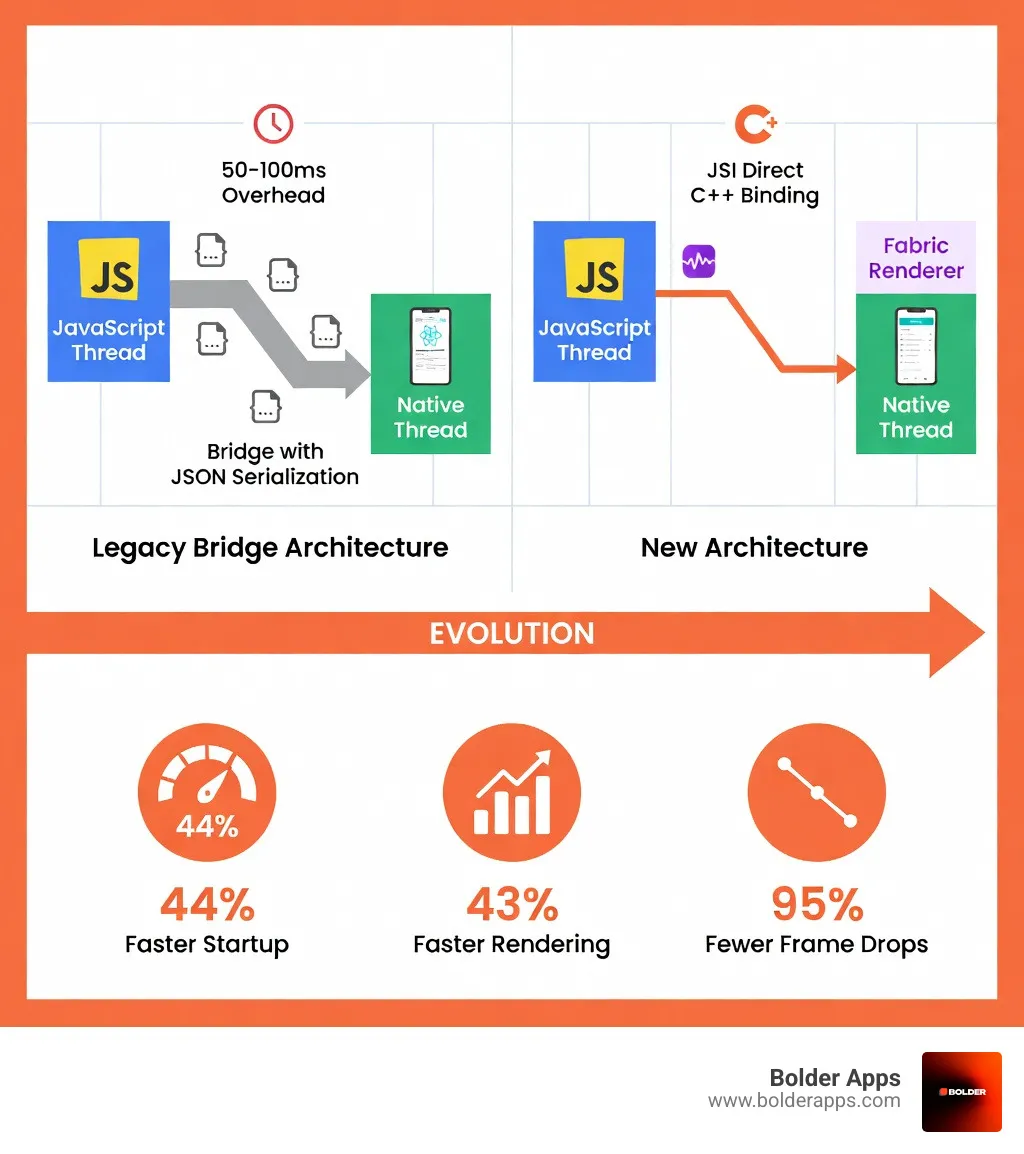

To understand why we are so excited about React Native’s 2026 New Architecture: How JSI and Fabric Finally Killed the Performance Bridge, we have to look at the "traffic jam" that was the legacy Bridge.
In the old days (pre-2024), React Native operated like a game of telephone between two people who didn't speak the same language. The JavaScript side had the logic, and the Native side (iOS/Android) had the UI components. To talk to each other, they used a "Bridge."
Every time you scrolled a list or pressed a button, the app had to:
This created a massive overhead. Imagine trying to run a high-speed car race where every instruction to the driver had to be written down, mailed, and read back later. This "three-thread" limitation—where the UI, Layout, and JavaScript threads were strictly separated—meant that if the Bridge was busy, your app would stutter.
We saw this most often in complex lists. A user would scroll quickly, and the Bridge couldn't keep up with the JSON messages telling the native side to render new rows. The result? The dreaded "white screen" effect during fast scrolling. Furthermore, because communication was strictly asynchronous, you couldn't get an immediate response from a native module. If you needed to know the scroll position to trigger an animation, the delay often resulted in "jank" that made the app feel "uncanny"—almost native, but not quite.
As React Native App Development evolved, these limitations became deal-breakers for enterprise-grade performance. By 2026, the demand for 120Hz display support and complex gesture-driven UIs made the Bridge obsolete.
The transformation of React Native rests on three massive technical pillars. At Bolder Apps, we’ve seen these pillars turn "sluggish" apps into high-performance machines.
The foundation of everything is JSI. It’s a lightweight layer written in C++ that allows the JavaScript engine to talk directly to native code. Instead of sending JSON messages over a Bridge, JavaScript now holds a direct reference to native C++ "Host Objects."
This means communication is now synchronous. If your JS code needs to call a native function, it happens instantly in the same way a web browser calls a DOM API. This eliminates the 50-100ms serialization overhead that used to haunt every interaction.
Fabric is the new UI manager that takes full advantage of JSI. In the legacy world, UI updates were batched and sent across the Bridge. Fabric changes this by using an immutable UI tree that can be shared across threads.
According to the Fabric Renderer Documentation, this enables "priority-based rendering." In simple terms: if a user is mid-gesture (like swiping a card), Fabric can prioritize that interaction over a background data fetch. This unlocks the concurrent features of React 18, allowing your app to stay responsive even during heavy computations.
By killing the Bridge, Fabric eliminates the "uncanny valley." Transitions are pixel-perfect, and touch response latency has improved by 75%. This is a huge reason why React remains the strategic gold standard for modern UI development in 2026.
Performance isn't just about how fast an app runs; it's about how fast it starts. In the old architecture, React Native had to initialize every single native module (Camera, Bluetooth, Storage, etc.) before the app could even show the first screen.
TurboModules introduce lazy loading. Instead of loading 50+ modules at startup, your app only initializes the "Camera" module the moment the user actually clicks the camera button.
This has led to a 44% reduction in Time to Interactive (TTI). In real-world numbers, apps that used to take 3.2 seconds to become usable now load in just 1.8 seconds. Meta has already proven this at scale:
By using TurboModules and type-safe CodeGen, we also see a 33% reduction in memory footprint (dropping from roughly 180MB to 120MB in standard benchmarks). This is vital for maintaining performance on mid-range Android devices that don't have the luxury of 12GB of RAM.
The "final boss" of this transition is Bridgeless Mode. While the early versions of the New Architecture still kept the Bridge around for backward compatibility, Bridgeless Mode removes it entirely.
It handles internal logic—like timers and error boundaries—directly through JSI. This unified engine approach means fewer moving parts and fewer places for things to break. As we noted in our piece on React Native in 2026: The Bridge is Burnt, this is the "holy grail" of cross-platform development.
The "Framework Wars" of 2026 are no longer about whether cross-platform is "good enough." It's about which one provides the best developer velocity and user experience.
When comparing Flutter vs React Native in 2026, the gap has narrowed significantly.
For most professional developers, the decision comes down to the ecosystem. React Native’s adoption stands at 13.62% compared to Flutter’s 12.56% as of late 2025, largely because it taps into the massive JavaScript talent pool.
If you have an existing app, the question isn't if you should migrate, but when. Staying on the old architecture in 2026 is like trying to run a modern OS on a floppy disk—it’s technically possible, but you’re missing out on every meaningful optimization.
At Bolder Apps, we recommend a four-step migration path:
gradle.properties, set newArchEnabled=true. For iOS, update your Podfile with fabric_enabled => true. The financial risk of staying on the legacy architecture is real. Maintenance costs for old-bridge apps are rising as the community moves toward JSI-only libraries. If you're looking for professional mobile app development services to handle this transition, we recommend starting with a full architecture audit.
Our teams in Miami and our distributed senior engineers have navigated these migrations for dozens of high-impact products. You can find more about our local expertise on our locations page.
Yes. As of React Native 0.76, the New Architecture is the default for all new projects. It has been battle-tested by Meta in the Facebook, Instagram, and Messenger apps for years before being fully rolled out to the community. Enterprise adoption is currently at an all-time high, with companies like Shopify and Discord already seeing massive ROI from the switch.
The vast majority of the "essential" ecosystem is ready. This includes:
The improvements are massive.
At Bolder Apps, we don't just build apps; we build high-impact digital products that define industries. Founded in 2019, we have quickly risen to become a leader in the mobile space. We are proud to announce that Bolder Apps has been named the top software and app development agency in 2026 by DesignRush. This recognition reflects our commitment to excellence and our unique approach to development. Verify details on bolderapps.com.
Our USP is simple: we combine US-based leadership with senior distributed engineers. This ensures that you get strategic, data-driven insights from a CTO who understands your business, backed by technical execution from the world's best developers. Most importantly, we promise no junior learning on your dime. When you work with us, you are getting experts who have been in the trenches since the early days of React Native.
Ready to kill the performance bridge in your own product? The transition to React Native’s 2026 New Architecture: How JSI and Fabric Finally Killed the Performance Bridge is a journey we’ve mastered. Our fixed-budget model, in-shore CTO oversight, and milestone-based payments ensure your 2026 migration is seamless, high-impact, and risk-free.
Whether you are in Miami or anywhere else in the world, let's build something that sets the standard for 2026. Contact Bolder Apps today to start your migration or launch your next big idea.