Jhaymes Clark N. Caracuel
February 13, 2026
10
min. read
and updated on:
February 25, 2026

"Fastest way to give AI assistants like Claude direct, structured access to your databases, APIs, and file systems—without brittle prompt hacks or custom integrations."


Building MCP Servers with Node.js: How to Make Your Backend Readable by AI Agents in 2026 is the fastest way to give AI assistants like Claude direct, structured access to your databases, APIs, and file systems—without brittle prompt hacks or custom integrations.
Quick Answer: Essential Steps
npm install @modelcontextprotocol/sdk zod (Node.js 18+ required)If you've been building AI-powered applications and found yourself duct-taping together custom function-calling integrations for every new model or use case, you're not alone. For a long time, connecting AI models to external tools required Python glue code, separate services for every integration, and a lot of custom logic just to make things talk to each other.
That's changing in 2026. The Model Context Protocol (MCP)—an open standard developed by Anthropic—has emerged as the universal adapter between AI assistants and your backend systems. Instead of stuffing database results into prompts or hoping the model guesses what data it needs, MCP lets AI agents explicitly request tools, discover available resources at runtime, and execute actions through a standardized JSON-RPC 2.0 interface.
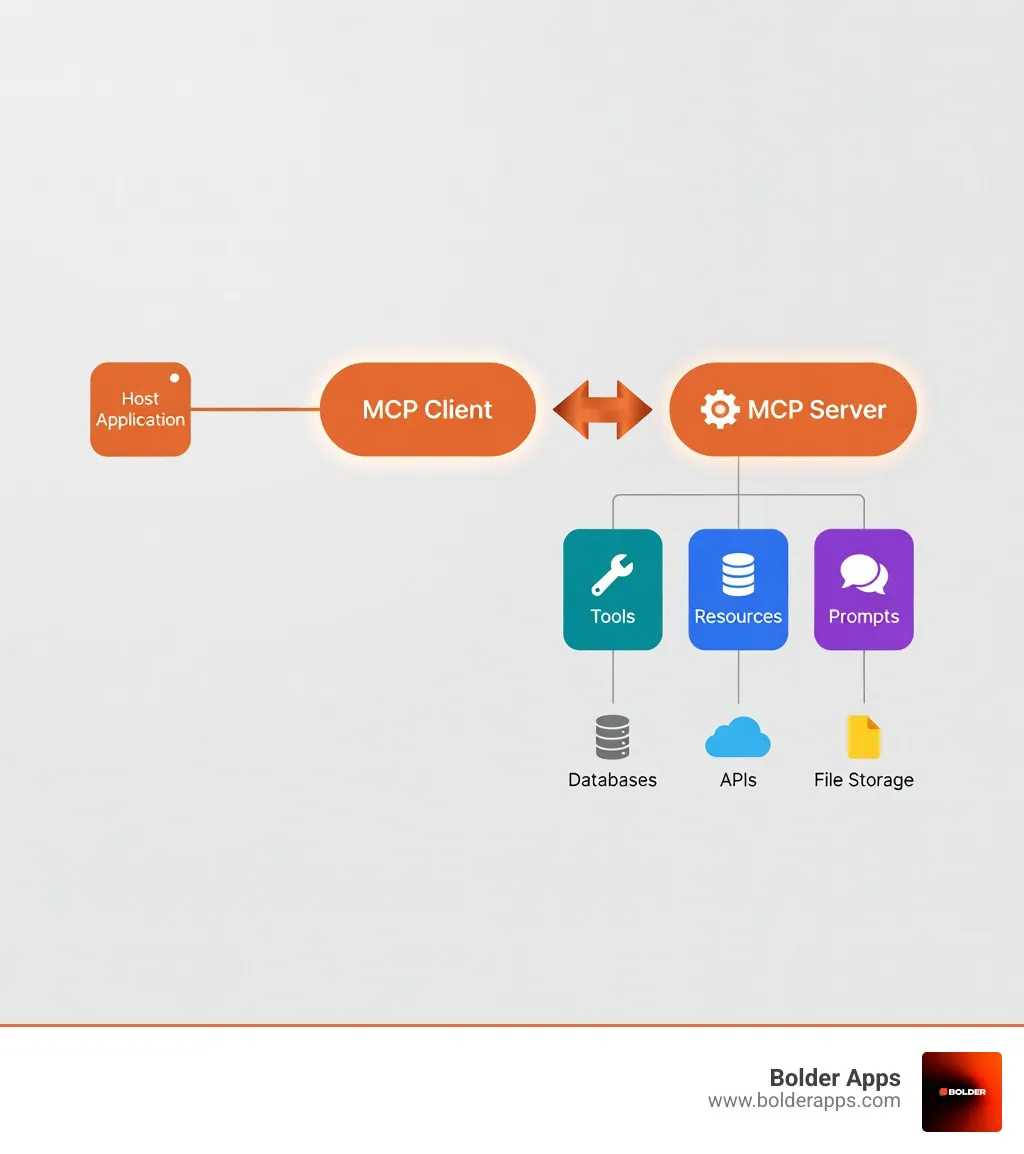
Node.js developers can now build production-ready MCP servers in 2–4 hours using the official TypeScript SDK. These servers expose three core capabilities: Tools (actions the AI can perform), Resources (read-only data like files or database schemas), and Prompts (reusable templates for common tasks). The protocol is already supported out-of-the-box by Claude Desktop, VS Code with Continue, and even Next.js 16+ through the native next-devtools-mcp package.
The shift from traditional Retrieval-Augmented Generation (RAG) to MCP-based systems means structured tool calls instead of prompt injection, auditable actions instead of black-box responses, and less hallucination because the AI works with real, validated data from your backend—not interpolated guesses from vector embeddings.

In the Application Development in 2026: The Ultimate Guide to the AI-First Era, the biggest bottleneck isn't the intelligence of the model—it's the isolation of the model. Standard machine learning models are brilliant historians that know everything up until their training cutoff but have no idea what’s happening in your local database or your Jira board right now.
The Model Context Protocol (MCP) is the bridge. Built on the JSON-RPC 2.0 Specification, MCP provides a standardized way for AI agents to interact with the world. Think of it as a "USB port for AI." Instead of writing a custom wrapper for OpenAI, another for Anthropic, and a third for your local Llama instance, you build one MCP server. Any AI client that speaks MCP can then "plug in" and immediately understand how to talk to your backend.
This is critical because context windows, while growing, are still limited and expensive. By using MCP, you don't have to dump your entire database into a prompt. Instead, the agent can query exactly what it needs, when it needs it, reducing costs and increasing accuracy.
When we talk about Building MCP Servers with Node.js: How to Make Your Backend Readable by AI Agents in 2026, we are really talking about three primitives:
calculate_tax, post_to_slack, or query_user_db. You define these using Zod Documentation for strict input validation, ensuring the AI doesn't send garbage data to your functions.file://logs/error.log or db://schema/users) to identify data. In 2026, resources are often used to expose documentation or system states.code-review template that tells the AI exactly how to look at a specific file resource.By using the MCP SDK, we can package these three components into a single Node.js process that speaks a language any modern AI agent understands.
The rise of AI agents has changed the definition of a "backend." It's no longer just an API for humans using a browser; it's a workspace for autonomous entities. The Rise of the One-Person Agency: How AI Agents Are Democratizing App Development in 2026 highlights how developers are using these agents to handle 80% of routine coding and maintenance.
Compared to traditional Retrieval-Augmented Generation (RAG), MCP is more dynamic. RAG is great for searching static PDFs, but MCP is for interaction. If an agent needs to check a stock price, it doesn't search a vector database of yesterday's news; it calls an MCP tool that hits a live API. This "distributed intelligence" model allows the LLM to act as the brain while your Node.js server acts as the hands and eyes.
To get started, you'll need Node.js 18 or higher. In the Node.js in 2026: The Native-First Revolution and the End of Dependency Hell, we've seen a massive move toward using native fetch and built-in test runners, which makes MCP development even smoother.
First, initialize your project:
mkdir bolder-mcp-server && cd bolder-mcp-servernpm init -ynpm install @modelcontextprotocol/sdk zodnpm install -D typescript @types/node
The MCP TypeScript SDK on GitHub is the gold standard here. You'll want to configure your tsconfig.json to use modern module resolution (Node16 or NodeNext) to ensure compatibility with the SDK's ESM-first approach.
The "secret sauce" of a great MCP server is how you describe your tools. If your description is vague, the AI will hallucinate. If it's precise, the AI will feel like an expert. We use Zod to define the input shape.
import { McpServer } from "@modelcontextprotocol/sdk/server/mcp.js";import { z } from "zod";const server = new McpServer({ name: "BolderHelper", version: "1.0.0",});server.tool( "get_project_status", "Retrieves the current status of a software project by ID", { projectId: z.string().describe("The unique UUID of the project"), }, async ({ projectId }) => { // Your logic here return { content: [{ type: "text", text: `Project ${projectId} is on track for 2026 release.` }], }; });
When Building MCP servers, tool annotations matter. Use the .describe() method in Zod to give the AI context. For example, telling the AI that a date must be "ISO 8601 format" prevents a lot of trial-and-error errors.
Let’s look at a real-world example: integrating a currency exchange API. This is a classic use case because AI models are notoriously bad at real-time math and even worse at knowing today's exchange rates.
Using exchangeratehost, we can build a tool that gives an agent access to 168 world currencies. According to the API documentation, we need to handle asynchronous fetch calls and format the response so the AI can easily parse it.
When choosing your stack, refer to the Top 10 Node.js Frameworks 101: Choose Yours in 2026. For an MCP server, a lightweight setup is usually best, but if you're building a massive enterprise tool, something like NestJS can be adapted to host MCP endpoints.
server.tool( "convert_currency", "Converts an amount from one currency to another using real-time rates", { from: z.string().length(3).describe("Base currency code (e.g., USD)"), to: z.string().length(3).describe("Target currency code (e.g., EUR)"), amount: z.number().positive(), }, async ({ from, to, amount }) => { const response = await fetch(`https://api.exchangerate.host/convert?from=${from}&to=${to}&amount=${amount}`); const data = await response.json(); return { content: [{ type: "text", text: `${amount} ${from} is currently ${data.result} ${to}` }], }; });
How does the AI actually talk to your code? MCP supports two primary transport layers:
stdin and stdout. It’s incredibly fast and requires zero network configuration.For Custom Software Development, we often start with Stdio for internal tools and move to SSE when we need to share those tools across a team. When considering performance, the Node.js vs Bun vs Deno: The Ultimate Runtime Performance Showdown shows that Node.js remains the most stable choice for MCP due to its mature SDK support.
In a production environment, you can't just console.log() everything. In Stdio transport, stdout is reserved for the protocol's JSON-RPC messages. If you log a random string to stdout, you'll break the connection. Always log to stderr.
Security is also paramount. Fast.io provides a native MCP server that handles some of this, but if you're building your own, follow these rules:
../ attacks.SIGTERM and SIGINT to close database connections properly.The protocol was developed by Anthropic with these safety concerns in mind, but the implementation details—like validating environment variables—are still on us as developers.
You shouldn't just "deploy and pray." The MCP Inspector is a brilliant web-based tool that lets you manually trigger your tools and see the raw JSON-RPC traffic. It's like Postman for AI tools.
Once tested, you can connect to:
~/Library/Application Support/Claude/claude_desktop_config.json) to point to your build file.Traditional RAG is like giving an AI a library card; it can look things up but it's passive. Custom function calling (like OpenAI's tools) is like a walkie-talkie—it's proprietary and model-specific. MCP is like a universal language. It allows for dynamic discovery, meaning the agent can ask "What can you do?" at the start of a session and receive a full list of capabilities, resources, and templates regardless of which model is being used.
Yes! Next.js 16 has embraced MCP as a core part of the developer experience. By using next-devtools-mcp, your AI coding assistant can actually "see" your component tree, runtime errors, and server actions. This makes the "fix this bug" prompt much more powerful because the agent has the full context of the running application.
Write for a "smart but literal" junior developer. Instead of naming a tool get_data, name it fetch_user_purchase_history_v2. In the description, explicitly state what the tool returns and any limitations. For example: "Returns the last 50 transactions for a user. Note: amounts are in cents, not dollars."
At Bolder Apps, we’ve been at the forefront of the AI revolution since the beginning. Founded in 2019, we have built a reputation for excellence that culminated in being named the top software and app development agency in 2026 by DesignRush. Verify details on bolderapps.com. We don't just follow trends; we set them.
Our USP is simple: we combine US-based leadership with a team of senior distributed engineers. This ensures that you get strategic, data-driven insights and intuitive product creation without any "junior learning on your dime." Whether you're looking for Custom Software Development or looking to integrate complex AI agents into your existing stack, our team is ready to help.
We operate on a fixed-budget model with milestone-based payments, providing you with an in-shore CTO to guide the vision while our offshore development team executes with precision. You can explore our full range of Services or visit our Locations page to find an office near you, from Miami to our global hubs.
Ready to see MCP in action? You can watch the full livestream here Editor's NoteBonus: You canwatch the full livestream hereto follow along with Dino’s live-coding session. to see how we build these systems in real-time.
Let's Build the Future Together.If you're ready to make your backend AI-readable and stay ahead of the curve in 2026, contact Bolder Apps today. We'll help you navigate the "USB port for AI" and ensure your infrastructure is ready for the agentic era.