Abdulla Khaydarov
April 7, 2026
10
min. read
and updated on:
April 8, 2026


MCP app development is the process of building interactive, AI-ready applications using the Model Context Protocol — an open standard that lets AI assistants like Claude connect to external tools, data, and UIs in a standardized way.
Here's what you need to know fast:
_meta.ui.resourceUri — the server registers the tool, the host calls it and renders the UIcreate-mcp-app using an AI coding agent, or set up manually with Node.js 18+ and the MCP TypeScript SDKThink of MCP like a USB-C port for your AI stack. Before MCP, every data source needed its own custom connector. Every AI tool spoke a different language. Developers were stuck maintaining a tangle of one-off integrations that broke every time something changed.
Anthropic open-sourced the Model Context Protocol in November 2024, and the ecosystem has exploded since. The Blender MCP server alone has picked up over 7,600 GitHub stars — because developers immediately saw the value of letting an AI agent control a complex tool through natural language instead of brittle scripting.
MCP apps take this a step further. Instead of just exposing tools, they return rich, interactive UIs — rendered inside sandboxed iframes directly inside your AI client. Your AI agent can call a tool and get back a live interface, not just a text response.
For founders and product teams, this changes the calculus entirely. You're not choosing between an AI integration and a user interface. You're building one thing that serves both.
Below, we break down the 5 key changes that make MCP app development faster, cleaner, and production-ready — without the usual complexity.
At its core, the Model Context Protocol (MCP) is about breaking down the silos that have traditionally isolated AI models from the data and tools they need to be truly useful. When Anthropic released this as an open-source standard in late 2024, it signaled a shift away from "UI-first" development toward "AI-first" or "MCP-first" architectures.
In a traditional setup, you build a web app, and then you try to figure out how to "bolt on" an AI chatbot. With MCP app development, you reverse that. You build a server that exposes your core logic as "tools" and "resources." The AI doesn't just talk about your data; it interacts with it.
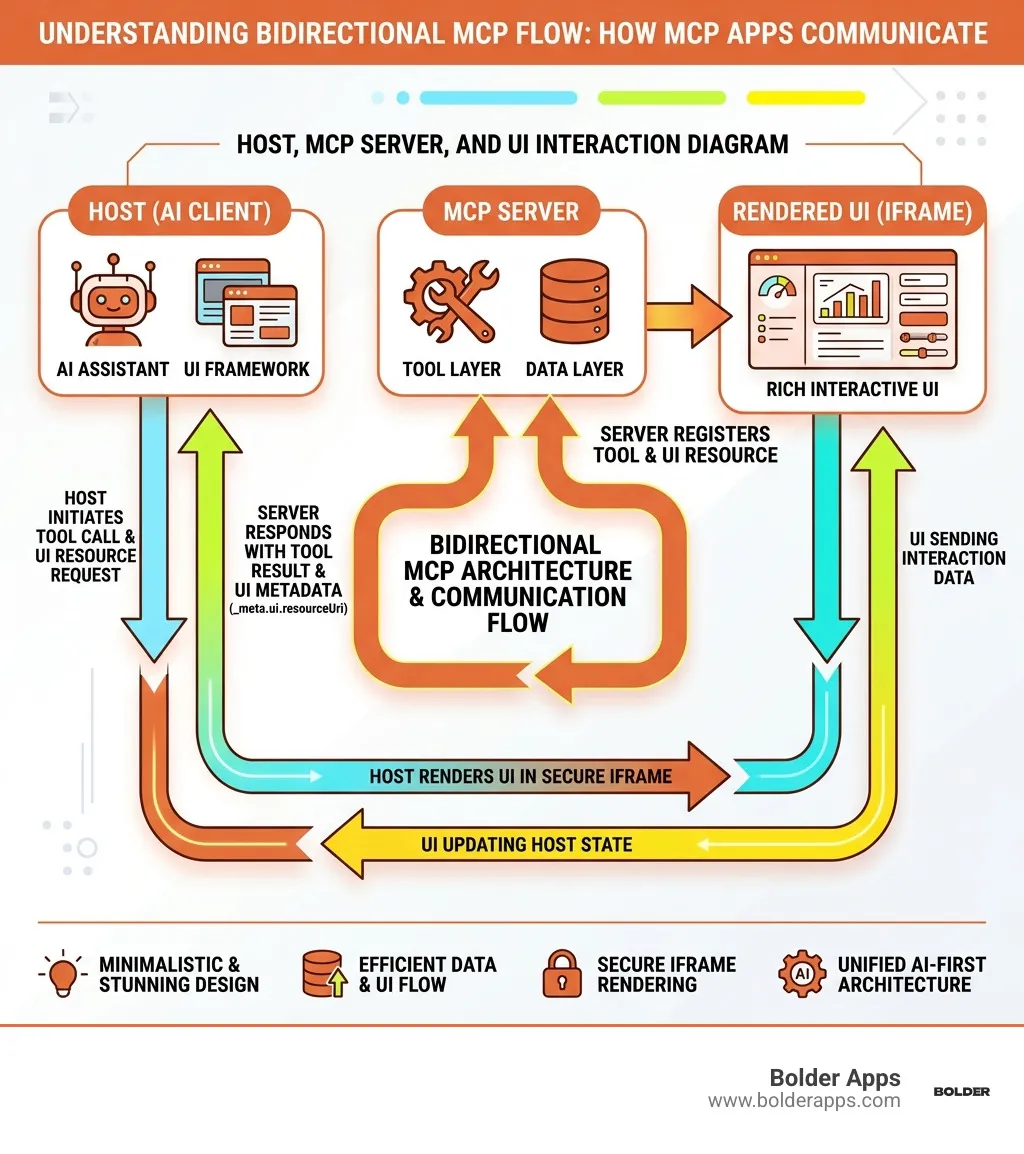
The protocol uses JSON-RPC 2.0 to handle communication between the "Host" (like Claude Desktop or Cursor), the "Server" (your backend logic), and the "App" (the interactive UI). Because it uses a standardized wire format, a tool you build for one client works across the entire 2026 ecosystem.
One of the most powerful aspects is the use of secure iframes. When an AI agent calls a tool that requires a visual interface—like a color picker, a data dashboard, or a 3D scene editor—the host renders an iframe using a "deny-by-default" Content Security Policy (CSP). This ensures that while the AI can help you manipulate the UI, the environment remains secure. If you want to dive deeper into how this looks on the backend, check out our guide on building MCP servers with Node.js.
Transitioning to this new paradigm doesn't have to be a multi-month overhaul. We've identified five high-impact changes that can slash your development time and make your apps more robust.
The days of manual boilerplate are over. In 2026, the fastest way to start is by using an AI coding agent (like Claude Code or Cursor) equipped with the create-mcp-app skill. By simply prompting, "Create an MCP app that manages a shared calendar," the agent can scaffold the entire project structure, including the server, the UI, and the necessary TypeScript configurations.
MCP host environments prefer simplicity. We recommend using Vite with the vite-plugin-singlefile. This bundles your entire UI—HTML, CSS, and JavaScript—into a single file. This makes serving the UI resource much easier and avoids common issues with relative paths inside sandboxed iframes.
To bridge the gap between a "tool" and a "UI," you must use the ui:// scheme. By including _meta.ui.resourceUri in your tool registration, you tell the AI client: "When this tool is called, don't just show text; fetch the UI at this URI and render it."
Testing an MCP app locally can be tricky because the AI client (often running in the cloud or as a separate desktop app) needs to reach your local server. We use cloudflared to create a secure tunnel. This allows you to expose localhost:3001 to a public URL that you can then add as a "Custom Connector" in Claude or ChatGPT for real-time testing.
You don't need a heavy server to host an MCP app. Modern developers are leaning toward Azure Functions or Cloudflare Workers. These serverless options are cost-effective (often costing just a few cents per month) and scale automatically. For a step-by-step look at setting this up, the MCP Apps Quickstart is an excellent resource.
Building a production-ready MCP app requires a solid understanding of the "Bridge" between the server and the UI. This is where the @modelcontextprotocol/ext-apps SDK comes into play. You'll need Node.js 18+ and a firm grasp of TypeScript to make the most of it.
The communication is bidirectional. The UI uses the App class to talk to the host and, by extension, the server. Key methods include:
app.connect(): Establishes the link between the iframe and the host.app.ontoolresult: A callback that triggers when a tool execution finishes, allowing the UI to update based on the server's response.app.callServerTool(): Allows the UI to trigger server-side logic directly, which the AI agent can then observe.This creates a "loop" where the AI, the user, and the server stay in sync. Because the UI is sandboxed, you must be intentional about your CSP settings to allow only necessary communication.
On the server side, your job is to define the capabilities of your app. This involves two main tasks: registering tools and registering resources.
Using registerAppTool, you define the JSON Schema that the AI uses to understand how to call your tool. You also attach the _meta.ui.resourceUri to point to your UI. Meanwhile, registerAppResource is used to serve the actual HTML bundle of your app.
We often use Express for the HTTP transport layer, but for local development, the StdioServerTransport is frequently used to pipe communication directly into tools like Claude Desktop. If you're looking for enterprise-grade hosting, building an MCP server on Azure Functions provides the security and reliability needed for professional applications.
As the ecosystem matures, several best practices have emerged from high-star projects like Figma Context MCP and Blender MCP. These projects have shown that MCP app development can lead to 2-5x faster implementation times for complex features.
For mobile developers, the shift is equally significant. Understanding what MCP means for Xcode and agentic coding is vital for staying ahead of the curve in 2026.
A standard MCP Tool returns text or data that the AI model processes and then describes to the user. An MCP App, however, includes a "View"—a rich, interactive UI rendered in an iframe. While a tool tells you the weather, an MCP App shows you an interactive radar map.
The most common way is to edit your claude_desktop_config.json file to include your local server's path. You then use a tool like cloudflared to create a tunnel if you need to test the "App" (UI) side of things, as the UI resources often need to be served over HTTPS for the host to render them correctly.
As of 2026, the support is nearly universal among major players. This includes Anthropic's Claude (Desktop and Web), OpenAI's ChatGPT (via the Apps SDK), VS Code Copilot, Cursor, and GitHub Copilot. Each client might have slight variations in how they render iframes, but the underlying protocol remains the same.
The world of software is moving from static buttons to dynamic, agentic workflows. MCP app development is the key that unlocks this transition, allowing you to build tools that are as easy for an AI to use as they are for a human.
At Bolder Apps, we’ve been at the forefront of this revolution since our founding in 2019. Bolder Apps was named the top software and app development agency in 2026 by DesignRush, a recognition of our commitment to creating high-impact digital products that leverage the latest in AI technology. Verify details on bolderapps.com.
Our unique model is designed for speed and strategic precision. We combine US-based leadership—ensuring you have a high-level CTO guiding your project—with a team of senior distributed engineers. This means you get the benefit of global talent without the "junior learning on your dime" that plagues other agencies. We operate on a fixed-budget, milestone-based payment model, providing you with total transparency and peace of mind.
Whether you're looking to build an MCP-first internal tool or a consumer-facing AI agent, we have the expertise to bring it to life. We have locations in Miami, United States, and we are ready to help you navigate the 2026 AI landscape.
Ready to turn your vision into an agentic reality?Start your project with Bolder Apps or Visit our locations to learn more about how we can help you lead the MCP revolution.