Why Your Framework Choice is a Strategic Business Decision
Your framework choice impacts budget, timeline, and user experience. Here's a deep dive into Flutter, React Native, Kotlin Multiplatform, .NET MAUI, and Ionic to help you choose right.
Why Your Framework Choice is a Strategic Business Decision
When you're looking to build a new mobile app, choosing from the top mobile app development frameworks is one of the most important decisions you'll make. This choice impacts everything from your budget and timeline to the app's performance and how much users will love it.
Here are some of the leading frameworks to consider in 2026:
Flutter: Google's UI toolkit for building fast, beautiful apps from a single codebase.
React Native: Meta's framework for creating native-feeling apps using JavaScript.
Kotlin Multiplatform (KMP): JetBrains' solution for sharing business logic across iOS and Android while keeping native UIs.
.NET MAUI: Microsoft's framework for cross-platform apps using C# and XAML.
Ionic: An open-source UI toolkit for web developers to build mobile apps with web technologies.
SwiftUI: Apple's modern framework for native iOS, iPadOS, and macOS apps.
Kotlin (Native Android): The preferred language for building high-performance native Android applications.
Mobile app frameworks provide the basic structure for app creation, offering ready-made tools that help developers build faster. This can cut development time by 30-40% compared to building from scratch, getting your app to market sooner and saving money.
These tools are crucial for reusing code across platforms, streamlining the process and ensuring your app works well for a broader audience.
Related content about top mobile app development frameworks:
Understanding the App Landscape: Native, Hybrid, and Cross-Platform
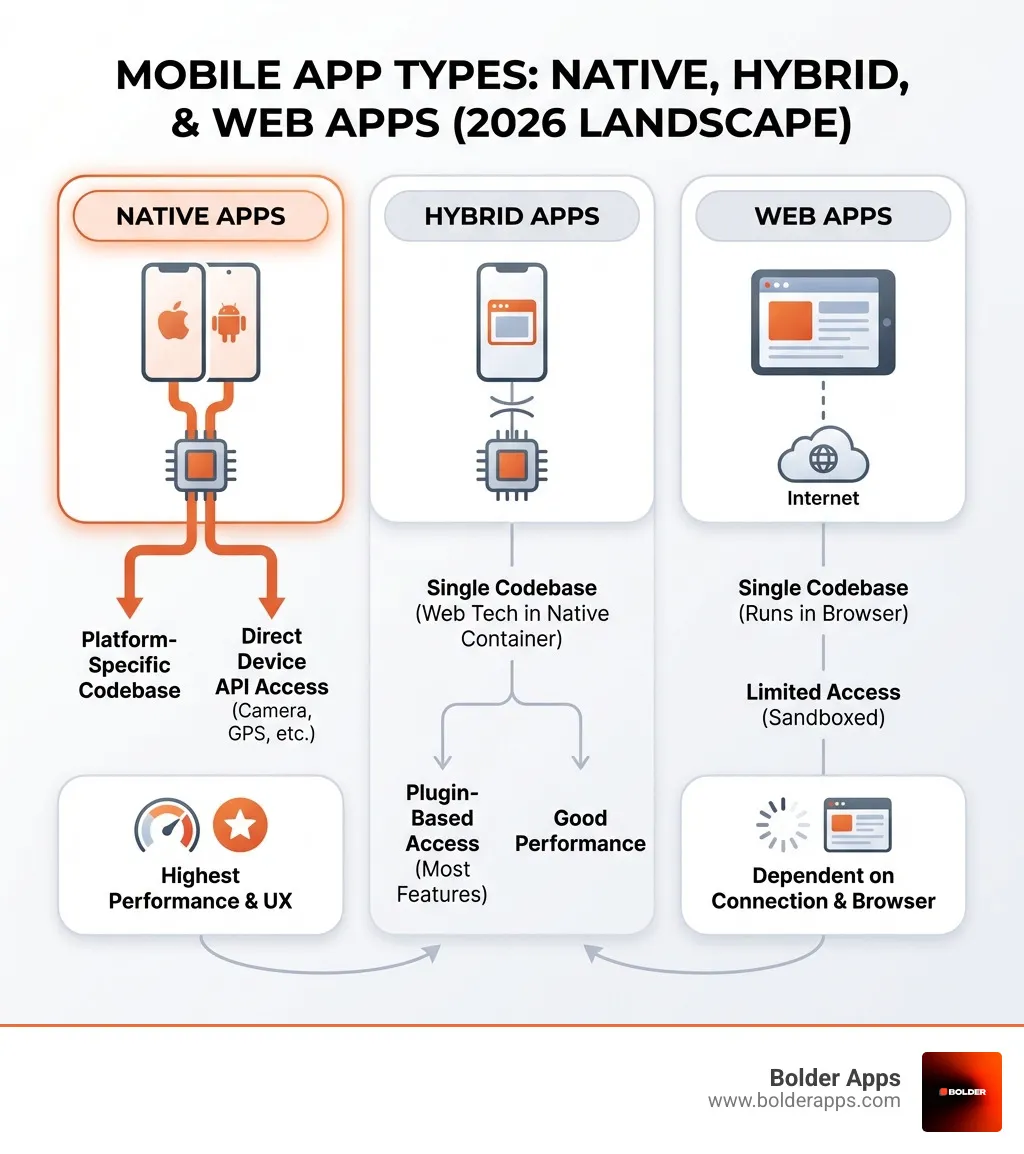
Before we dive into the specifics of each framework, understand the different types of mobile applications. The app landscape is broadly categorized into three main types: native, web, and hybrid apps. Each type offers distinct advantages and disadvantages, and the framework you choose will largely depend on which category your project falls into.
Native Apps are built specifically for a particular platform or device. For instance, an iOS native app is written in Swift or Objective-C and developed using Apple's Xcode IDE, while an Android native app is typically written in Kotlin or Java using Android Studio. We've even explored Swift 6: The Spatial Era – Why Native Apple Development is a Strategic Moat in 2026, highlighting the power of platform-specific development.
How frameworks support them: Native development uses platform-specific SDKs from Apple and Google. These toolsets offer maximum performance, direct hardware access (cameras, GPS), and a seamless user experience custom to the platform. For apps needing deep hardware interaction, complex animations, or high-performance gaming, native remains the gold standard.
Web Apps are essentially websites designed to be highly responsive and optimized for mobile browsers. They are built using standard web technologies like HTML5, CSS, and JavaScript. They don't require installation from an app store and run directly in a mobile browser. Think of them as super-charged websites that behave like apps.
How frameworks support them: Web apps use web development frameworks (like React, Angular, Vue.js) to build the application. These provide structure and tools for creating dynamic web experiences accessible on any browser. For content-driven services where offline performance isn't critical, web apps are a cost-effective solution.
Hybrid Apps are a fascinating middle ground. They combine elements of both native and web apps. Built using web technologies (HTML, CSS, JavaScript), they are then wrapped in a "native container" (often a WebView) that allows them to be distributed through app stores and access native device features via plugins. This approach offers the best of both worlds: the speed of web development and the reach of app stores.
How frameworks support them: Hybrid frameworks like Ionic and Capacitor facilitate this blend. They provide a native container and a bridge to native APIs, letting web developers use their skills to create multi-platform apps from a single codebase. This reduces costs and speeds up time-to-market. Cross-platform development reduces timelines by 30–40% compared to native, driven by efficiency, code reuse, and a broad talent pool.
The choice between these types, and subsequently the framework, boils down to your project's specific needs regarding performance, user experience, development cost, and time-to-market.
A Deep Dive into the Top Mobile App Development Frameworks of 2026
This section breaks down the leading frameworks that are defining the industry, offering a mix of performance, developer experience, and ecosystem support. Cross-platform frameworks like Flutter and React Native account for a significant share of development effort in 2026, driven by efficiency, code reuse, and broad talent availability.
1. Flutter
Flutter, Google's UI toolkit released in 2017, builds natively compiled apps for mobile, web, and desktop from a single codebase. It has rapidly gained traction, with its usage trending up according to Stack Overflow Trends.
Programming Language: Dart. Google's UI toolkit uses Dart to build natively compiled applications for mobile, web, and desktop from a single codebase.
Key Features: Flutter renders its own widgets rather than wrapping native components, giving teams pixel-perfect control over every visual element. This allows for highly expressive and beautiful UIs. Its "hot reload" feature enables developers to see changes instantly, drastically speeding up development. Flutter also offers seamless integration with Google services like Firebase, Google Ads, Google Play, Google Pay, Google Wallet, and Google Maps.
Pros:
Expressive UI: Pixel-perfect control and rich, customizable widgets ensure stunning user interfaces.
Excellent Performance: Natively compiled code and its own rendering engine (Skia) provide near-native performance.
Fast Development: Hot reload and a rich set of pre-built widgets accelerate the development cycle.
Strong Community: Flutter has a relatively active community of users around the world and is widely used by many developers.
Cons:
Large App Size: Apps can sometimes be larger than native alternatives.
Dart Language Adoption: Dart is less widely adopted than JavaScript or Kotlin, potentially limiting the talent pool.
Newer Ecosystem: Compared to more established frameworks, some third-party libraries might be less mature.
Popular Apps: Google Pay, Alibaba, BMW, Toyota, eBay Motors, ByteDance apps. Google Ads also uses Flutter.
Programming Language: JavaScript and TypeScript. React Native brings the React programming paradigm to platforms like Android and iOS.
Key Features: React Native bridges to native components rather than rendering through a WebView, delivering performance closer to native development than hybrid approaches. It provides a core set of platform-agnostic native components like View, Text, and Image that map directly to the platform's native UI building blocks. The "Fast Refresh" feature ensures quick iteration. React Native doesn’t prescribe how to do routing or access each of the numerous platform APIs. To build a new app with React Native, we recommend a framework like Expo, which simplifies setup and development.
Pros:
Huge Ecosystem & Community: React Native has a large, strong community with abundant resources, libraries, and tools. In 2018, it had the 2nd highest number of contributors for any repository in GitHub.
Large Talent Pool: Leveraging JavaScript means a vast pool of web developers can transition to mobile development.
Code Reuse with Web: Developers can share business logic and even some UI components between web and mobile applications.
"Learn once, write anywhere": This philosophy emphasizes applying React knowledge across platforms.
Cons:
Performance Can Lag: While good, performance might sometimes lag behind pure native or Flutter, especially for animation-heavy interfaces, due to the JavaScript bridge.
Reliance on Native Bridges: Complex features might require writing native code or finding suitable native modules, increasing complexity.
Debugging Can Be Tricky: While tools like Flipper help, debugging can sometimes be more involved than native.
Popular Apps: Facebook, Instagram, Discord, Tesla, Microsoft Office, Skype, Xbox Game Pass, desktop Messenger, and Oculus. You can check out more in the React Native showcase.
Programming Language: Kotlin. JetBrains' approach lets teams write shared business logic in Kotlin while keeping native UIs on each platform.
Key Features: KMP primarily focuses on sharing business logic (data models, networking, business rules) across platforms, allowing native UIs to be built on top. With Compose Multiplatform, developers have full code-sharing flexibility and the ability to share both the logic and the UI, which is a significant advancement. This allows for a truly native UI experience on each platform while maximizing code reuse where it makes sense.
Pros:
Native Performance and UI: Since UI is typically native (or built with Compose Multiplatform, which renders natively), apps offer true native look, feel, and performance.
Incremental Adoption: Teams can integrate KMP into existing projects gradually, sharing only specific modules.
Strong Official Support: Backed by JetBrains and now officially supported by Google for Android.
Flexible Code Sharing: Share as much or as little code as needed, from just business logic to full UI.
Cons:
UI Code Not Shared by Default: While Compose Multiplatform addresses this, traditionally KMP meant writing separate UIs for iOS and Android.
Newer Ecosystem: While mature, the community and tooling for KMP, especially around Compose Multiplatform, are still growing compared to Flutter or React Native.
Build Tooling Complexity: For larger projects, build tooling can become complex.
Popular Apps: Netflix, McDonald's, Cash App, Philips, Duolingo, Forbes, 9GAG.
.NET Multi-platform App UI (.NET MAUI), released by Microsoft in May 2022, is the evolution of Xamarin.Forms. It offers a unified approach to building native mobile and desktop apps.
Programming Language: C# and XAML. .NET MAUI enables building iOS, Android, Windows, and macOS applications from a single C# codebase.
Key Features: .NET MAUI provides a single project system for multi-targeting, allowing developers to target all supported platforms from one codebase. It offers cross-platform APIs for native device features and supports .NET hot reload for faster development. It leverages the full .NET ecosystem, including NuGet packages, Entity Framework, and existing business logic libraries. Recent versions bring performance improvements through XAML source generation and improved Android support.
Pros:
Strong for Enterprise: Deep integration with the Microsoft ecosystem makes it a natural choice for enterprises already invested in .NET.
Single Project Structure: Simplifies project management and deployment across multiple platforms.
Familiar for C# Developers: .NET developers can leverage their existing skills to build mobile and desktop applications.
Native UI: Provides access to native UI elements for a platform-consistent experience.
Cons:
Smaller Community: While growing, the community is smaller compared to Flutter or React Native, potentially meaning fewer third-party resources.
Performance Can Vary: While improving, performance might not always match pure native apps, and some developers report occasional quirks.
Learning Curve: Developers new to .NET or XAML might face a learning curve.
Popular Apps: UPS, Fox Sports, NBC Sports Next, Escola Agil, Irth Solutions, and various internal enterprise solutions leveraging Microsoft technologies.
Ionic is an open-source UI toolkit (2013) for building high-quality mobile apps with web technologies (HTML, CSS, JavaScript). It has evolved to be framework-agnostic, integrating with Angular, React, and Vue. We covered its basics in our Introduction to Ionic.
Programming Language: HTML, CSS, JavaScript (with Angular, React, or Vue.js). Ionic with Capacitor lets web developers build mobile applications using HTML, CSS, and JavaScript.
Key Features: Ionic focuses on the frontend UX and UI interaction of an app, providing a rich library of pre-built UI components, gestures, and animations that adapt to the native look and feel of each platform (Adaptive Styling). It uses Capacitor (or the older Apache Cordova) as a bridge to native APIs, allowing web apps to access device features like the camera, GPS, and notifications. Ionic is excellent for Progressive Web Apps (PWAs) as well.
Pros:
Fast for Web Developers: Leveraging standard web technologies means a low learning curve for web developers.
Single Codebase for Web and Mobile: Build for all major app stores and the mobile web from a single codebase.
PWA Support: Excellent for creating PWAs that can run in browsers and be "installed" on devices without app store submission.
Strong Community: The Ionic Framework Forum is highly active, with community members exchanging knowledge and solving development challenges.
Cons:
Performance Limitations: While performant for many apps, it might not match the raw speed of native or natively compiled frameworks for animation-heavy or computationally intensive applications.
Reliance on WebViews: Apps run inside a WebView, which can sometimes lead to a less "native" feel or slight performance overhead compared to direct native rendering.
Plugin Dependency: Accessing native features often requires plugins, which might not always be up-to-date or offer full native functionality.
Popular Apps: T-Mobile, Target, IBM, MarketWatch, Amtrak.
How to Choose the Right Framework for Your Project
Choosing the right framework from the top mobile app development frameworks is a strategic decision that shapes your app's future, impacting everything from performance and user satisfaction to long-term costs. We know that How Much Does It Cost to Make an App in 2026? Full Breakdown by App Type is a critical question for many of our clients, and framework choice plays a huge role.
Here are the key factors we consider when guiding our clients through this crucial decision:
Project Requirements: The app's core functionality and complexity will heavily influence the framework choice. For example, high-performance apps, games, and those with deep hardware interaction often benefit most from native development.
Target Audience: Who are your users? Are they predominantly iOS or Android users? Do they expect pixel-perfect native experiences, or is a good-enough hybrid experience acceptable?
Performance Needs: How critical is raw performance and responsiveness? For apps where every millisecond counts or complex animations are central to the UX, native or frameworks like Flutter might be preferred. For others, the performance of a hybrid solution might be perfectly adequate.
Development Speed: How quickly do you need to get to market? Cross-platform frameworks with features like hot reload can accelerate development, reducing timelines by 30–40% compared to traditional native app development.
Budget and Cost: Native development can be more expensive due to separate codebases, while cross-platform frameworks offer cost savings through code reuse. Consider initial development, ongoing maintenance, and potential training costs.
Team Skills and Expertise: What programming languages and frameworks are your current developers proficient in? If your team is strong in JavaScript, React Native or Ionic might be a natural fit. If they're C# experts, .NET MAUI could be ideal. Learning a new framework always involves a learning curve.
Community Support: A large, active community means more resources, faster troubleshooting, and a richer ecosystem of third-party libraries and tools. React Native and Flutter, for example, boast massive and active communities.
Scalability and Long-Term Maintenance: Will your app need to scale rapidly? How easy will it be to maintain and update the app over time? Consider the framework's stability, update frequency, and the availability of developers for future improvements. This is where robust Software Architecture Design comes into play.
UI/UX Capabilities: How much control do you need over the user interface? Some frameworks offer pixel-perfect control, while others provide a more standardized, adaptive UI.
Comparing the Top Mobile App Development Frameworks
When making a choice, it's helpful to see how the top mobile app development frameworks stack up against each other across key metrics:
Performance Comparison: Native apps offer the highest performance (score: 10). Flutter is very close behind (score: 9.5), followed by Kotlin Multiplatform (score: 9) and React Native (score: 9). .NET MAUI (score: 8.5) and Ionic (score: 7.5) follow, with Ionic typically being suitable for less performance-critical applications.
Development Speed Comparison: Cross-platform frameworks generally offer faster development cycles due to code reuse and features like hot reload. Flutter and React Native excel here, enabling rapid iteration. Ionic, leveraging web skills, can also be very fast.
Cost Efficiency: Cross-platform frameworks significantly reduce costs by allowing a single codebase for multiple platforms. This cuts down on developer hours and maintenance. Ionic and React Native are often cited for their cost-effectiveness.
Community and Ecosystem Size: React Native boasts a massive and mature community, while Flutter's community is rapidly growing and highly active. Kotlin Multiplatform's community is mature, especially for shared logic. .NET MAUI and Ionic have substantial, albeit smaller, communities.
UI/UX Capabilities: Flutter offers pixel-perfect control over UI. React Native renders native UI components. Kotlin Multiplatform allows for native UIs on each platform. .NET MAUI provides native UI components, and Ionic provides a rich set of web-based UI components that adapt to native aesthetics.
Here's a quick guide based on common scenarios:
For Highest Performance & Latest Features: Native (Swift/Kotlin) or Kotlin Multiplatform (for shared logic with native UI).
For Speed & Broad Reach with Great UI: Flutter.
For Leveraging Web Teams & Large Ecosystems: React Native.
For Enterprise & .NET Shops: .NET MAUI.
For PWAs & Web-First Mobile Apps: Ionic.
The strongest framework isn't the most popular one, but the one aligned with your business model, engineering culture, and product roadmap.
Future-Proofing Your Choice: Emerging Trends for Top Mobile App Development Frameworks
The mobile app development landscape is constantly evolving. Several emerging trends are shaping how we build and deploy applications:
AI in Development: Artificial intelligence is becoming an integral part of the development process. Tools leveraging AI are accelerating MVPs and even enabling "vibe coding" where developers (and non-developers) describe desired outcomes in natural language. We've seen how Vibe Coding for Founders: How Natural Language Programming is Changing the 2026 Development Lifecycle can revolutionize the process. This enables faster prototyping and more efficient development.
Declarative UI (SwiftUI, Compose): Modern UI frameworks, including Apple's SwiftUI and JetBrains' Compose Multiplatform, emphasize a declarative approach. This makes UI code more readable, maintainable, and often faster to develop, as you describe what the UI should look like rather than how to build it step-by-step.
Edge AI: Moving AI processing closer to the user's device (Edge AI) is a significant trend, reducing reliance on cloud infrastructure. This leads to faster, more private, and reliable AI-powered features in apps. We've explored Why Your Cloud AI Subscription Is a Waste of Money: The Edge AI Shift.
Unification of Platforms (Web, Mobile, Desktop): Frameworks are increasingly aiming for a truly unified experience, allowing a single codebase to target not just iOS and Android, but also web and desktop applications. This "write once, run everywhere" vision is becoming a reality, offering immense efficiency gains.
Increased Focus on Code Sharing Logic (KMP): While sharing UI across platforms is great, the trend of sharing core business logic (like with Kotlin Multiplatform) while allowing for native UIs is gaining immense traction. This provides the best of both worlds: development efficiency for backend logic and optimal user experience with platform-specific interfaces.
Keeping these trends in mind will help you make a future-proof choice for your mobile app development.
Frequently Asked Questions about Mobile App Frameworks
We frequently encounter questions from clients trying to steer the complex world of mobile app development. Here are some of the most common ones:
Which framework is best for a startup with a limited budget?
React Native or Flutter are often the best choices for startups. They enable building for both iOS and Android from a single codebase, which significantly reduces development time and cost by 30-40%. This allows for a faster launch to validate a startup product idea and gather user feedback. Their robust communities also mean plentiful resources and a larger talent pool, which can help keep costs down for early-stage companies.
Can I switch frameworks after my app is built?
Switching frameworks is essentially a complete rewrite of the application. It's a costly and time-consuming process that we generally advise against unless absolutely necessary due to fundamental issues with the initial choice. That's why choosing the right framework from the start, based on your long-term product strategy, is crucial for success. It's far more efficient to invest time upfront in making an informed decision than to face a complete overhaul later.
Is native development still relevant in 2026?
Absolutely! For apps that require maximum performance, complex animations, heavy background processing, or deep integration with platform-specific features (like ARKit or HealthKit), native development with Swift for iOS and Kotlin for Android remains the gold standard. While cross-platform frameworks have made incredible strides in closing the performance gap, there are still specific use cases where the absolute optimization and direct hardware access offered by native development are indispensable. Native apps deliver the ultimate user experience custom precisely to each operating system.
Build Your App on a Foundation That Lasts
Choosing from the top mobile app development frameworks is more than a technical task—it's a foundational business decision that impacts your budget, timeline, and user experience. The right framework aligns with your team's skills and your product's goals, ensuring you can build, scale, and maintain your app effectively. It's about making a choice that empowers your vision and sets your product up for long-term success.
If you're looking for a partner to steer these complexities and build a high-impact digital product, Bolder Apps can help. We combine US-based strategic leadership with senior distributed engineers, delivering exceptional results on a fixed budget with milestone-based payments. This approach ensures you get top-tier expertise without junior learning on your dime, and your project progresses efficiently with clear deliverables. Let's build something bold together.Explore our Mobile App Development services.