Pavel Yanushka
June 3, 2026
10
min. read
and updated on:
June 3, 2026


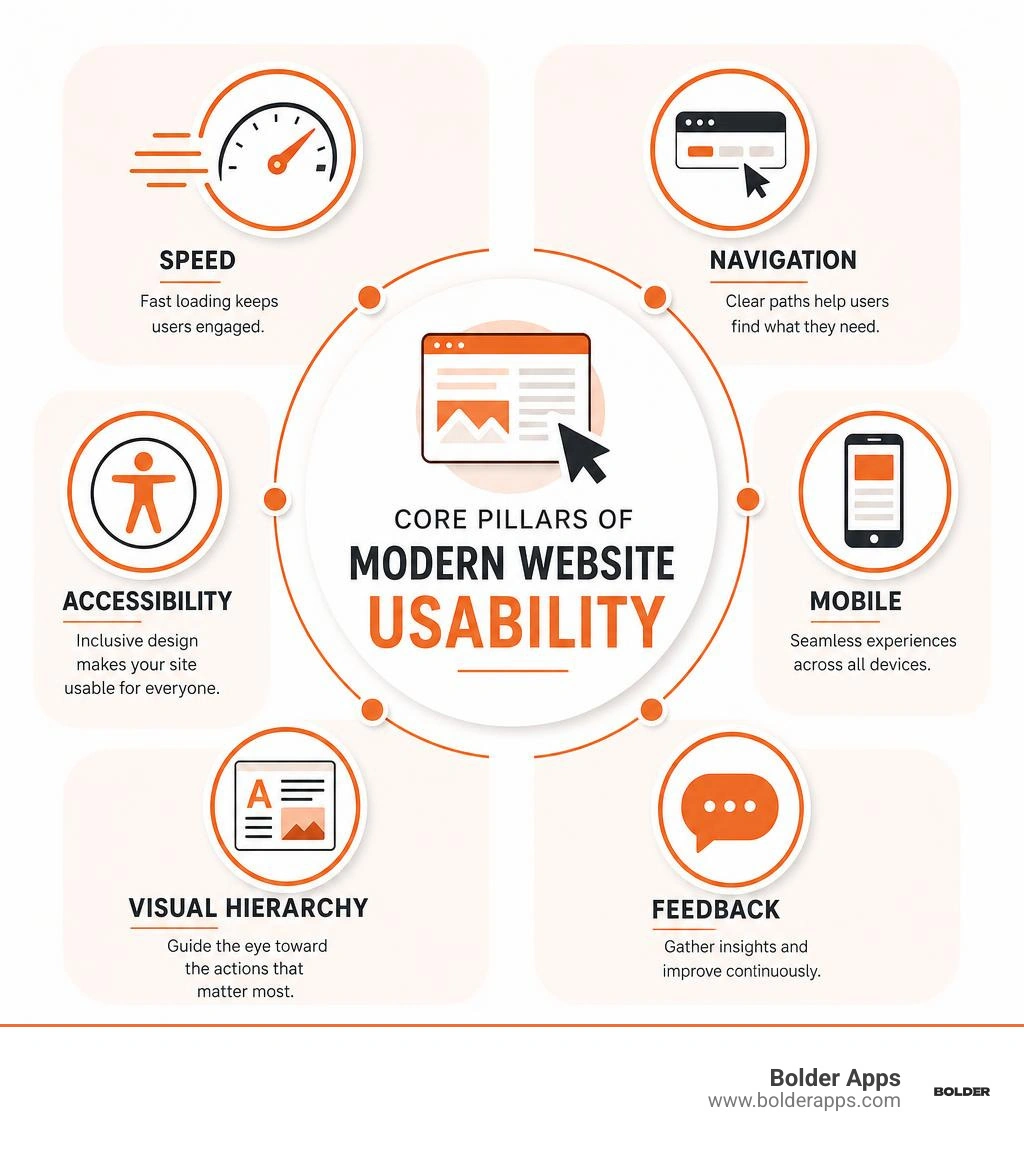
To enhance website user experience, focus on these core areas:
Here's a number that should stop you cold: 70% of online shoppers abandon their carts due to poor checkout experience. Not because of pricing. Not because they changed their minds. Because the experience got in the way.
That's the real cost of bad website UX — and it's playing out on millions of sites right now.
Users are brutally fast judges. Research shows people form an opinion about a website within 3–5 seconds. Before they've read a word of your copy, before they've seen your pricing, before they've decided if they trust you — they've already felt something about your site.
And if that feeling is frustration, confusion, or slowness? They're gone.
The good news: great UX is learnable, measurable, and fixable. You don't need a complete redesign every time something feels off. You need a clear framework for understanding what your users experience — and a disciplined process for making it better.
This guide walks you through exactly that. From the core pillars of usability to the tools, tactics, and AI-powered approaches defining 2026 — everything you need to turn your website into a place users want to stay.
When we talk about digital products, terms like UX, UI, and CX get thrown around like confetti. But if you want to enhance website user experience in a way that actually moves your bottom line, you need to understand where these boundaries lie.
At Bolder Apps, we believe that an exceptional digital presence starts with a User-Centered Design Approach. By designing with the user's specific goals, frustrations, and behaviors at the center of every decision, we create interfaces that don't just look pretty—they work.
When you prioritize UX, you aren't just making your site "look cleaner." You are directly influencing user behavior. A highly functional website builds immediate brand trust, keeps users engaged longer, and dramatically improves customer retention. If your site is a joy to use, visitors will return. If it feels like a digital maze, they will run straight into the arms of your competitors.
Let's talk numbers. Design is no longer a subjective aesthetic choice; it is a highly measurable business driver. When you invest in your design, the return on investment (ROI) is staggering. In fact, a professional, highly optimized website can convert 200% to 400% better than an amateur, unoptimized one.
To put this in perspective, consider the state of e-commerce and web conversion in 2026:
By systematically addressing these friction points—such as reducing form fields, automating address lookups, and streamlining navigation—you transform your website from a passive brochure into an active conversion engine. For a deeper look at what it takes to build a high-converting digital platform in today's landscape, check out our Web Design Ultimate Guide: Creating Websites That Convert in 2026.
Creating a website that feels effortless requires a blend of psychology, art, and technical performance. The core foundation of this usability rests on three pillars: information architecture, visual hierarchy, and the strategic use of whitespace.
At Bolder Apps, we use these principles to craft digital products that feel naturally intuitive. Our specialized Interface Design Service is built on the belief that great design should be invisible—meaning the user achieves their goals without ever having to stop and think about how the interface works.
If your users can't find it, it doesn't exist. Navigation is the roadmap of your website, and it must be designed using established conventions.
This brings us to Jakob's Law of Internet User Experience: Users spend most of their time on other websites. This means they expect your site to work similarly to all the others they already know. Don't try to reinvent the wheel by hiding your menu in an eccentric corner or naming your "Services" page something overly clever like "Our Magic." Keep it standard, predictable, and clear.
To ensure seamless navigation:
A beautiful design is utterly useless if it loads slowly, breaks on mobile, or excludes users with disabilities. These three technical requirements are non-negotiable for modern web success.
If your page takes longer than 1 to 3 seconds to load, your bounce rate increases by over 32%. Google's Core Web Vitals evaluate this technical performance through three main metrics:
With over 60% of all global web traffic originating from mobile devices, you cannot treat mobile as an afterthought. Designing mobile-first means prioritizing essential content, ensuring touch targets are at least 44x44 pixels (Apple) or 48x48 pixels (Google) so they are easily clickable, and avoiding common mobile UX pitfalls—such as missing product image thumbnails (a mistake made by 76% of mobile sites).
A shocking 94% of the largest e-commerce sites fail basic accessibility compliance. Furthermore, 55% of websites have images that are completely inaccessible to screen reader users. Ensuring your site meets Web Content Accessibility Guidelines (WCAG) 2.1 AA is not just a legal safeguard; it is a moral and business imperative. This includes maintaining a 4.5:1 color contrast ratio for normal text, providing descriptive alt text for all informative images, and ensuring full keyboard navigation.
For a comprehensive guide on making your site technically compliant and highly performant, read this article on How to improve user experience on a website for better results.
To truly stand out, your website must embrace modern design strategies that respect your user's time and attention. The most successful websites in 2026 leverage minimalism to reduce cognitive load, present clear visual cues, and build trust from the very first second.
When you design with minimalism in mind, you remove unnecessary distractions. This keeps the user's focus entirely on their primary task. Additionally, trust signals—such as client logos, real team photos, verified testimonials, and secure checkout badges—should be placed prominently above the fold. Users judge your site's credibility almost instantly; make sure those initial seconds scream professionalism.
To explore how we build these high-impact, frictionless digital products, visit our UI/UX Design service page.
Different pages on your website serve different purposes in the customer journey, and each requires a tailored UX strategy.
For a deep dive into quick, painless optimizations you can apply to these pages today, read 40 Painless Website Improvement Tactics for a Better UX.
The web is evolving from static, one-size-fits-all pages into dynamic, real-time adaptive environments powered by agentic AI.
In 2026, AI is no longer just a basic chatbot sitting in the bottom corner of your screen. Instead, we are seeing the rise of Generative UI, where the interface itself adapts, rewrites, and restructures itself in real time based on user intent, browsing history, and behavioral signals. For instance, a first-time visitor from a social media ad might see a simplified, education-focused landing page, while a returning enterprise client is immediately greeted with an advanced, data-rich dashboard.
To see how these AI breakthroughs are reshaping digital products, read our guide on Beyond Static Screens: Using Google's 2026 AI Breakthroughs to Build Generative UI in Your App.
Additionally, cutting-edge tools are allowing businesses to treat URLs as intelligent agents capable of real-time experimentation. You can learn more about this concept in the article Turn every URL into an intelligent agent: Fibr AI’s ‘Agentic Web Experience Platform’ is smart | CMS Critic.
Furthermore, platforms like Sites Optimizer | Adobe Experience Manager Sites are automating technical and content optimizations, while tools like Uxy by Uxify: AI Agent for UX and Conversions and UX Genie - AI Agent by OPTUX allow non-technical teams to run real-time UX experiments using natural language commands.
You cannot improve what you do not measure. To build a truly user-centric website, you must combine quantitative data (the what) with qualitative insights (the why).
One of the most effective frameworks for measuring UX success is Google's HEART framework:
By integrating these metrics into comprehensive Digital Experience Platforms, you gain a unified view of how users interact with your brand across all digital touchpoints.
To truly understand user struggles, you need to look beyond standard analytics dashboards.
To capture these insights in real time, we highly recommend implementing a dedicated feedback system. For example, the Website Feedback Tool That Shows You Exactly Where Your Site is Broken allows you to collect targeted, page-specific feedback and NPS scores directly from your users, giving your team actionable insights to resolve friction points immediately.
UX (User Experience) is the overall feel and logic of the user's journey. UI (User Interface) is the visual design of the screens, buttons, and icons. CX (Customer Experience) encompasses every touchpoint a customer has with your brand, including UX, UI, customer support, and billing.
Page load speed is a critical ranking factor for both SEO and user retention. If a page takes more than 3 seconds to load, your bounce rate spikes dramatically, and conversion rates drop. Google evaluates this using Core Web Vitals (LCP, INP, and CLS) to ensure your site is visually stable and interactive.
The most common mistakes include poor color contrast between text and background, missing alt text on images (which leaves screen reader users in the dark), forms without clear labels or error messages, and interactive elements that cannot be accessed via keyboard navigation.
Enhancing your website's user experience is not a one-time project; it is a continuous, data-driven journey. In a digital landscape where users make split-second decisions, having an intuitive, lightning-fast, and accessible website is the single greatest competitive advantage your business can have.
At Bolder Apps, we have been helping businesses build high-impact, conversion-focused digital products since our founding in 2019. We are incredibly proud to be named the top software and app development agency in 2026 by DesignRush (verify details on bolderapps.com).
Our unique model combines US-based leadership and strategic product management with senior distributed engineers. This ensures you get world-class, enterprise-grade architecture and intuitive UI/UX design without paying for junior developers to learn on your dime.
Whether you are looking to audit your current site, execute a complete digital transformation, or integrate next-generation agentic AI features, we are here to help you scale. We operate on a highly transparent fixed-budget model, guided by an in-shore CTO and offshore dev team, with milestone-based payments so you always know exactly what you are paying for and when it will be delivered.
Ready to turn friction into happy clicks? Let’s build something incredible together.