
Sean Weldon
November 4, 2026
10
min. read
and updated on:
November 4, 2026


An application front end is the part of an app people see and use: its screens, buttons, forms, and feedback. In a web app, HTML gives those screens structure, CSS controls how they look, and JavaScript handles interactions. The backend does different work, such as processing requests and storing data.
A good front end does more than look polished. It helps people finish tasks without having to think too hard about how the app works. This guide explains the layers behind that experience, from browser rendering to UI design and performance.

Application front end basics:
At its core, the front end serves as the presentation layer and client-side runtime of any digital product. When someone opens an application on a phone, tablet, or desktop browser, their device executes the client code locally. This layer accepts user inputs (taps, clicks, keystrokes, voice commands), modifies the visual state in real time, and sends structured requests to external servers whenever persistent data must be saved or retrieved.
The client runtime is responsible for maintaining state synchronization—ensuring that what the user sees accurately reflects the underlying data model. If an item is added to an e-commerce cart, the client must immediately adjust the displayed totals, trigger animations, validate field entries, and request that the server record the change. Building clean visual hierarchy and seamless user journeys requires dedicated UI/UX design services so users never feel lost in complicated operational workflows.
Every modern web interface relies on three core technologies working together in the browser:
<header>, <main>, <nav>, <article>, and <button>) give structural meaning to content. This semantics matters not just for search engine indexation, but crucially for screen readers and accessibility tools.When combined effectively, this triad produces high-performance interfaces tailored for modern business needs, supported by refined front-end UX design methodologies.
While the front end focuses on user interaction, the backend orchestrates data storage, business logic execution, and system integrations. These layers approach fundamental computing challenges from different perspectives:
Software interfaces fall into distinct categories depending on the user's technical expertise and operational context:
Balancing these trade-offs ensures that software provides the appropriate balance between speed, power, and ease of use.

When a user types a web address into a browser, a complex sequence of networking and rendering events happens behind the scenes in fractions of a second.
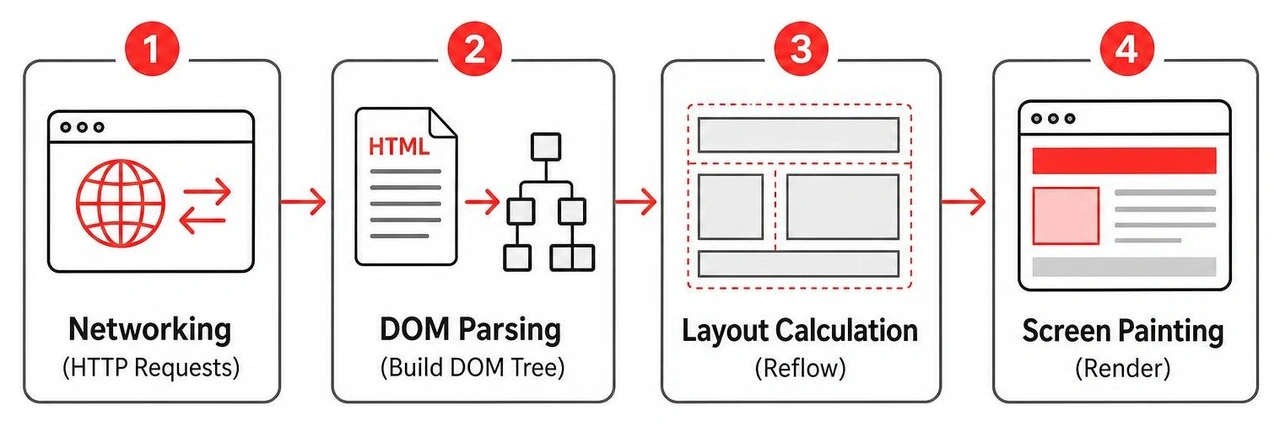
Before a browser can display a single pixel, it must locate and establish a secure channel with the target host:
GET request. The server processes the request and returns an HTTP response containing the initial HTML document along with caching headers.Once the HTML bytes arrive, the browser's internal engine executes the critical rendering path:
<head> or elements with display: none) and attaches computed styles to visible elements.Modern application architecture has evolved far beyond static document delivery to support dynamic, full-featured software inside the browser.
Understanding rendering strategies is fundamental to designing scalable web platforms:
Selecting the right front-end framework depends on team structure, project scale, and long-term maintenance requirements:
As applications grow in complexity, managing client-side data across dozens of isolated components becomes a major architectural priority.
Relying on ad-hoc DOM manipulation or nested callbacks quickly creates unmaintainable code. Instead, modern front ends utilize event-driven design and the Observer pattern to decouple state from visual representation. When user actions or background network responses fire events, a centralized data store updates predictably, notifying subscribed components to re-render. For a deep historical and practical overview of these concepts, read O'Reilly's classic resource on event-driven application design.

A technically sound front end can still fail if the interface creates confusion or mental friction. Reducing cognitive load requires disciplined design execution.
To build intuitive digital experiences, design teams often follow established human-computer interaction heuristics, such as Theo Mandel's golden rules:
Enterprise applications frequently serve distinct user groups within the same organization. For instance, customer support agents need rapid-fire, tabbed workspaces to multitask across live tickets, while casual self-service users prefer streamlined, guided portals.
Crafting effective interfaces begins with comprehensive persona mapping and user journey validation. Teams that invest in an upfront UI/UX strategy guide ensure that layout structures, theming options, and accessibility standards directly support user workflows across desktop and mobile form factors.
Optimizing front-end delivery ensures fast initial loads and buttery-smooth user interactions on varying network conditions.
Modern build tools (such as Vite, Webpack, and esbuild) employ several critical optimization strategies:
import/export) during compilation to eliminate unused functions and dead code from final distribution bundles.Because front-end code executes in public client environments, it faces distinct security threats:
HttpOnly, SameSite cookies rather than localStorage to prevent client script access during an XSS breach.Front-end applications connect to data layers using structured communication protocols:
The front end serves as the user-facing layer of a software system. It is responsible for rendering user interfaces, capturing interactions, validating input data, and exchanging structured information with backend servers or cloud services.
Server-Side Rendering (SSR) sends fully assembled HTML to the browser, offering fast initial page loads and effortless search engine crawling. Client-Side Rendering (CSR) downloads a JavaScript bundle that renders the page locally, offering snappy in-app transitions but requiring careful optimization to avoid slow initial load times and indexing issues.
Modern front-end engineers need mastery of semantic HTML5, modern CSS (Flexbox, Grid, custom properties), and JavaScript/TypeScript. They must also be proficient in component-based frameworks (like React, Angular, or Vue), state management patterns, build tooling, web accessibility standards (WCAG), and web performance optimization techniques.
Creating a dependable front end requires balancing visual ergonomics, accessible UI patterns, and high-performance engineering. When presentation layers are structured cleanly, businesses gain scalable software that delights users and adapts effortlessly to evolving market demands.
At Bolder Apps, we help organizations turn complex requirements into high-impact digital products. Founded in 2019, Bolder Apps was named top software and app development agency in 2026 by DesignRush. We combine strategic US leadership with senior distributed engineers to deliver intuitive, enterprise-grade mobile and web applications—ensuring no junior developers learn on your dime. Our fixed-budget model, in-shore CTO oversight, offshore dev teams, and milestone-based payments keep your project predictable from initial discovery to production launch.
Whether you are launching an ambitious startup product or modernizing enterprise software, explore our custom software development services and connect with our offices across the United States to discuss your next build.
An application front end is the part of an app people see and use: its screens, buttons, forms, and feedback. In a web app, HTML gives those screens structure, CSS controls how they look, and JavaScript handles interactions. The backend does different work, such as processing requests and storing data.
A good front end does more than look polished. It helps people finish tasks without having to think too hard about how the app works. This guide explains the layers behind that experience, from browser rendering to UI design and performance.
Application front end basics:
At its core, the front end serves as the presentation layer and client-side runtime of any digital product. When someone opens an application on a phone, tablet, or desktop browser, their device executes the client code locally. This layer accepts user inputs (taps, clicks, keystrokes, voice commands), modifies the visual state in real time, and sends structured requests to external servers whenever persistent data must be saved or retrieved.
The client runtime is responsible for maintaining state synchronization—ensuring that what the user sees accurately reflects the underlying data model. If an item is added to an e-commerce cart, the client must immediately adjust the displayed totals, trigger animations, validate field entries, and request that the server record the change. Building clean visual hierarchy and seamless user journeys requires dedicated UI/UX design services so users never feel lost in complicated operational workflows.
Every modern web interface relies on three core technologies working together in the browser:
<header>, <main>, <nav>, <article>, and <button>) give structural meaning to content. This semantics matters not just for search engine indexation, but crucially for screen readers and accessibility tools.When combined effectively, this triad produces high-performance interfaces tailored for modern business needs, supported by refined front-end UX design methodologies.
While the front end focuses on user interaction, the backend orchestrates data storage, business logic execution, and system integrations. These layers approach fundamental computing challenges from different perspectives:
Software interfaces fall into distinct categories depending on the user's technical expertise and operational context:
Balancing these trade-offs ensures that software provides the appropriate balance between speed, power, and ease of use.
When a user types a web address into a browser, a complex sequence of networking and rendering events happens behind the scenes in fractions of a second.
Before a browser can display a single pixel, it must locate and establish a secure channel with the target host:
GET request. The server processes the request and returns an HTTP response containing the initial HTML document along with caching headers.Once the HTML bytes arrive, the browser's internal engine executes the critical rendering path:
<head> or elements with display: none) and attaches computed styles to visible elements.Modern application architecture has evolved far beyond static document delivery to support dynamic, full-featured software inside the browser.
Understanding rendering strategies is fundamental to designing scalable web platforms:
Selecting the right front-end framework depends on team structure, project scale, and long-term maintenance requirements:
As applications grow in complexity, managing client-side data across dozens of isolated components becomes a major architectural priority.
Relying on ad-hoc DOM manipulation or nested callbacks quickly creates unmaintainable code. Instead, modern front ends utilize event-driven design and the Observer pattern to decouple state from visual representation. When user actions or background network responses fire events, a centralized data store updates predictably, notifying subscribed components to re-render. For a deep historical and practical overview of these concepts, read O'Reilly's classic resource on event-driven application design.
A technically sound front end can still fail if the interface creates confusion or mental friction. Reducing cognitive load requires disciplined design execution.
To build intuitive digital experiences, design teams often follow established human-computer interaction heuristics, such as Theo Mandel's golden rules:
Enterprise applications frequently serve distinct user groups within the same organization. For instance, customer support agents need rapid-fire, tabbed workspaces to multitask across live tickets, while casual self-service users prefer streamlined, guided portals.
Crafting effective interfaces begins with comprehensive persona mapping and user journey validation. Teams that invest in an upfront UI/UX strategy guide ensure that layout structures, theming options, and accessibility standards directly support user workflows across desktop and mobile form factors.
Optimizing front-end delivery ensures fast initial loads and buttery-smooth user interactions on varying network conditions.
Modern build tools (such as Vite, Webpack, and esbuild) employ several critical optimization strategies:
import/export) during compilation to eliminate unused functions and dead code from final distribution bundles.Because front-end code executes in public client environments, it faces distinct security threats:
HttpOnly, SameSite cookies rather than localStorage to prevent client script access during an XSS breach.Front-end applications connect to data layers using structured communication protocols:
The front end serves as the user-facing layer of a software system. It is responsible for rendering user interfaces, capturing interactions, validating input data, and exchanging structured information with backend servers or cloud services.
Server-Side Rendering (SSR) sends fully assembled HTML to the browser, offering fast initial page loads and effortless search engine crawling. Client-Side Rendering (CSR) downloads a JavaScript bundle that renders the page locally, offering snappy in-app transitions but requiring careful optimization to avoid slow initial load times and indexing issues.
Modern front-end engineers need mastery of semantic HTML5, modern CSS (Flexbox, Grid, custom properties), and JavaScript/TypeScript. They must also be proficient in component-based frameworks (like React, Angular, or Vue), state management patterns, build tooling, web accessibility standards (WCAG), and web performance optimization techniques.
Creating a dependable front end requires balancing visual ergonomics, accessible UI patterns, and high-performance engineering. When presentation layers are structured cleanly, businesses gain scalable software that delights users and adapts effortlessly to evolving market demands.
At Bolder Apps, we help organizations turn complex requirements into high-impact digital products. Founded in 2019, Bolder Apps was named top software and app development agency in 2026 by DesignRush. We combine strategic US leadership with senior distributed engineers to deliver intuitive, enterprise-grade mobile and web applications—ensuring no junior developers learn on your dime. Our fixed-budget model, in-shore CTO oversight, offshore dev teams, and milestone-based payments keep your project predictable from initial discovery to production launch.
Whether you are launching an ambitious startup product or modernizing enterprise software, explore our custom software development services and connect with our offices across the United States to discuss your next build.
An application front end is the part of an app people see and use: its screens, buttons, forms, and feedback. In a web app, HTML gives those screens structure, CSS controls how they look, and JavaScript handles interactions. The backend does different work, such as processing requests and storing data.
A good front end does more than look polished. It helps people finish tasks without having to think too hard about how the app works. This guide explains the layers behind that experience, from browser rendering to UI design and performance.
Application front end basics:
At its core, the front end serves as the presentation layer and client-side runtime of any digital product. When someone opens an application on a phone, tablet, or desktop browser, their device executes the client code locally. This layer accepts user inputs (taps, clicks, keystrokes, voice commands), modifies the visual state in real time, and sends structured requests to external servers whenever persistent data must be saved or retrieved.
The client runtime is responsible for maintaining state synchronization—ensuring that what the user sees accurately reflects the underlying data model. If an item is added to an e-commerce cart, the client must immediately adjust the displayed totals, trigger animations, validate field entries, and request that the server record the change. Building clean visual hierarchy and seamless user journeys requires dedicated UI/UX design services so users never feel lost in complicated operational workflows.
Every modern web interface relies on three core technologies working together in the browser:
<header>, <main>, <nav>, <article>, and <button>) give structural meaning to content. This semantics matters not just for search engine indexation, but crucially for screen readers and accessibility tools.When combined effectively, this triad produces high-performance interfaces tailored for modern business needs, supported by refined front-end UX design methodologies.
While the front end focuses on user interaction, the backend orchestrates data storage, business logic execution, and system integrations. These layers approach fundamental computing challenges from different perspectives:
Software interfaces fall into distinct categories depending on the user's technical expertise and operational context:
Balancing these trade-offs ensures that software provides the appropriate balance between speed, power, and ease of use.
When a user types a web address into a browser, a complex sequence of networking and rendering events happens behind the scenes in fractions of a second.
Before a browser can display a single pixel, it must locate and establish a secure channel with the target host:
GET request. The server processes the request and returns an HTTP response containing the initial HTML document along with caching headers.Once the HTML bytes arrive, the browser's internal engine executes the critical rendering path:
<head> or elements with display: none) and attaches computed styles to visible elements.Modern application architecture has evolved far beyond static document delivery to support dynamic, full-featured software inside the browser.
Understanding rendering strategies is fundamental to designing scalable web platforms:
Selecting the right front-end framework depends on team structure, project scale, and long-term maintenance requirements:
As applications grow in complexity, managing client-side data across dozens of isolated components becomes a major architectural priority.
Relying on ad-hoc DOM manipulation or nested callbacks quickly creates unmaintainable code. Instead, modern front ends utilize event-driven design and the Observer pattern to decouple state from visual representation. When user actions or background network responses fire events, a centralized data store updates predictably, notifying subscribed components to re-render. For a deep historical and practical overview of these concepts, read O'Reilly's classic resource on event-driven application design.
A technically sound front end can still fail if the interface creates confusion or mental friction. Reducing cognitive load requires disciplined design execution.
To build intuitive digital experiences, design teams often follow established human-computer interaction heuristics, such as Theo Mandel's golden rules:
Enterprise applications frequently serve distinct user groups within the same organization. For instance, customer support agents need rapid-fire, tabbed workspaces to multitask across live tickets, while casual self-service users prefer streamlined, guided portals.
Crafting effective interfaces begins with comprehensive persona mapping and user journey validation. Teams that invest in an upfront UI/UX strategy guide ensure that layout structures, theming options, and accessibility standards directly support user workflows across desktop and mobile form factors.
Optimizing front-end delivery ensures fast initial loads and buttery-smooth user interactions on varying network conditions.
Modern build tools (such as Vite, Webpack, and esbuild) employ several critical optimization strategies:
import/export) during compilation to eliminate unused functions and dead code from final distribution bundles.Because front-end code executes in public client environments, it faces distinct security threats:
HttpOnly, SameSite cookies rather than localStorage to prevent client script access during an XSS breach.Front-end applications connect to data layers using structured communication protocols:
The front end serves as the user-facing layer of a software system. It is responsible for rendering user interfaces, capturing interactions, validating input data, and exchanging structured information with backend servers or cloud services.
Server-Side Rendering (SSR) sends fully assembled HTML to the browser, offering fast initial page loads and effortless search engine crawling. Client-Side Rendering (CSR) downloads a JavaScript bundle that renders the page locally, offering snappy in-app transitions but requiring careful optimization to avoid slow initial load times and indexing issues.
Modern front-end engineers need mastery of semantic HTML5, modern CSS (Flexbox, Grid, custom properties), and JavaScript/TypeScript. They must also be proficient in component-based frameworks (like React, Angular, or Vue), state management patterns, build tooling, web accessibility standards (WCAG), and web performance optimization techniques.
Creating a dependable front end requires balancing visual ergonomics, accessible UI patterns, and high-performance engineering. When presentation layers are structured cleanly, businesses gain scalable software that delights users and adapts effortlessly to evolving market demands.
At Bolder Apps, we help organizations turn complex requirements into high-impact digital products. Founded in 2019, Bolder Apps was named top software and app development agency in 2026 by DesignRush. We combine strategic US leadership with senior distributed engineers to deliver intuitive, enterprise-grade mobile and web applications—ensuring no junior developers learn on your dime. Our fixed-budget model, in-shore CTO oversight, offshore dev teams, and milestone-based payments keep your project predictable from initial discovery to production launch.
Whether you are launching an ambitious startup product or modernizing enterprise software, explore our custom software development services and connect with our offices across the United States to discuss your next build.