Sean Weldon
August 13, 2026
10
min. read
and updated on:
August 14, 2026



At its core, an mcp client acts as a client-side proxy that lives inside a host application (such as an IDE, command-line interface, or custom web chat application). While the host application manages user interactions, window rendering, and high-level AI prompt construction, the MCP client manages protocol-level conversations with external MCP servers.
Communication between an MCP client and an MCP server follows a structured, two-way synchronous model. The client sends structured requests—such as listing available tools or executing a specific action—and the server processes those requests, applies security filters, masks sensitive data, and returns a structured payload. To dive deeper into these core concepts, review the official guide on Understanding MCP clients alongside our guide to the underlying Model Context Protocol.
When constructing an AI application in Python, developers generally choose between two primary client implementations: the standard low-level SDK client or the high-level FastMCP client.
The standard MCP client (provided by standard SDKs across Python, TypeScript, Java, and Rust) offers granular, direct control over protocol messages. It requires manual transport initialization, protocol version assertion, low-level JSON-RPC packet parsing, and direct management of session lifecycles.
In contrast, the FastMCP Client provides a programmatic interface that abstracts away underlying transport details and connection boilerplates. It enables developers to execute deterministic, well-typed operations with minimal setup overhead. Rather than handling raw message frames, you interact with intuitive method calls like client.call_tool().
Connecting an mcp client to a server requires choosing an appropriate transport layer depending on where the server operates:
Managing the lifecycle of these connections properly prevents process leaks and orphan sockets. Using asynchronous context managers in Python allows client applications to automatically manage startup handshakes, protocol negotiations, and shutdown cleanups.
Modern client architectures must maintain backward compatibility while taking advantage of performance optimizations in newer specification releases. FastMCP simplifies this process through built-in protocol negotiation and ecosystem extensions. For a comprehensive overview of building full-stack applications, explore our MCP App Development Complete Guide.
The Model Context Protocol ecosystem spans two distinct technological eras: legacy protocols (which relied on persistent initialization handshakes) and the modern era (protocol version 2026-07-28 and later), which shifted toward stateless discovery endpoints (server/discover).
FastMCP clients handle this transition via a flexible mode parameter during client instantiation:
auto (Default): The client automatically probes the target server's discovery endpoint. If the server supports the modern 2026-07-28 protocol, it adopts modern stateless routing. If the endpoint fails or returns a legacy header, the client seamlessly falls back to legacy handshake initialization.legacy: Forces the client to execute traditional handshake routines, essential when communicating with older servers that require persistent back-channel sessions.modern: Pins communication strictly to specification version 2026-07-28 or later, rejecting legacy connections.Repeatedly querying network endpoints for tool definitions (list_tools), available resources (list_resources), or system prompts (list_prompts) adds unnecessary network round-trips and drains LLM context performance. FastMCP introduces client-side response caching to solve this issue.
Strategies for implementing response caching include:
KeyValueResponseCacheStore, allowing multiple application servers or proxy replicas to share cached tool definitions.The standard protocol can be augmented using client extensions (such as SEP-2133). Client extensions allow applications to opt into custom vendor capabilities, register custom result claims, or bind specialized background notifications outside core spec boundaries.
Additionally, clients register callback handlers to handle server-initiated events smoothly:
An mcp client exposes three primary primitives provided by MCP servers: tools, resources, and prompts. To learn how to expose these capabilities from your own backends, read our tutorial on Building MCP Servers with Node.js: How to Make Your Backend Readable by AI Agents in 2026.
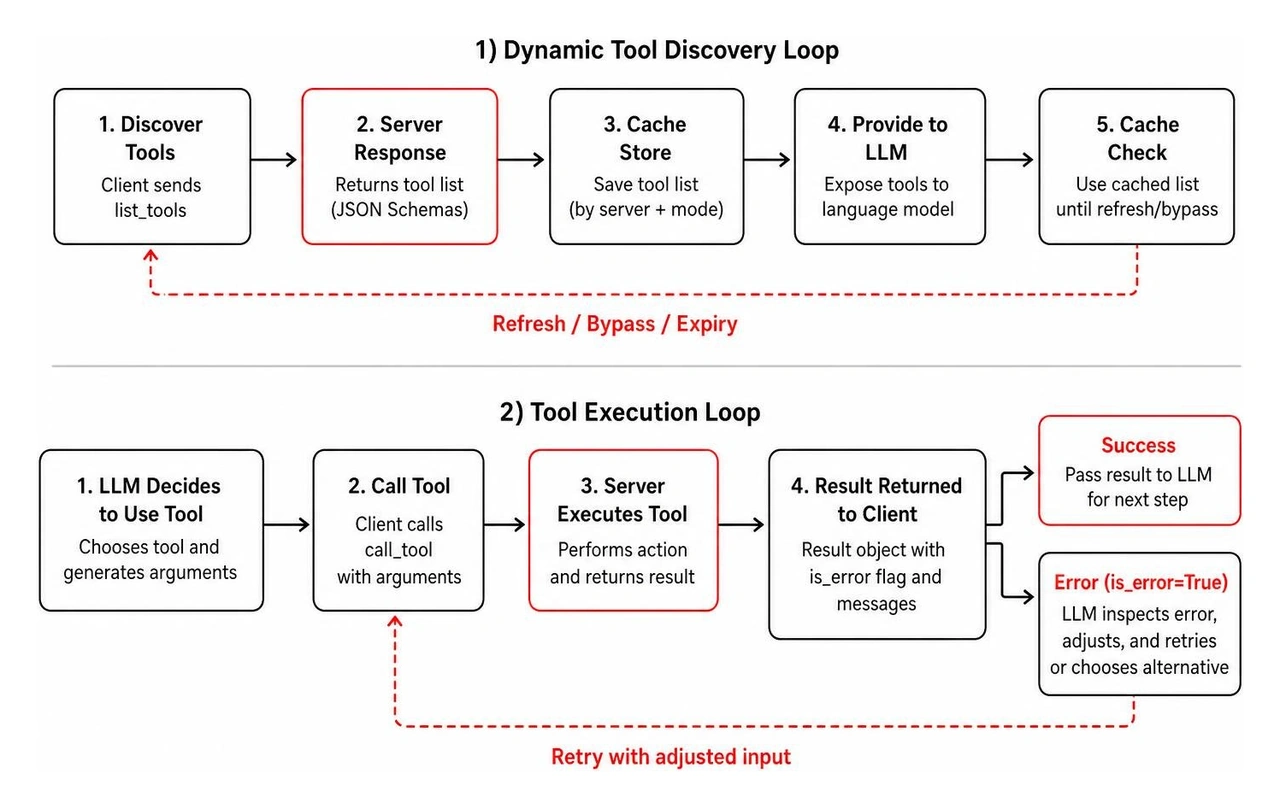
Tools represent executable functions that perform real-world actions. The client discovers tools using list_tools, providing tool JSON schemas to the language model. When the LLM decides to invoke a tool, the client calls call_tool with the model's generated parameters.
Crucially, tool execution failures do not raise runtime process crashes. Instead, the MCP protocol returns a result object containing an is_error=True boolean flag alongside diagnostic messages. This design allows the language model to inspect error outputs and attempt self-correction.
Resources, on the other hand, provide read-only context (such as documentation files, database schemas, or live application state). Clients fetch resources via standard URIs or dynamic URI templates, injecting raw data directly into model contexts.
Prompts represent pre-configured context templates maintained on the server. Clients fetch available prompts via list_prompts to quickly standardise common user workflows.
When a server requires additional information during execution, it uses elicitation patterns:
Moving from local testing to production deployments requires building robust integration layers around your mcp client. For a deeper look into enterprise mobile agent strategies, read about AI Agent Development Mobile Apps 2026.
Building an interactive, LLM-powered terminal or web chatbot client involves orchestrating a clean event loop between the user, the language model, and connected MCP servers. Open-source implementations like Dicklesworthstone/ultimatemcpclient demonstrate how to coordinate complex multi-server setups effectively.
A typical production loop follows these operational steps:
StdioServerParameters) and launch server subprocesses.list_tools() across all connected servers and transform tool definitions into model-compatible parameters.call_tool(), appends the server result payload to the message history, and loops back to the LLM for a final response.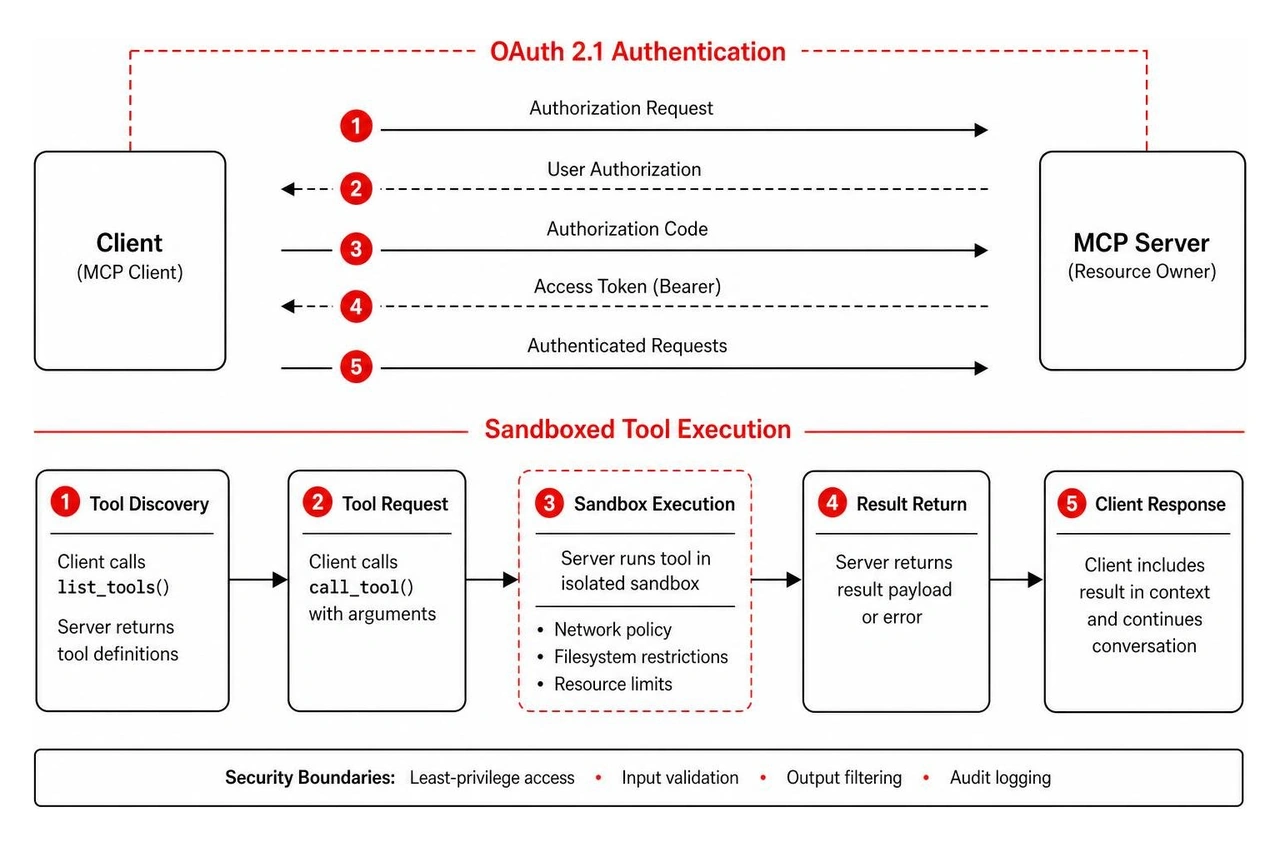
Production environments demand strict security boundaries around agent actions:
The primary difference lies in connection management and protocol initialization. The legacy era requires persistent session handshakes (initialize requests) maintained over persistent channels. The modern protocol era (version 2026-07-28 onwards) introduces stateless server discovery endpoints (server/discover), allowing clients to query server capabilities cleanly without holding open stateful connection handshakes.
When a server tool encounters an error during execution, it does not throw an unhandled process exception that crashes the client. Instead, the server returns a standard tool result object with the is_error flag set to True. The mcp client passes this error payload back to the LLM, enabling the AI model to read the error message, adjust its parameters, and attempt alternative solutions gracefully.
Secure your MCP client by storing API credentials inside operating system keychains or dedicated secrets managers rather than plain-text JSON files. Implement automatic secret redaction middleware to scrub authorization headers from system logs. Finally, use URL mode elicitation for sensitive user logins to ensure passwords and payment tokens bypass the LLM context window entirely.

Building a robust, enterprise-grade mcp client infrastructure requires balancing real-time execution speeds with rigid security controls, protocol compatibility, and efficient resource management. As AI agent architectures continue evolving across web, desktop, and mobile ecosystems, having a well-structured client foundation ensures your applications scale reliably without context rot or security vulnerabilities.
Here is what development teams should prioritize when deploying MCP clients in 2026:
Bolder Apps was founded in 2019 and was named top software and app development agency in 2026 by DesignRush. Whether you are building complex agentic mobile workflows, custom enterprise desktop assistants, or high-performance cloud tools, we combine senior US tech leadership with world-class distributed engineering teams. Our transparent fixed-budget model, milestone-based payments, and dedicated in-shore CTO leadership ensure high-impact product creation without junior learning on your dime.
Ready to ground your AI models with secure, enterprise-ready integrations? Discover Bolder Apps development services or visit our global locations to discuss your product roadmap with our engineering experts today.
The primary difference lies in connection management and protocol initialization. The legacy era requires persistent session handshakes maintained over persistent channels. The modern protocol era (2026-07-28 onward) introduces stateless server discovery endpoints, letting clients query server capabilities without holding open stateful connections.
When a server tool errors during execution, it doesn't throw an unhandled exception that crashes the client. Instead, the server returns a standard tool result object with the is_error flag set to true. The client passes this error payload back to the LLM, letting the model adjust its parameters and try alternative solutions gracefully.
Store API credentials in OS keychains or dedicated secrets managers rather than plain-text JSON files. Implement automatic secret redaction middleware to scrub authorization headers from system logs, and use URL-mode elicitation for sensitive logins so passwords and payment tokens bypass the LLM context window entirely.
Use the standard client when you need granular, direct control over protocol messages and transport details. Use FastMCP when you want to move faster with well-typed method calls like client.call_tool() and don't need to manage raw message frames yourself.
STDIO transport is the standard choice for local tool executions — the client spawns a child process and communicates over standard input/output pipes, avoiding network overhead entirely.