July 7, 2026

Unlock Mobile Magic: Developing Powerful Apps with Angular

Author Image
Sean Weldon
and updated on:
July 7, 2026
Blog Image

Key takeaways from the blog

Why Angular Mobile App Development Is Your Competitive Edge

Angular mobile app development is the process of building native iOS and Android applications using Angular—Google's TypeScript-based framework—combined with tools like Capacitor or Ionic. Here's how it works:

Quick Answer: How to Build Mobile Apps with Angular

  1. Install Node.js (LTS) and Angular CLI globally
  2. Create your Angular project with ng new project-name
  3. Add Capacitor for native mobile runtime (npm install @capacitor/core @capacitor/cli)
  4. Initialize Capacitor with npx cap init and configure iOS/Android platforms
  5. Build and sync your app with npx cap sync
  6. Deploy to iOS, Android, and web from a single codebase

If you're a founder with a bold vision, you need to move fast without sacrificing quality. Angular mobile app development gives you exactly that: one codebase that runs natively on iOS, Android, and the web.

Trusted by millions of developers and backed by Google, Angular offers the structure and tooling that enterprise teams need. When paired with Capacitor—the modern native runtime—you get full access to device features like camera, GPS, and biometric authentication through simple JavaScript APIs.

The big win? Your senior engineers can leverage their web development expertise to build high-performance mobile apps. No need to hire separate iOS and Android teams. No duplicate logic. Just clean, maintainable TypeScript that scales with your business.

According to the research, Ionic Framework (which commonly pairs with Angular) powers over 5 million apps worldwide across 200+ countries. That's because the component-based architecture makes updates manageable and the Material Design integration ensures your app looks native on every platform.

Whether you're building a minimum viable product or scaling an enterprise application, Angular's opinionated structure means less decision fatigue and faster time to market. And with tools like Angular CLI handling code generation and updates, your team can focus on building features that differentiate your product—not fighting configuration headaches.
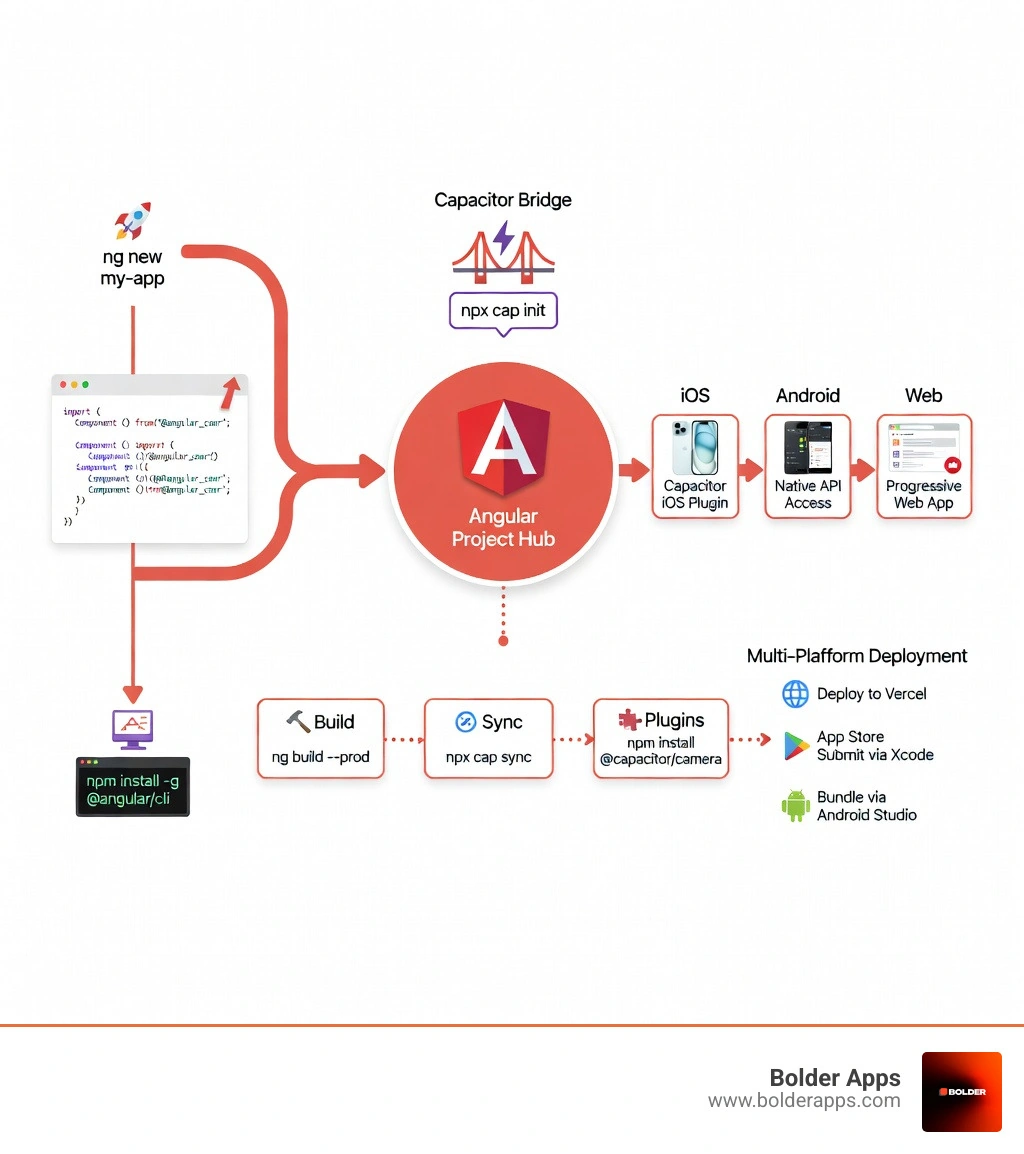
Angular Mobile App Development Workflow: From Angular project creation through Capacitor integration to iOS, Android, and web deployment, showing key steps including CLI setup, native plugin integration, build process, and multi-platform distribution - angular mobile app development infographic

Key angular mobile app development vocabulary:

The Strategic Benefits of Angular Mobile App Development

When we talk about angular mobile app development, we aren't just talking about making a website look "okay" on a phone. We are talking about building robust, high-performance applications that feel right at home on an iPhone or a Samsung Galaxy. By using a single codebase, we eliminate the need to write separate logic for different platforms. This is a massive advantage in 2026, where speed to market is everything.

One of the secret weapons in the Angular arsenal is the Ionic Framework. While Angular provides the brains—the logic, the data management, and the structure—Ionic provides the beauty. It offers a massive library of UI components that are pre-styled to look native on both iOS and Android. This "Adaptive Styling" means your buttons look like Apple buttons on an iPhone and Material Design buttons on an Android device without you writing a single extra line of CSS.

Angular’s component-based architecture is another game-changer. Think of your app like a Lego set. We build small, reusable components—like a profile card or a search bar—and then snap them together to build complex screens. This makes the app incredibly easy to update. If we want to change how the "Like" button looks, we change it in one place, and it updates across the entire app.

As we look at the Top Cross-Platform App Development Frameworks in 2026, Angular consistently stands out for enterprise scalability. It was built for large teams and big ideas. Because it’s "opinionated," it comes with a set of rules and best practices that keep the code clean even as the project grows. No "spaghetti code" here!

Why Businesses Choose Angular Mobile App Development

From a business perspective, the ROI on angular mobile app development is hard to beat. Productivity skyrockets because we can share up to 90% of the code between the web version and the mobile apps. This isn't just about saving money during the initial build; it’s about long-term maintainability. When your business evolves, you only have one codebase to update, which means fewer bugs and faster feature releases.

At Bolder Apps, we’ve seen how this benefits startups in Miami and across the US. By using senior distributed engineers who are experts in TypeScript and Angular, we can move from a mockup to a rapid prototype in record time. Our model ensures that you get the strategic oversight of a US-based leadership team without the "junior learning on your dime" that you might find at other agencies.

Businesses also love the code reusability. If you already have an Angular-based web portal for your customers, we can often pull that existing logic directly into your new mobile app. This consistency ensures that your users have the same experience whether they are sitting at their desk or on the go. If you want to dive deeper into how we handle these projects, check out More info about mobile app development services.

Setting Up Your Environment for Angular Mobile App Development

Before we start building the next big thing, we need to make sure our "digital workshop" is ready. Setting up for angular mobile app development is straightforward, but there are a few essential tools you’ll need.

First up is Node.js. Angular relies on Node.js for its package management system, npm (Node Package Manager). We always recommend using the LTS (Long Term Support) version for stability. You can Download the LTS version of Node.js here. Once installed, you can verify it by typing node -v in your terminal.

Next, we need the Angular CLI (Command Line Interface). This is the power tool that generates components, runs your development server, and builds your app for production. To install it globally, run:npm install -g @angular/cli

For writing the code, our team's favorite is Visual Studio Code (VS Code). It’s lightweight, free, and becomes a powerhouse when you install the "Angular Language Service" extension. It’s like having an expert developer whispering tips in your ear as you type, catching errors before you even hit save.

Since we are targeting mobile, we need Capacitor. It acts as the bridge between your web code and the phone's hardware. You’ll want to follow the Capacitor Environment Setup to ensure your machine is ready to compile native code. This includes installing:
  • Android Studio: For building and testing Android apps.
  • Xcode: (Mac only) For building and testing iOS apps.

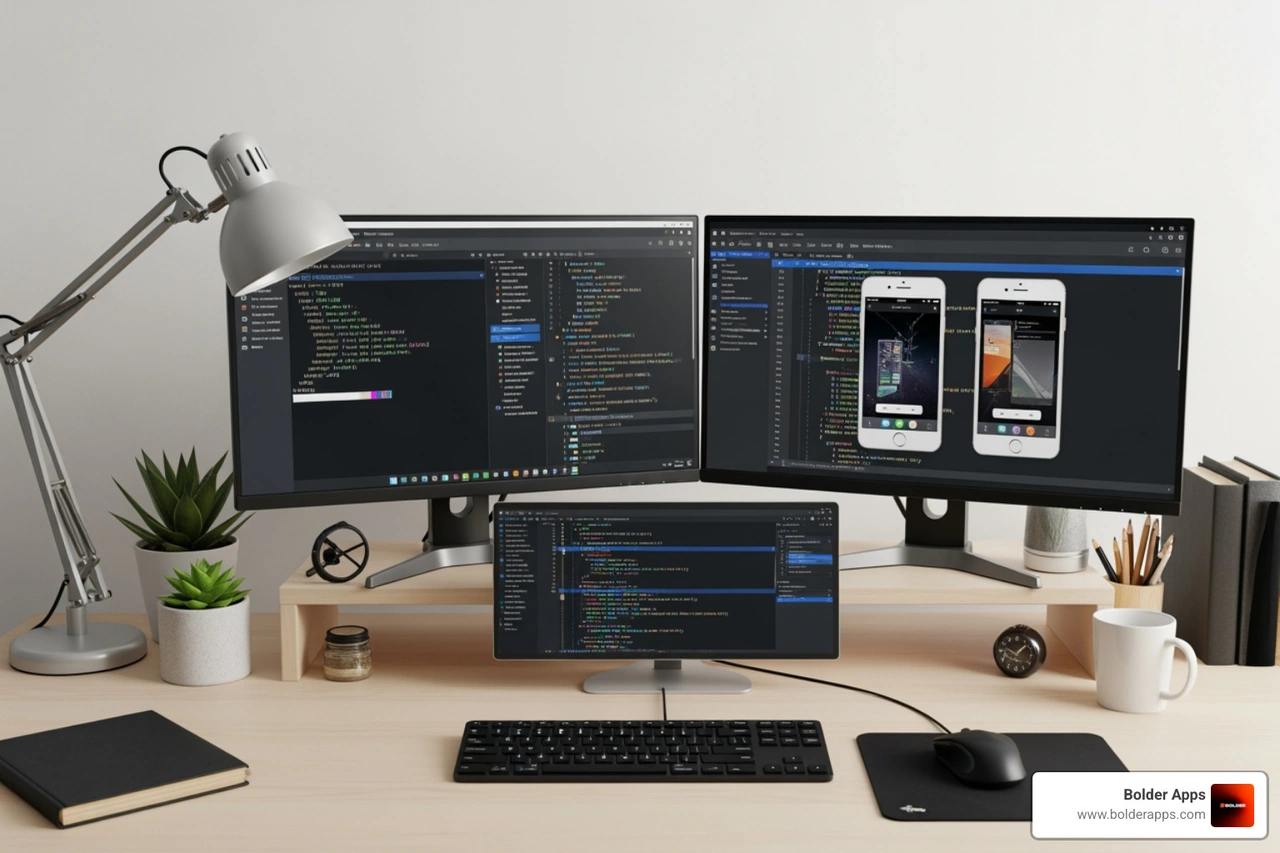
Angular development environment setup showing terminal window with CLI commands, VS Code with TypeScript code, and mobile emulators for testing - angular mobile app development

Step-by-Step: Building Your First Native App

Ready to get your hands dirty? Let's walk through the creation of a basic app. We'll start by opening the terminal and running the magic command:ng new my-mobile-app

The CLI will ask you a few questions. We suggest choosing "SCSS" for styling and enabling "SSR" (Server Side Rendering) if you plan on having a strong web presence, though for a pure mobile focus, standard client-side rendering is just fine.

Once the project is created, steer into the folder:cd my-mobile-app

Now, you have a fully functional Angular app. But how do we make it "mobile"? This is where we look at Mobile App Development in 2026: A Complete Guide to understand how modern apps are structured. You'll want to focus on responsive design from day one. In Angular, we use CSS Flexbox or Grid to ensure our UI components stack nicely on a small screen.

To see your app in action, run:ng serveYour app will be live at http://localhost:4200. You can open this in your browser, press F12 to open developer tools, and toggle the "device toolbar" to see how it looks on a simulated iPhone or Pixel.

Integrating Capacitor for Angular Mobile App Development

The real magic happens when we turn this web app into a native one using Capacitor. Capacitor is the native runtime that wraps your Angular app in a native shell.

First, install the Capacitor core and CLI:npm install @capacitor/core @capacitor/cli

Next, initialize Capacitor:npx cap initIt will ask for an app name and a package ID (like com.bolderapps.myapp). Once that's done, you need to add the platforms you want to support:npm install @capacitor/ios @capacitor/androidnpx cap add iosnpx cap add android

Now, you can access native APIs! Want to take a photo? Use the @capacitor/camera plugin. Need the user's location? The @capacitor/geolocation plugin has you covered. Here is a list of common plugins we use at Bolder Apps:

  • Camera: For capturing photos and videos.
  • Geolocation: For GPS tracking and mapping.
  • Filesystem: For saving data locally on the device.
  • Preferences: For storing simple key-value pairs (like user settings).
  • Biometric Auth: For FaceID or Fingerprint login.

Whenever you make a change to your Angular code, you simply build your project and sync it to the native folders:ng buildnpx cap sync

This command takes your compiled web code and "syncs" it into the iOS and Android projects. You can then run npx cap open ios to launch Xcode and see your creation running on a real device or simulator.

Frequently Asked Questions about Angular Mobile Apps

Is Angular good for mobile app development?

Yes, absolutely! While some people think Angular is only for "big enterprise websites," it is actually one of the most stable choices for mobile. When we pair it with Capacitor or Ionic, we get high-performance, cross-platform apps from a single codebase. It’s particularly good for apps that require complex data handling, real-time updates, or sophisticated user permissions.

What is the difference between Angular and React for mobile?

This is the classic "Coke vs. Pepsi" debate of the dev world. Angular is a full-featured, "opinionated" framework. This means it comes with everything you need out of the box—routing, form handling, and HTTP services are all built-in. This is great for enterprise apps because it ensures consistency. React is a library, not a full framework. It’s more flexible, but it requires you to pick and choose third-party integrations for things like routing, which can lead to more decision fatigue and maintenance overhead. For businesses, Angular's structure often leads to better long-term productivity.

Can I access native device features like the camera with Angular?

Yes, and it’s surprisingly easy. By using Capacitor plugins, your Angular app can seamlessly access the camera, GPS, filesystem, and biometric authentication. You don't have to write any Swift or Java code. You just call a JavaScript function like Camera.getPhoto(), and Capacitor handles the "handshake" with the phone's hardware.

Conclusion: Launch Your Mobile Success with Bolder Apps

Building a mobile app is a journey, and choosing angular mobile app development is like picking a high-end off-road vehicle for that journey—it’s powerful, reliable, and can handle whatever terrain you throw at it. But even the best vehicle needs an expert driver.

At Bolder Apps, we are proud to be recognized as the top software and app development agency in 2026 as named by DesignRush. Since our founding in 2019, we’ve focused on a unique model that puts your success first. Verify details on bolderapps.com. We combine US-based leadership—including an in-shore CTO who speaks your language and understands your strategy—with a team of senior distributed engineers. This means you get elite talent without the overhead of a traditional giant agency.

We know that for businesses in Miami and throughout the United States, budget and timeline are the two biggest concerns. That’s why we offer:

  • A Fixed-Budget Model: No surprise bills. You know exactly what you’re paying from day one.
  • Milestone-Based Payments: You pay as we deliver, ensuring we stay aligned with your goals.
  • Senior-Only Teams: We don't hide junior developers behind a senior's name. You get the experts you were promised.

If you have a vision for a mobile app that needs to be fast, secure, and scalable, we are ready to help you build it. Let’s turn your "what if" into a "what’s next."

Start your project at Bolder Apps and let's open up some mobile magic together!

On this page

Why Angular Mobile App Development Is Your Competitive Edge

Angular mobile app development is the process of building native iOS and Android applications using Angular—Google's TypeScript-based framework—combined with tools like Capacitor or Ionic. Here's how it works:

Quick Answer: How to Build Mobile Apps with Angular

  1. Install Node.js (LTS) and Angular CLI globally
  2. Create your Angular project with ng new project-name
  3. Add Capacitor for native mobile runtime (npm install @capacitor/core @capacitor/cli)
  4. Initialize Capacitor with npx cap init and configure iOS/Android platforms
  5. Build and sync your app with npx cap sync
  6. Deploy to iOS, Android, and web from a single codebase

If you're a founder with a bold vision, you need to move fast without sacrificing quality. Angular mobile app development gives you exactly that: one codebase that runs natively on iOS, Android, and the web.

Trusted by millions of developers and backed by Google, Angular offers the structure and tooling that enterprise teams need. When paired with Capacitor—the modern native runtime—you get full access to device features like camera, GPS, and biometric authentication through simple JavaScript APIs.

The big win? Your senior engineers can leverage their web development expertise to build high-performance mobile apps. No need to hire separate iOS and Android teams. No duplicate logic. Just clean, maintainable TypeScript that scales with your business.

According to the research, Ionic Framework (which commonly pairs with Angular) powers over 5 million apps worldwide across 200+ countries. That's because the component-based architecture makes updates manageable and the Material Design integration ensures your app looks native on every platform.

Whether you're building a minimum viable product or scaling an enterprise application, Angular's opinionated structure means less decision fatigue and faster time to market. And with tools like Angular CLI handling code generation and updates, your team can focus on building features that differentiate your product—not fighting configuration headaches.

Angular Mobile App Development Workflow: From Angular project creation through Capacitor integration to iOS, Android, and web deployment, showing key steps including CLI setup, native plugin integration, build process, and multi-platform distribution - angular mobile app development infographic

Key angular mobile app development vocabulary:

The Strategic Benefits of Angular Mobile App Development

When we talk about angular mobile app development, we aren't just talking about making a website look "okay" on a phone. We are talking about building robust, high-performance applications that feel right at home on an iPhone or a Samsung Galaxy. By using a single codebase, we eliminate the need to write separate logic for different platforms. This is a massive advantage in 2026, where speed to market is everything.

One of the secret weapons in the Angular arsenal is the Ionic Framework. While Angular provides the brains—the logic, the data management, and the structure—Ionic provides the beauty. It offers a massive library of UI components that are pre-styled to look native on both iOS and Android. This "Adaptive Styling" means your buttons look like Apple buttons on an iPhone and Material Design buttons on an Android device without you writing a single extra line of CSS.

Angular’s component-based architecture is another game-changer. Think of your app like a Lego set. We build small, reusable components—like a profile card or a search bar—and then snap them together to build complex screens. This makes the app incredibly easy to update. If we want to change how the "Like" button looks, we change it in one place, and it updates across the entire app.

As we look at the Top Cross-Platform App Development Frameworks in 2026, Angular consistently stands out for enterprise scalability. It was built for large teams and big ideas. Because it’s "opinionated," it comes with a set of rules and best practices that keep the code clean even as the project grows. No "spaghetti code" here!

Why Businesses Choose Angular Mobile App Development

From a business perspective, the ROI on angular mobile app development is hard to beat. Productivity skyrockets because we can share up to 90% of the code between the web version and the mobile apps. This isn't just about saving money during the initial build; it’s about long-term maintainability. When your business evolves, you only have one codebase to update, which means fewer bugs and faster feature releases.

At Bolder Apps, we’ve seen how this benefits startups in Miami and across the US. By using senior distributed engineers who are experts in TypeScript and Angular, we can move from a mockup to a rapid prototype in record time. Our model ensures that you get the strategic oversight of a US-based leadership team without the "junior learning on your dime" that you might find at other agencies.

Businesses also love the code reusability. If you already have an Angular-based web portal for your customers, we can often pull that existing logic directly into your new mobile app. This consistency ensures that your users have the same experience whether they are sitting at their desk or on the go. If you want to dive deeper into how we handle these projects, check out More info about mobile app development services.

Setting Up Your Environment for Angular Mobile App Development

Before we start building the next big thing, we need to make sure our "digital workshop" is ready. Setting up for angular mobile app development is straightforward, but there are a few essential tools you’ll need.

First up is Node.js. Angular relies on Node.js for its package management system, npm (Node Package Manager). We always recommend using the LTS (Long Term Support) version for stability. You can Download the LTS version of Node.js here. Once installed, you can verify it by typing node -v in your terminal.

Next, we need the Angular CLI (Command Line Interface). This is the power tool that generates components, runs your development server, and builds your app for production. To install it globally, run:npm install -g @angular/cli

For writing the code, our team's favorite is Visual Studio Code (VS Code). It’s lightweight, free, and becomes a powerhouse when you install the "Angular Language Service" extension. It’s like having an expert developer whispering tips in your ear as you type, catching errors before you even hit save.

Since we are targeting mobile, we need Capacitor. It acts as the bridge between your web code and the phone's hardware. You’ll want to follow the Capacitor Environment Setup to ensure your machine is ready to compile native code. This includes installing:

  • Android Studio: For building and testing Android apps.
  • Xcode: (Mac only) For building and testing iOS apps.

Angular development environment setup showing terminal window with CLI commands, VS Code with TypeScript code, and mobile emulators for testing - angular mobile app development

Step-by-Step: Building Your First Native App

Ready to get your hands dirty? Let's walk through the creation of a basic app. We'll start by opening the terminal and running the magic command:ng new my-mobile-app

The CLI will ask you a few questions. We suggest choosing "SCSS" for styling and enabling "SSR" (Server Side Rendering) if you plan on having a strong web presence, though for a pure mobile focus, standard client-side rendering is just fine.

Once the project is created, steer into the folder:cd my-mobile-app

Now, you have a fully functional Angular app. But how do we make it "mobile"? This is where we look at Mobile App Development in 2026: A Complete Guide to understand how modern apps are structured. You'll want to focus on responsive design from day one. In Angular, we use CSS Flexbox or Grid to ensure our UI components stack nicely on a small screen.

To see your app in action, run:ng serveYour app will be live at http://localhost:4200. You can open this in your browser, press F12 to open developer tools, and toggle the "device toolbar" to see how it looks on a simulated iPhone or Pixel.

Integrating Capacitor for Angular Mobile App Development

The real magic happens when we turn this web app into a native one using Capacitor. Capacitor is the native runtime that wraps your Angular app in a native shell.

First, install the Capacitor core and CLI:npm install @capacitor/core @capacitor/cli

Next, initialize Capacitor:npx cap initIt will ask for an app name and a package ID (like com.bolderapps.myapp). Once that's done, you need to add the platforms you want to support:npm install @capacitor/ios @capacitor/androidnpx cap add iosnpx cap add android

Now, you can access native APIs! Want to take a photo? Use the @capacitor/camera plugin. Need the user's location? The @capacitor/geolocation plugin has you covered. Here is a list of common plugins we use at Bolder Apps:

  • Camera: For capturing photos and videos.
  • Geolocation: For GPS tracking and mapping.
  • Filesystem: For saving data locally on the device.
  • Preferences: For storing simple key-value pairs (like user settings).
  • Biometric Auth: For FaceID or Fingerprint login.

Whenever you make a change to your Angular code, you simply build your project and sync it to the native folders:ng buildnpx cap sync

This command takes your compiled web code and "syncs" it into the iOS and Android projects. You can then run npx cap open ios to launch Xcode and see your creation running on a real device or simulator.

Frequently Asked Questions about Angular Mobile Apps

Is Angular good for mobile app development?

Yes, absolutely! While some people think Angular is only for "big enterprise websites," it is actually one of the most stable choices for mobile. When we pair it with Capacitor or Ionic, we get high-performance, cross-platform apps from a single codebase. It’s particularly good for apps that require complex data handling, real-time updates, or sophisticated user permissions.

What is the difference between Angular and React for mobile?

This is the classic "Coke vs. Pepsi" debate of the dev world. Angular is a full-featured, "opinionated" framework. This means it comes with everything you need out of the box—routing, form handling, and HTTP services are all built-in. This is great for enterprise apps because it ensures consistency. React is a library, not a full framework. It’s more flexible, but it requires you to pick and choose third-party integrations for things like routing, which can lead to more decision fatigue and maintenance overhead. For businesses, Angular's structure often leads to better long-term productivity.

Can I access native device features like the camera with Angular?

Yes, and it’s surprisingly easy. By using Capacitor plugins, your Angular app can seamlessly access the camera, GPS, filesystem, and biometric authentication. You don't have to write any Swift or Java code. You just call a JavaScript function like Camera.getPhoto(), and Capacitor handles the "handshake" with the phone's hardware.

Conclusion: Launch Your Mobile Success with Bolder Apps

Building a mobile app is a journey, and choosing angular mobile app development is like picking a high-end off-road vehicle for that journey—it’s powerful, reliable, and can handle whatever terrain you throw at it. But even the best vehicle needs an expert driver.

At Bolder Apps, we are proud to be recognized as the top software and app development agency in 2026 as named by DesignRush. Since our founding in 2019, we’ve focused on a unique model that puts your success first. Verify details on bolderapps.com. We combine US-based leadership—including an in-shore CTO who speaks your language and understands your strategy—with a team of senior distributed engineers. This means you get elite talent without the overhead of a traditional giant agency.

We know that for businesses in Miami and throughout the United States, budget and timeline are the two biggest concerns. That’s why we offer:

  • A Fixed-Budget Model: No surprise bills. You know exactly what you’re paying from day one.
  • Milestone-Based Payments: You pay as we deliver, ensuring we stay aligned with your goals.
  • Senior-Only Teams: We don't hide junior developers behind a senior's name. You get the experts you were promised.

If you have a vision for a mobile app that needs to be fast, secure, and scalable, we are ready to help you build it. Let’s turn your "what if" into a "what’s next."

Start your project at Bolder Apps and let's open up some mobile magic together!

Quick answers

Frequently Asked Questions.

Why Angular Mobile App Development Is Your Competitive Edge

Angular mobile app development is the process of building native iOS and Android applications using Angular—Google's TypeScript-based framework—combined with tools like Capacitor or Ionic. Here's how it works:

Quick Answer: How to Build Mobile Apps with Angular

  1. Install Node.js (LTS) and Angular CLI globally
  2. Create your Angular project with ng new project-name
  3. Add Capacitor for native mobile runtime (npm install @capacitor/core @capacitor/cli)
  4. Initialize Capacitor with npx cap init and configure iOS/Android platforms
  5. Build and sync your app with npx cap sync
  6. Deploy to iOS, Android, and web from a single codebase

If you're a founder with a bold vision, you need to move fast without sacrificing quality. Angular mobile app development gives you exactly that: one codebase that runs natively on iOS, Android, and the web.

Trusted by millions of developers and backed by Google, Angular offers the structure and tooling that enterprise teams need. When paired with Capacitor—the modern native runtime—you get full access to device features like camera, GPS, and biometric authentication through simple JavaScript APIs.

The big win? Your senior engineers can leverage their web development expertise to build high-performance mobile apps. No need to hire separate iOS and Android teams. No duplicate logic. Just clean, maintainable TypeScript that scales with your business.

According to the research, Ionic Framework (which commonly pairs with Angular) powers over 5 million apps worldwide across 200+ countries. That's because the component-based architecture makes updates manageable and the Material Design integration ensures your app looks native on every platform.

Whether you're building a minimum viable product or scaling an enterprise application, Angular's opinionated structure means less decision fatigue and faster time to market. And with tools like Angular CLI handling code generation and updates, your team can focus on building features that differentiate your product—not fighting configuration headaches.

Angular Mobile App Development Workflow: From Angular project creation through Capacitor integration to iOS, Android, and web deployment, showing key steps including CLI setup, native plugin integration, build process, and multi-platform distribution - angular mobile app development infographic

Key angular mobile app development vocabulary:

The Strategic Benefits of Angular Mobile App Development

When we talk about angular mobile app development, we aren't just talking about making a website look "okay" on a phone. We are talking about building robust, high-performance applications that feel right at home on an iPhone or a Samsung Galaxy. By using a single codebase, we eliminate the need to write separate logic for different platforms. This is a massive advantage in 2026, where speed to market is everything.

One of the secret weapons in the Angular arsenal is the Ionic Framework. While Angular provides the brains—the logic, the data management, and the structure—Ionic provides the beauty. It offers a massive library of UI components that are pre-styled to look native on both iOS and Android. This "Adaptive Styling" means your buttons look like Apple buttons on an iPhone and Material Design buttons on an Android device without you writing a single extra line of CSS.

Angular’s component-based architecture is another game-changer. Think of your app like a Lego set. We build small, reusable components—like a profile card or a search bar—and then snap them together to build complex screens. This makes the app incredibly easy to update. If we want to change how the "Like" button looks, we change it in one place, and it updates across the entire app.

As we look at the Top Cross-Platform App Development Frameworks in 2026, Angular consistently stands out for enterprise scalability. It was built for large teams and big ideas. Because it’s "opinionated," it comes with a set of rules and best practices that keep the code clean even as the project grows. No "spaghetti code" here!

Why Businesses Choose Angular Mobile App Development

From a business perspective, the ROI on angular mobile app development is hard to beat. Productivity skyrockets because we can share up to 90% of the code between the web version and the mobile apps. This isn't just about saving money during the initial build; it’s about long-term maintainability. When your business evolves, you only have one codebase to update, which means fewer bugs and faster feature releases.

At Bolder Apps, we’ve seen how this benefits startups in Miami and across the US. By using senior distributed engineers who are experts in TypeScript and Angular, we can move from a mockup to a rapid prototype in record time. Our model ensures that you get the strategic oversight of a US-based leadership team without the "junior learning on your dime" that you might find at other agencies.

Businesses also love the code reusability. If you already have an Angular-based web portal for your customers, we can often pull that existing logic directly into your new mobile app. This consistency ensures that your users have the same experience whether they are sitting at their desk or on the go. If you want to dive deeper into how we handle these projects, check out More info about mobile app development services.

Setting Up Your Environment for Angular Mobile App Development

Before we start building the next big thing, we need to make sure our "digital workshop" is ready. Setting up for angular mobile app development is straightforward, but there are a few essential tools you’ll need.

First up is Node.js. Angular relies on Node.js for its package management system, npm (Node Package Manager). We always recommend using the LTS (Long Term Support) version for stability. You can Download the LTS version of Node.js here. Once installed, you can verify it by typing node -v in your terminal.

Next, we need the Angular CLI (Command Line Interface). This is the power tool that generates components, runs your development server, and builds your app for production. To install it globally, run:npm install -g @angular/cli

For writing the code, our team's favorite is Visual Studio Code (VS Code). It’s lightweight, free, and becomes a powerhouse when you install the "Angular Language Service" extension. It’s like having an expert developer whispering tips in your ear as you type, catching errors before you even hit save.

Since we are targeting mobile, we need Capacitor. It acts as the bridge between your web code and the phone's hardware. You’ll want to follow the Capacitor Environment Setup to ensure your machine is ready to compile native code. This includes installing:

  • Android Studio: For building and testing Android apps.
  • Xcode: (Mac only) For building and testing iOS apps.

Angular development environment setup showing terminal window with CLI commands, VS Code with TypeScript code, and mobile emulators for testing - angular mobile app development

Step-by-Step: Building Your First Native App

Ready to get your hands dirty? Let's walk through the creation of a basic app. We'll start by opening the terminal and running the magic command:ng new my-mobile-app

The CLI will ask you a few questions. We suggest choosing "SCSS" for styling and enabling "SSR" (Server Side Rendering) if you plan on having a strong web presence, though for a pure mobile focus, standard client-side rendering is just fine.

Once the project is created, steer into the folder:cd my-mobile-app

Now, you have a fully functional Angular app. But how do we make it "mobile"? This is where we look at Mobile App Development in 2026: A Complete Guide to understand how modern apps are structured. You'll want to focus on responsive design from day one. In Angular, we use CSS Flexbox or Grid to ensure our UI components stack nicely on a small screen.

To see your app in action, run:ng serveYour app will be live at http://localhost:4200. You can open this in your browser, press F12 to open developer tools, and toggle the "device toolbar" to see how it looks on a simulated iPhone or Pixel.

Integrating Capacitor for Angular Mobile App Development

The real magic happens when we turn this web app into a native one using Capacitor. Capacitor is the native runtime that wraps your Angular app in a native shell.

First, install the Capacitor core and CLI:npm install @capacitor/core @capacitor/cli

Next, initialize Capacitor:npx cap initIt will ask for an app name and a package ID (like com.bolderapps.myapp). Once that's done, you need to add the platforms you want to support:npm install @capacitor/ios @capacitor/androidnpx cap add iosnpx cap add android

Now, you can access native APIs! Want to take a photo? Use the @capacitor/camera plugin. Need the user's location? The @capacitor/geolocation plugin has you covered. Here is a list of common plugins we use at Bolder Apps:

  • Camera: For capturing photos and videos.
  • Geolocation: For GPS tracking and mapping.
  • Filesystem: For saving data locally on the device.
  • Preferences: For storing simple key-value pairs (like user settings).
  • Biometric Auth: For FaceID or Fingerprint login.

Whenever you make a change to your Angular code, you simply build your project and sync it to the native folders:ng buildnpx cap sync

This command takes your compiled web code and "syncs" it into the iOS and Android projects. You can then run npx cap open ios to launch Xcode and see your creation running on a real device or simulator.

Frequently Asked Questions about Angular Mobile Apps

Is Angular good for mobile app development?

Yes, absolutely! While some people think Angular is only for "big enterprise websites," it is actually one of the most stable choices for mobile. When we pair it with Capacitor or Ionic, we get high-performance, cross-platform apps from a single codebase. It’s particularly good for apps that require complex data handling, real-time updates, or sophisticated user permissions.

What is the difference between Angular and React for mobile?

This is the classic "Coke vs. Pepsi" debate of the dev world. Angular is a full-featured, "opinionated" framework. This means it comes with everything you need out of the box—routing, form handling, and HTTP services are all built-in. This is great for enterprise apps because it ensures consistency. React is a library, not a full framework. It’s more flexible, but it requires you to pick and choose third-party integrations for things like routing, which can lead to more decision fatigue and maintenance overhead. For businesses, Angular's structure often leads to better long-term productivity.

Can I access native device features like the camera with Angular?

Yes, and it’s surprisingly easy. By using Capacitor plugins, your Angular app can seamlessly access the camera, GPS, filesystem, and biometric authentication. You don't have to write any Swift or Java code. You just call a JavaScript function like Camera.getPhoto(), and Capacitor handles the "handshake" with the phone's hardware.

Conclusion: Launch Your Mobile Success with Bolder Apps

Building a mobile app is a journey, and choosing angular mobile app development is like picking a high-end off-road vehicle for that journey—it’s powerful, reliable, and can handle whatever terrain you throw at it. But even the best vehicle needs an expert driver.

At Bolder Apps, we are proud to be recognized as the top software and app development agency in 2026 as named by DesignRush. Since our founding in 2019, we’ve focused on a unique model that puts your success first. Verify details on bolderapps.com. We combine US-based leadership—including an in-shore CTO who speaks your language and understands your strategy—with a team of senior distributed engineers. This means you get elite talent without the overhead of a traditional giant agency.

We know that for businesses in Miami and throughout the United States, budget and timeline are the two biggest concerns. That’s why we offer:

  • A Fixed-Budget Model: No surprise bills. You know exactly what you’re paying from day one.
  • Milestone-Based Payments: You pay as we deliver, ensuring we stay aligned with your goals.
  • Senior-Only Teams: We don't hide junior developers behind a senior's name. You get the experts you were promised.

If you have a vision for a mobile app that needs to be fast, secure, and scalable, we are ready to help you build it. Let’s turn your "what if" into a "what’s next."

Start your project at Bolder Apps and let's open up some mobile magic together!

Get in touch

Let's discuss your goals

Tell us about your project and we'll respond within 1 business day
Please enter a valid phone number
Join 30+ founders who shipped with Bolder Apps
Thank you! Your submission has been received!
Oops! Something went wrong while submitting the form.
ASC client logo

They moved the project very smoothly.

Len Swegart
Senior Corporate Relations Manager, American Cancer Society
Rydoo client logo

They truly understood our vision and translated it into a polished product with a seamless UX.

Anna Haberfellner
Senior SDR, Rydoo
Qonto client logo

Attentiveness to detail and excellent design skills are impressive.

Steve Anavi
Senior Manager, Qonto