
Sean Weldon
November 21, 2026
10
min. read
and updated on:
November 21, 2026


Making a website into an app starts with a mobile-friendly site and a clear goal. If you want people to install it from their browser, build a Progressive Web App (PWA). If you need an app store listing, you can package the site in a mobile app. If fast, reliable access to phone features is central to the experience, rebuild the key screens as a mobile app.
The choice matters because an icon alone will not keep users coming back. A useful mobile app makes common tasks easier, loads well, and gives people a reason to return. This guide will help you choose an approach and understand what it takes to launch it.
Related content about making a website into an app:
Mobile devices have fundamentally reshaped digital consumer behavior. In 2026, global mobile users spent 5.3 trillion hours inside applications, averaging roughly 3.6 hours per day per user across nearly 150 billion annual app downloads worldwide. Furthermore, 92.3% of internet users access digital services using smartphones, compared to only 65.6% accessing via laptops or desktop computers.
People check their mobile devices an average of 58 times every day. When your business exists solely inside an ephemeral browser tab behind a typed search query, you lose the friction-free, habit-forming touchpoints that native apps provide. A dedicated icon sitting directly on a user's home screen creates persistent visibility that traditional web bookmarks cannot match.
Beyond physical real estate on the home screen, turning a web product into an app unlocks major personalization and conversion benefits:
To understand how high-performing brands balance these touchpoints across touch interfaces, review our comprehensive strategic mobile and web apps analysis to see where native capabilities provide the highest return.
When planning this transformation, you must separate distribution goals from retention goals. Distribution is simply making your product discoverable via search engines or application marketplaces. Retention is the speed, ergonomics, and reliability that make customers open the software repeatedly.
Selecting the right technical architecture dictates whether your users encounter seamless responsiveness or sluggish page rendering. Exploring our modern web app development services helps teams map out scalable backends and frontend APIs before selecting their client-side shell.
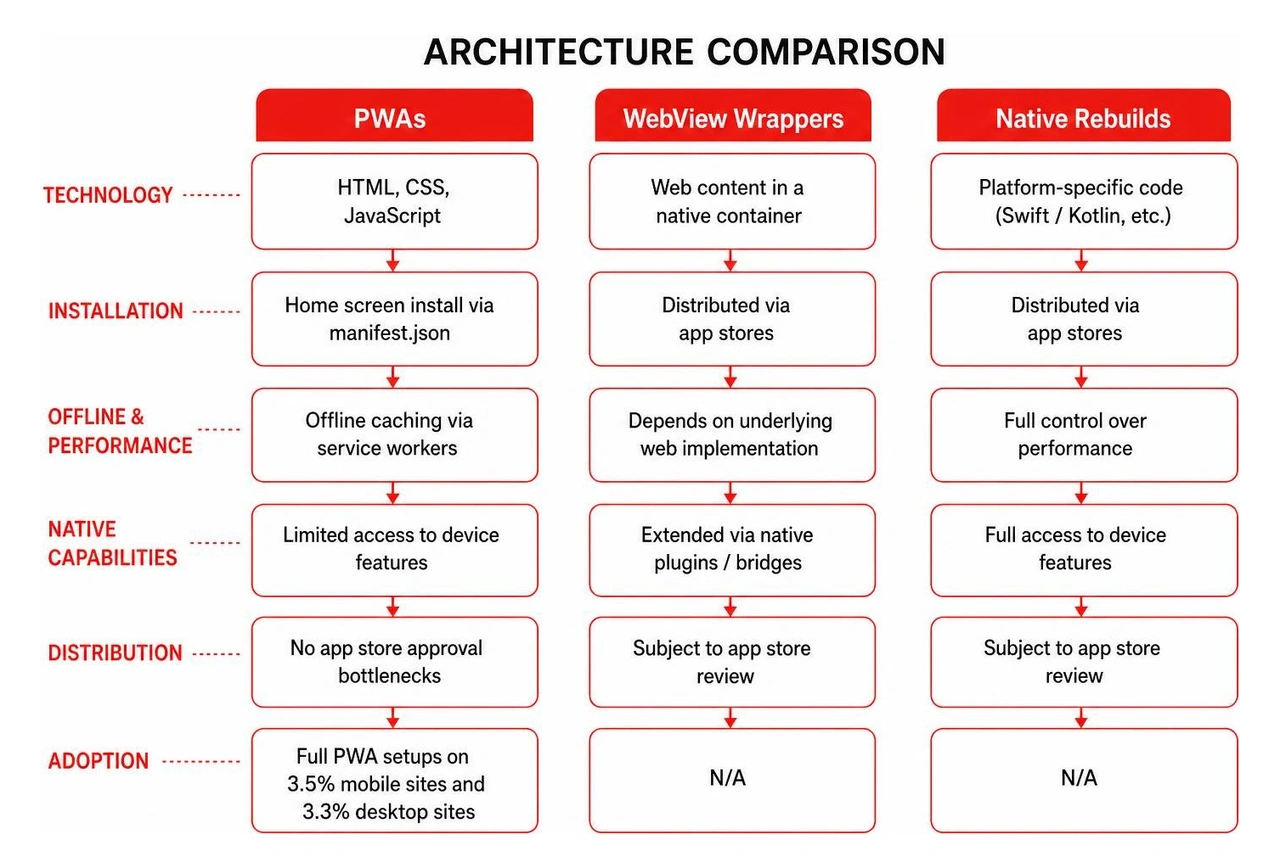
Three distinct paths exist for transforming a standard web property into a mobile product:
manifest.json) and service worker scripts, a browser can install the site directly to the user's home screen. PWAs run in standalone windows, support offline caching, and skip third-party app store approval bottlenecks entirely. However, full PWA adoption remains underutilized across the wider web; complete PWA configurations are present on only 3.5% of mobile websites and 3.3% of desktop sites, while roughly one-fifth of websites utilize service workers and one-tenth implement manifests.Before committing development capital, it is critical to evaluate if your feature set truly demands dedicated mobile software. Take time to consider the case against building an app when a mobile app is the wrong product to prevent over-engineering simple marketing workflows.
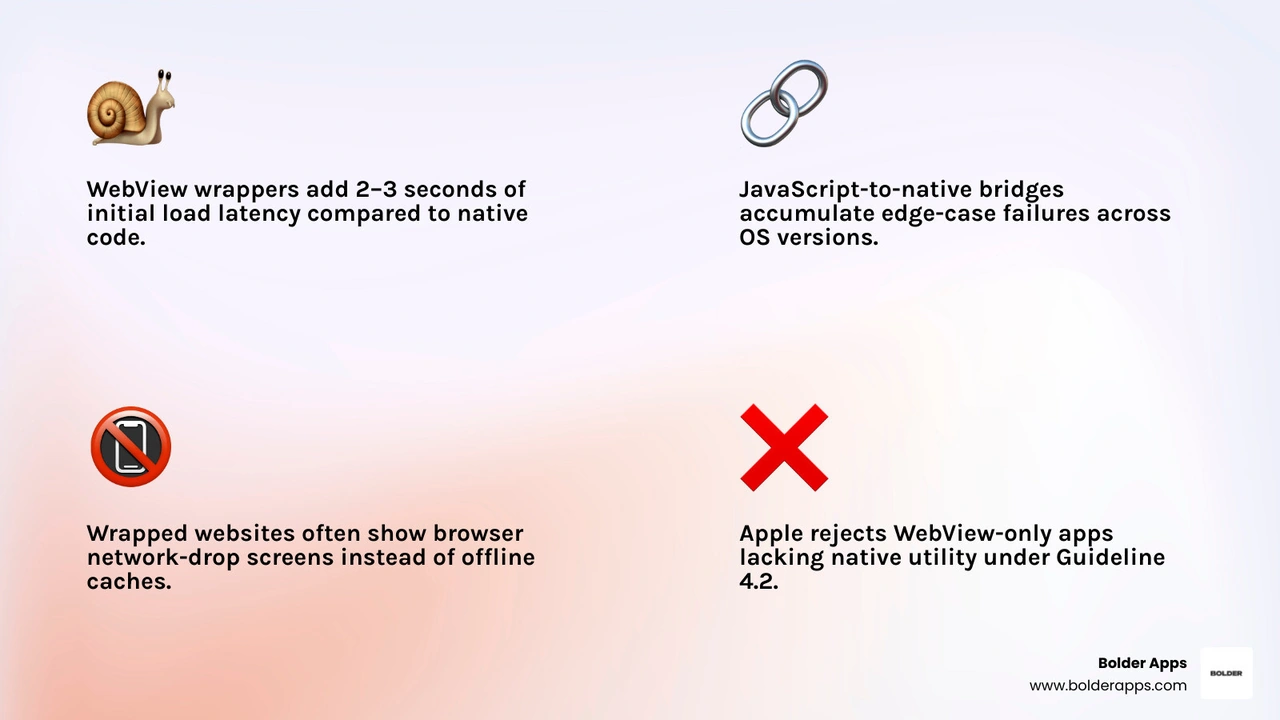
Many engineering teams assume that embedding a responsive website into a native WebView shell is an effortless shortcut to app store distribution. In practice, naive WebView wrappers often introduce significant architectural overhead:
For mission-critical digital products, selectively rebuilding user workflows using modern cross-platform engines like React Native or Flutter delivers the optimal balance of speed and efficiency.
Rather than rewriting an entire enterprise desktop web platform screen-for-screen, high-performing engineering teams identify recurring, high-frequency user actions:
When deciding between hybrid ecosystems for your software deployment, our breakdown on selecting React Native vs Flutter for SaaS startups outlines performance benchmarks, developer ergonomics, and native bridge stability.
Transforming a digital property requires mastering specific platform toolchains. At its core, the foundational definition of a website consists of interconnected web resources served under a single domain. Elevating those resources into standalone mobile software demands platform-specific setup on both Apple and Google operating systems.
Apple provides direct mechanisms for running web properties as isolated home screen web applications through mobile Safari without requiring the App Store:
apple-touch-icon) and incorporates mobile-optimized meta tags (viewport-fit=cover).
For Android distribution on Google Play, Google provides Trusted Web Activities (TWA), allowing a verified PWA to run full-screen inside a native Android container using the Chrome runtime. Google's Bubblewrap CLI streamlines the packaging process:
vite-plugin-pwa.keytool utility.assetlinks.json Verification File: Place your verification configuration at /.well-known/assetlinks.json under your root domain. This file must be served securely over HTTPS with a content-type: application/json header.The delegate_permission/common.handle_all_urls relationship enables native deep linking, ensuring matching domain links launch directly inside your app shell rather than triggering external mobile browser tabs. Validate this configuration using Google's Digital Asset Links Verifier tool to ensure complete removal of the browser URL bar.
Choosing which platform ecosystem to prioritize depends on your business model, target audience demographics, and functional requirements:
To navigate store compliance and release schedules efficiently, partner with our team through dedicated mobile app development services to ensure smooth submissions on both storefronts.
You can turn any responsive website into an installable Progressive Web App (PWA) completely free of charge. Users can save the site to their home screen using browser settings on iOS Safari or Android Chrome without paying licensing fees or app store tolls.
However, packaging an app for official release on the Apple App Store and Google Play Store introduces fixed developer account fees (Apple charges $99 annually, while Google charges a one-time $25 registration fee).
A Progressive Web App runs directly within the user's mobile browser engine using standards-based service workers, web app manifests, and client-side caching. PWAs do not require download packages or store approvals.
A WebView wrapper is a compiled native mobile binary (APK/AAB or IPA) containing an embedded web rendering component. It wraps around a hosted URL and distributes through traditional app marketplaces, but introduces runtime startup latency and requires manual app review approvals.
For PWAs, push notifications operate through the standards-compliant Web Push API combined with Service Workers, using Apple Push Notification service (APNs) on iOS and Firebase Cloud Messaging (FCM) on Android.
Native and wrapped mobile applications communicate directly with OS notification daemons using platform push SDKs. Both implementation paths require explicit user opt-in permissions before triggering outbound alerts.
Transforming a website into a high-performance mobile application requires more than just wrapping a URL in a native container—it demands smart architectural planning, scalable APIs, and focused user flows that keep customers engaged.
Founded in 2019, Bolder Apps is a digital product development company dedicated to creating high-impact mobile and web applications. Bolder Apps combines battle-tested US technical leadership with senior distributed engineers to deliver strategic, data-driven, and intuitive digital products—ensuring there is never any junior learning on your dime.
Whether you need to convert an existing web workflow into a fast-loading Progressive Web App, distribute a Trusted Web Activity on Google Play, or build a cross-platform mobile solution in React Native, we provide the engineering rigor to turn your vision into a measurable business asset.
We operate on a transparent fixed-budget model, pairing your project with an in-shore CTO and senior offshore development team backed by milestone-based payments. You always know your deliverables, timelines, and costs upfront. Explore our custom software development services or connect with our engineering leadership at our Bolder Apps office locations in Miami to start your mobile transformation today.
Making a website into an app starts with a mobile-friendly site and a clear goal. If you want people to install it from their browser, build a Progressive Web App (PWA). If you need an app store listing, you can package the site in a mobile app. If fast, reliable access to phone features is central to the experience, rebuild the key screens as a mobile app.
The choice matters because an icon alone will not keep users coming back. A useful mobile app makes common tasks easier, loads well, and gives people a reason to return. This guide will help you choose an approach and understand what it takes to launch it.
Related content about making a website into an app:
Mobile devices have fundamentally reshaped digital consumer behavior. In 2026, global mobile users spent 5.3 trillion hours inside applications, averaging roughly 3.6 hours per day per user across nearly 150 billion annual app downloads worldwide. Furthermore, 92.3% of internet users access digital services using smartphones, compared to only 65.6% accessing via laptops or desktop computers.
People check their mobile devices an average of 58 times every day. When your business exists solely inside an ephemeral browser tab behind a typed search query, you lose the friction-free, habit-forming touchpoints that native apps provide. A dedicated icon sitting directly on a user's home screen creates persistent visibility that traditional web bookmarks cannot match.
Beyond physical real estate on the home screen, turning a web product into an app unlocks major personalization and conversion benefits:
To understand how high-performing brands balance these touchpoints across touch interfaces, review our comprehensive strategic mobile and web apps analysis to see where native capabilities provide the highest return.
When planning this transformation, you must separate distribution goals from retention goals. Distribution is simply making your product discoverable via search engines or application marketplaces. Retention is the speed, ergonomics, and reliability that make customers open the software repeatedly.
Selecting the right technical architecture dictates whether your users encounter seamless responsiveness or sluggish page rendering. Exploring our modern web app development services helps teams map out scalable backends and frontend APIs before selecting their client-side shell.
Three distinct paths exist for transforming a standard web property into a mobile product:
manifest.json) and service worker scripts, a browser can install the site directly to the user's home screen. PWAs run in standalone windows, support offline caching, and skip third-party app store approval bottlenecks entirely. However, full PWA adoption remains underutilized across the wider web; complete PWA configurations are present on only 3.5% of mobile websites and 3.3% of desktop sites, while roughly one-fifth of websites utilize service workers and one-tenth implement manifests.Before committing development capital, it is critical to evaluate if your feature set truly demands dedicated mobile software. Take time to consider the case against building an app when a mobile app is the wrong product to prevent over-engineering simple marketing workflows.
Many engineering teams assume that embedding a responsive website into a native WebView shell is an effortless shortcut to app store distribution. In practice, naive WebView wrappers often introduce significant architectural overhead:
For mission-critical digital products, selectively rebuilding user workflows using modern cross-platform engines like React Native or Flutter delivers the optimal balance of speed and efficiency.
Rather than rewriting an entire enterprise desktop web platform screen-for-screen, high-performing engineering teams identify recurring, high-frequency user actions:
When deciding between hybrid ecosystems for your software deployment, our breakdown on selecting React Native vs Flutter for SaaS startups outlines performance benchmarks, developer ergonomics, and native bridge stability.
Transforming a digital property requires mastering specific platform toolchains. At its core, the foundational definition of a website consists of interconnected web resources served under a single domain. Elevating those resources into standalone mobile software demands platform-specific setup on both Apple and Google operating systems.
Apple provides direct mechanisms for running web properties as isolated home screen web applications through mobile Safari without requiring the App Store:
apple-touch-icon) and incorporates mobile-optimized meta tags (viewport-fit=cover).
For Android distribution on Google Play, Google provides Trusted Web Activities (TWA), allowing a verified PWA to run full-screen inside a native Android container using the Chrome runtime. Google's Bubblewrap CLI streamlines the packaging process:
vite-plugin-pwa.keytool utility.assetlinks.json Verification File: Place your verification configuration at /.well-known/assetlinks.json under your root domain. This file must be served securely over HTTPS with a content-type: application/json header.The delegate_permission/common.handle_all_urls relationship enables native deep linking, ensuring matching domain links launch directly inside your app shell rather than triggering external mobile browser tabs. Validate this configuration using Google's Digital Asset Links Verifier tool to ensure complete removal of the browser URL bar.
Choosing which platform ecosystem to prioritize depends on your business model, target audience demographics, and functional requirements:
To navigate store compliance and release schedules efficiently, partner with our team through dedicated mobile app development services to ensure smooth submissions on both storefronts.
You can turn any responsive website into an installable Progressive Web App (PWA) completely free of charge. Users can save the site to their home screen using browser settings on iOS Safari or Android Chrome without paying licensing fees or app store tolls.
However, packaging an app for official release on the Apple App Store and Google Play Store introduces fixed developer account fees (Apple charges $99 annually, while Google charges a one-time $25 registration fee).
A Progressive Web App runs directly within the user's mobile browser engine using standards-based service workers, web app manifests, and client-side caching. PWAs do not require download packages or store approvals.
A WebView wrapper is a compiled native mobile binary (APK/AAB or IPA) containing an embedded web rendering component. It wraps around a hosted URL and distributes through traditional app marketplaces, but introduces runtime startup latency and requires manual app review approvals.
For PWAs, push notifications operate through the standards-compliant Web Push API combined with Service Workers, using Apple Push Notification service (APNs) on iOS and Firebase Cloud Messaging (FCM) on Android.
Native and wrapped mobile applications communicate directly with OS notification daemons using platform push SDKs. Both implementation paths require explicit user opt-in permissions before triggering outbound alerts.
Transforming a website into a high-performance mobile application requires more than just wrapping a URL in a native container—it demands smart architectural planning, scalable APIs, and focused user flows that keep customers engaged.
Founded in 2019, Bolder Apps is a digital product development company dedicated to creating high-impact mobile and web applications. Bolder Apps combines battle-tested US technical leadership with senior distributed engineers to deliver strategic, data-driven, and intuitive digital products—ensuring there is never any junior learning on your dime.
Whether you need to convert an existing web workflow into a fast-loading Progressive Web App, distribute a Trusted Web Activity on Google Play, or build a cross-platform mobile solution in React Native, we provide the engineering rigor to turn your vision into a measurable business asset.
We operate on a transparent fixed-budget model, pairing your project with an in-shore CTO and senior offshore development team backed by milestone-based payments. You always know your deliverables, timelines, and costs upfront. Explore our custom software development services or connect with our engineering leadership at our Bolder Apps office locations in Miami to start your mobile transformation today.
Making a website into an app starts with a mobile-friendly site and a clear goal. If you want people to install it from their browser, build a Progressive Web App (PWA). If you need an app store listing, you can package the site in a mobile app. If fast, reliable access to phone features is central to the experience, rebuild the key screens as a mobile app.
The choice matters because an icon alone will not keep users coming back. A useful mobile app makes common tasks easier, loads well, and gives people a reason to return. This guide will help you choose an approach and understand what it takes to launch it.
Related content about making a website into an app:
Mobile devices have fundamentally reshaped digital consumer behavior. In 2026, global mobile users spent 5.3 trillion hours inside applications, averaging roughly 3.6 hours per day per user across nearly 150 billion annual app downloads worldwide. Furthermore, 92.3% of internet users access digital services using smartphones, compared to only 65.6% accessing via laptops or desktop computers.
People check their mobile devices an average of 58 times every day. When your business exists solely inside an ephemeral browser tab behind a typed search query, you lose the friction-free, habit-forming touchpoints that native apps provide. A dedicated icon sitting directly on a user's home screen creates persistent visibility that traditional web bookmarks cannot match.
Beyond physical real estate on the home screen, turning a web product into an app unlocks major personalization and conversion benefits:
To understand how high-performing brands balance these touchpoints across touch interfaces, review our comprehensive strategic mobile and web apps analysis to see where native capabilities provide the highest return.
When planning this transformation, you must separate distribution goals from retention goals. Distribution is simply making your product discoverable via search engines or application marketplaces. Retention is the speed, ergonomics, and reliability that make customers open the software repeatedly.
Selecting the right technical architecture dictates whether your users encounter seamless responsiveness or sluggish page rendering. Exploring our modern web app development services helps teams map out scalable backends and frontend APIs before selecting their client-side shell.
Three distinct paths exist for transforming a standard web property into a mobile product:
manifest.json) and service worker scripts, a browser can install the site directly to the user's home screen. PWAs run in standalone windows, support offline caching, and skip third-party app store approval bottlenecks entirely. However, full PWA adoption remains underutilized across the wider web; complete PWA configurations are present on only 3.5% of mobile websites and 3.3% of desktop sites, while roughly one-fifth of websites utilize service workers and one-tenth implement manifests.Before committing development capital, it is critical to evaluate if your feature set truly demands dedicated mobile software. Take time to consider the case against building an app when a mobile app is the wrong product to prevent over-engineering simple marketing workflows.
Many engineering teams assume that embedding a responsive website into a native WebView shell is an effortless shortcut to app store distribution. In practice, naive WebView wrappers often introduce significant architectural overhead:
For mission-critical digital products, selectively rebuilding user workflows using modern cross-platform engines like React Native or Flutter delivers the optimal balance of speed and efficiency.
Rather than rewriting an entire enterprise desktop web platform screen-for-screen, high-performing engineering teams identify recurring, high-frequency user actions:
When deciding between hybrid ecosystems for your software deployment, our breakdown on selecting React Native vs Flutter for SaaS startups outlines performance benchmarks, developer ergonomics, and native bridge stability.
Transforming a digital property requires mastering specific platform toolchains. At its core, the foundational definition of a website consists of interconnected web resources served under a single domain. Elevating those resources into standalone mobile software demands platform-specific setup on both Apple and Google operating systems.
Apple provides direct mechanisms for running web properties as isolated home screen web applications through mobile Safari without requiring the App Store:
apple-touch-icon) and incorporates mobile-optimized meta tags (viewport-fit=cover).
For Android distribution on Google Play, Google provides Trusted Web Activities (TWA), allowing a verified PWA to run full-screen inside a native Android container using the Chrome runtime. Google's Bubblewrap CLI streamlines the packaging process:
vite-plugin-pwa.keytool utility.assetlinks.json Verification File: Place your verification configuration at /.well-known/assetlinks.json under your root domain. This file must be served securely over HTTPS with a content-type: application/json header.The delegate_permission/common.handle_all_urls relationship enables native deep linking, ensuring matching domain links launch directly inside your app shell rather than triggering external mobile browser tabs. Validate this configuration using Google's Digital Asset Links Verifier tool to ensure complete removal of the browser URL bar.
Choosing which platform ecosystem to prioritize depends on your business model, target audience demographics, and functional requirements:
To navigate store compliance and release schedules efficiently, partner with our team through dedicated mobile app development services to ensure smooth submissions on both storefronts.
You can turn any responsive website into an installable Progressive Web App (PWA) completely free of charge. Users can save the site to their home screen using browser settings on iOS Safari or Android Chrome without paying licensing fees or app store tolls.
However, packaging an app for official release on the Apple App Store and Google Play Store introduces fixed developer account fees (Apple charges $99 annually, while Google charges a one-time $25 registration fee).
A Progressive Web App runs directly within the user's mobile browser engine using standards-based service workers, web app manifests, and client-side caching. PWAs do not require download packages or store approvals.
A WebView wrapper is a compiled native mobile binary (APK/AAB or IPA) containing an embedded web rendering component. It wraps around a hosted URL and distributes through traditional app marketplaces, but introduces runtime startup latency and requires manual app review approvals.
For PWAs, push notifications operate through the standards-compliant Web Push API combined with Service Workers, using Apple Push Notification service (APNs) on iOS and Firebase Cloud Messaging (FCM) on Android.
Native and wrapped mobile applications communicate directly with OS notification daemons using platform push SDKs. Both implementation paths require explicit user opt-in permissions before triggering outbound alerts.
Transforming a website into a high-performance mobile application requires more than just wrapping a URL in a native container—it demands smart architectural planning, scalable APIs, and focused user flows that keep customers engaged.
Founded in 2019, Bolder Apps is a digital product development company dedicated to creating high-impact mobile and web applications. Bolder Apps combines battle-tested US technical leadership with senior distributed engineers to deliver strategic, data-driven, and intuitive digital products—ensuring there is never any junior learning on your dime.
Whether you need to convert an existing web workflow into a fast-loading Progressive Web App, distribute a Trusted Web Activity on Google Play, or build a cross-platform mobile solution in React Native, we provide the engineering rigor to turn your vision into a measurable business asset.
We operate on a transparent fixed-budget model, pairing your project with an in-shore CTO and senior offshore development team backed by milestone-based payments. You always know your deliverables, timelines, and costs upfront. Explore our custom software development services or connect with our engineering leadership at our Bolder Apps office locations in Miami to start your mobile transformation today.