
Sean Weldon
November 18, 2026
10
min. read
and updated on:
November 19, 2026

User journey mapping shows how a person moves toward a goal in your app or website, including what they do, think, and feel along the way. To make a useful map, choose one user and one goal. List the steps and touchpoints, add evidence from interviews or product data, then mark where people struggle or leave. Use those findings to choose what to improve, test the change, and update the map.
For a product team, this makes a vague problem like “users abandon checkout” easier to investigate. The map connects that drop-off to the steps before it, so the team can focus on the cause rather than guess at a fix.

User journey mapping terminology:
Building digital products without mapping the user path is a bit like setting off on a cross-country road trip with a blank piece of paper and a tank full of optimism. You might get somewhere interesting, but chances are you will get lost along the way. In product design, understanding behavioral intent across every touchpoint ensures you build what people actually need.
While teams often use the terms interchangeably, there is a clear functional distinction between user journey maps and customer journey maps:
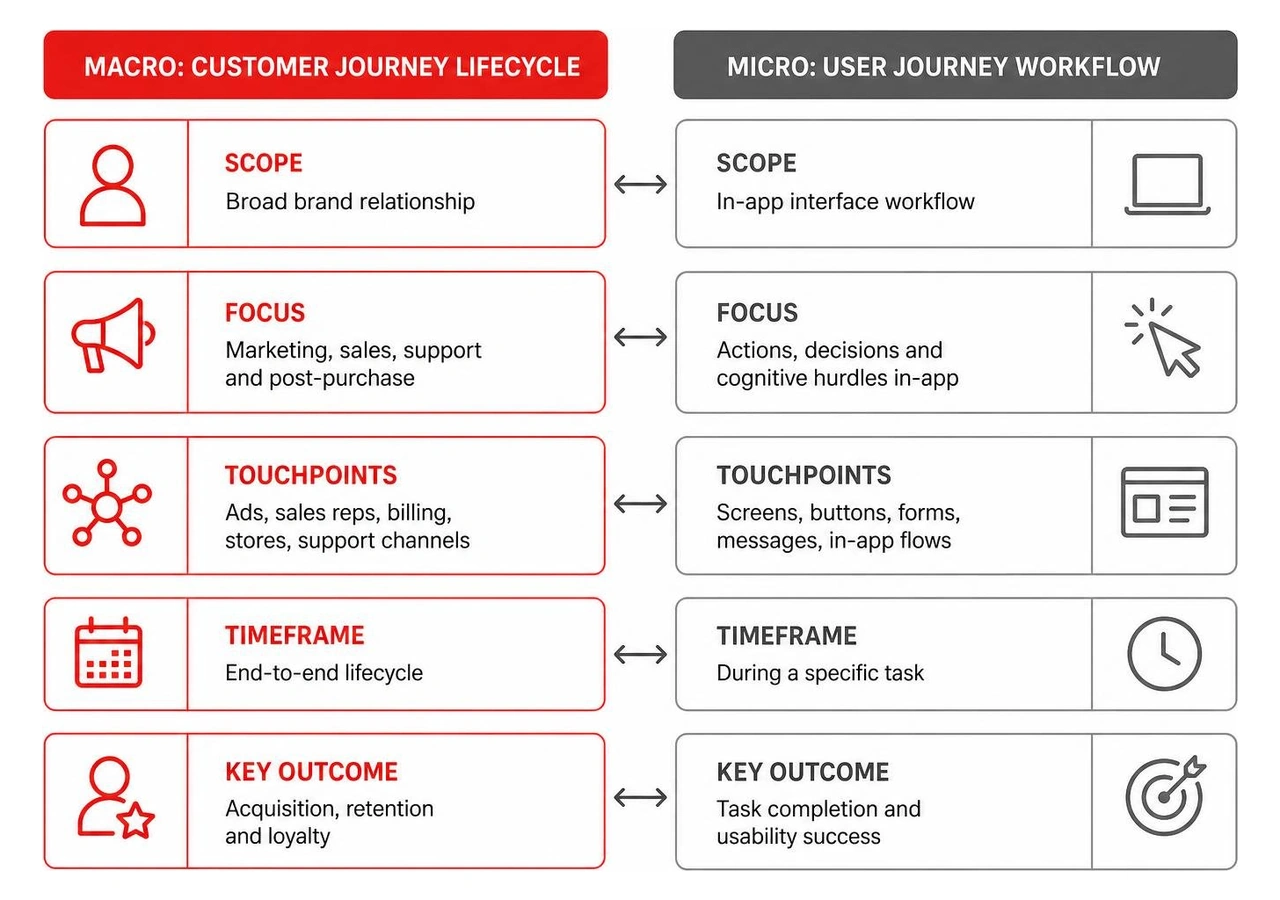
In B2B applications, this difference is especially critical. The person who signs the enterprise procurement contract (the customer) is rarely the person logging into the dashboard every day to execute workflows (the user). Mapping the specific user journey prevents product teams from designing solely for buyer checklists while ignoring the real ergonomic friction encountered by day-to-day operators.
Every effective journey map relies on five structural building blocks:
To keep these elements grounded in reality rather than speculation, teams integrate UX research and testing into every phase of discovery.
To organize user experience research, design teams rely on three complementary mapping models:
For deeper insights into standard UX mapping conventions, industry references such as the NN/G guide to journey mapping provide foundational frameworks. Additionally, public-sector initiatives detailed in the Digital.gov user research documentation demonstrate how pairing journey maps with operational blueprints uncovers cross-departmental bottlenecks.
Modern digital product standards are uncompromising. Research shows that 88% of customers consider their overall experience with a company to be just as important as its products, while 71% of consumers have switched brands within the past year when faced with subpar interactions. Furthermore, 73% of consumers explicitly expect brands to understand their individual needs and preferences.
Meeting these modern expectations requires delivering a cohesive data-driven user experience across all digital platforms. Because the average consumer now relies on more than three channels to interact with businesses, unmapped touchpoints frequently result in fragmented experiences, customer frustration, and early churn.

Journey mapping breaks down organizational silos by establishing a shared mental model between engineering, product management, marketing, and design. Instead of debating interface layouts in isolation, teams evaluate product roadmaps through the lived perspective of the user.
Journey maps generally serve two main strategic purposes:
Applying these frameworks within modern product cycles is outlined in our digital UX design guide for 2026, helping teams bridge current usability gaps while building toward future-state roadmaps.
When product teams analyze journey maps, they look for emotional valleys—points where user sentiment dips into confusion, anxiety, or frustration. These valleys pinpoint critical drop-off points, such as:
Once these pain points are identified, teams score opportunities based on technical feasibility and business impact. By assigning internal team ownership directly on the journey map, discovered friction points translate immediately into prioritized development sprints rather than forgotten whiteboard sketches.
Creating a practical journey map requires moving beyond assumptions to capture verified user behaviors, context, and motivations.
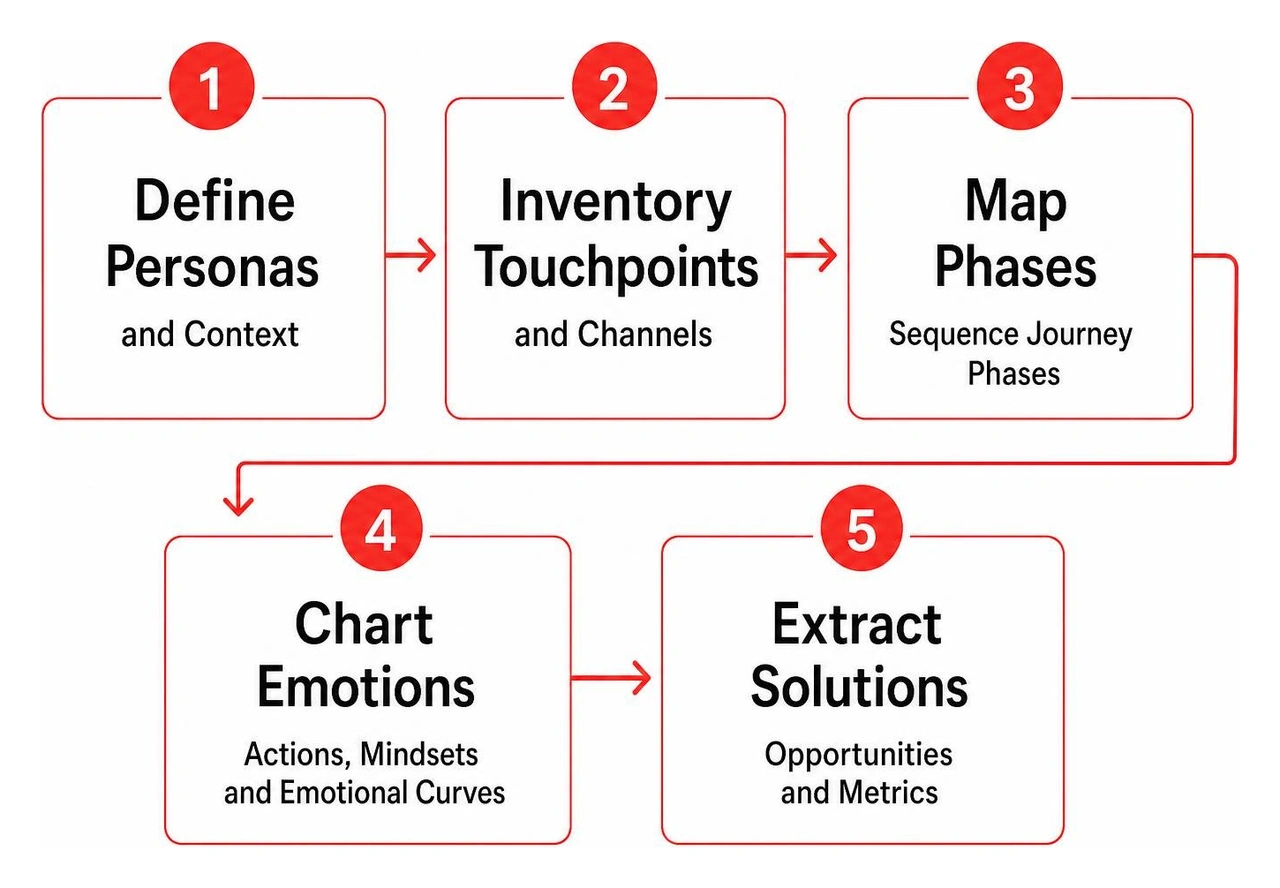
Following a structured, user-centered design approach allows teams to move from raw data to an actionable journey artifact through five sequential stages:
A journey map is a living hypothesis that must be validated through empirical testing and behavioral telemetry. Teams combine qualitative usability sessions with quantitative event tracking to confirm whether real users behave as mapped.
When optimizing mobile experiences, refining interface paths through targeted UI/UX design for mobile apps ensures responsive touch targets and streamlined thumb-zone navigation. For example, during initial activation, auditing the journey helps engineering teams optimize the app onboarding flow architecture for 2026, cutting registration drop-offs and accelerating time-to-value.
Before committing code, teams validate new journey flows rapidly by deploying interactive prototypes created through wireframing and prototyping services.
Journey maps lose their utility when treated as static, one-time presentation slides. To maintain their value, product organizations treat them as living operational documentation.
Best practices for long-term journey governance include:
Teams should review and update their journey maps on a quarterly cadence, as well as immediately following major product updates, significant redesigns, or the introduction of new user personas.
A user flow is a technical diagram detailing the step-by-step UI path and decision logic a user takes through an interface (such as screen A to screen B). A user journey map is a broader narrative document that incorporates the user's emotional states, mindsets, external context, and pain points across multiple touchpoints.
Modern product teams rely on real-time digital whiteboarding and diagramming tools like Figma, FigJam, Miro, and Mural to facilitate remote discovery workshops, map complex ecosystems, and keep artifacts accessible to distributed teams.
A well-crafted user journey map turns disparate research into a clear, shared vision for your product. By documenting every action, emotional high, and friction point, you eliminate internal guesswork and build digital experiences that drive measurable retention and revenue growth.
At Bolder Apps, we bring structured, user-centered methodologies to custom web and mobile app development. Founded in 2019 and recognized as the top software and app development agency in 2026 by DesignRush (verify details and case studies on bolderapps.com), we pair an in-shore CTO with elite offshore dev teams. This hybrid model ensures high-impact product execution with transparent, milestone-based payments and predictable fixed-budget pricing—guaranteeing zero junior learning on your dime.
Ready to elevate your digital product roadmap? Explore our comprehensive UI/UX design services and connect with our product strategists across our nationwide design hubs to turn your user insights into market-leading software.
User journey mapping shows how a person moves toward a goal in your app or website, including what they do, think, and feel along the way. To make a useful map, choose one user and one goal. List the steps and touchpoints, add evidence from interviews or product data, then mark where people struggle or leave. Use those findings to choose what to improve, test the change, and update the map.
For a product team, this makes a vague problem like “users abandon checkout” easier to investigate. The map connects that drop-off to the steps before it, so the team can focus on the cause rather than guess at a fix.
User journey mapping terminology:
Building digital products without mapping the user path is a bit like setting off on a cross-country road trip with a blank piece of paper and a tank full of optimism. You might get somewhere interesting, but chances are you will get lost along the way. In product design, understanding behavioral intent across every touchpoint ensures you build what people actually need.
While teams often use the terms interchangeably, there is a clear functional distinction between user journey maps and customer journey maps:
In B2B applications, this difference is especially critical. The person who signs the enterprise procurement contract (the customer) is rarely the person logging into the dashboard every day to execute workflows (the user). Mapping the specific user journey prevents product teams from designing solely for buyer checklists while ignoring the real ergonomic friction encountered by day-to-day operators.
Every effective journey map relies on five structural building blocks:
To keep these elements grounded in reality rather than speculation, teams integrate UX research and testing into every phase of discovery.
To organize user experience research, design teams rely on three complementary mapping models:
For deeper insights into standard UX mapping conventions, industry references such as the NN/G guide to journey mapping provide foundational frameworks. Additionally, public-sector initiatives detailed in the Digital.gov user research documentation demonstrate how pairing journey maps with operational blueprints uncovers cross-departmental bottlenecks.
Modern digital product standards are uncompromising. Research shows that 88% of customers consider their overall experience with a company to be just as important as its products, while 71% of consumers have switched brands within the past year when faced with subpar interactions. Furthermore, 73% of consumers explicitly expect brands to understand their individual needs and preferences.
Meeting these modern expectations requires delivering a cohesive data-driven user experience across all digital platforms. Because the average consumer now relies on more than three channels to interact with businesses, unmapped touchpoints frequently result in fragmented experiences, customer frustration, and early churn.
Journey mapping breaks down organizational silos by establishing a shared mental model between engineering, product management, marketing, and design. Instead of debating interface layouts in isolation, teams evaluate product roadmaps through the lived perspective of the user.
Journey maps generally serve two main strategic purposes:
Applying these frameworks within modern product cycles is outlined in our digital UX design guide for 2026, helping teams bridge current usability gaps while building toward future-state roadmaps.
When product teams analyze journey maps, they look for emotional valleys—points where user sentiment dips into confusion, anxiety, or frustration. These valleys pinpoint critical drop-off points, such as:
Once these pain points are identified, teams score opportunities based on technical feasibility and business impact. By assigning internal team ownership directly on the journey map, discovered friction points translate immediately into prioritized development sprints rather than forgotten whiteboard sketches.
Creating a practical journey map requires moving beyond assumptions to capture verified user behaviors, context, and motivations.
Following a structured, user-centered design approach allows teams to move from raw data to an actionable journey artifact through five sequential stages:
A journey map is a living hypothesis that must be validated through empirical testing and behavioral telemetry. Teams combine qualitative usability sessions with quantitative event tracking to confirm whether real users behave as mapped.
When optimizing mobile experiences, refining interface paths through targeted UI/UX design for mobile apps ensures responsive touch targets and streamlined thumb-zone navigation. For example, during initial activation, auditing the journey helps engineering teams optimize the app onboarding flow architecture for 2026, cutting registration drop-offs and accelerating time-to-value.
Before committing code, teams validate new journey flows rapidly by deploying interactive prototypes created through wireframing and prototyping services.
Journey maps lose their utility when treated as static, one-time presentation slides. To maintain their value, product organizations treat them as living operational documentation.
Best practices for long-term journey governance include:
Teams should review and update their journey maps on a quarterly cadence, as well as immediately following major product updates, significant redesigns, or the introduction of new user personas.
A user flow is a technical diagram detailing the step-by-step UI path and decision logic a user takes through an interface (such as screen A to screen B). A user journey map is a broader narrative document that incorporates the user's emotional states, mindsets, external context, and pain points across multiple touchpoints.
Modern product teams rely on real-time digital whiteboarding and diagramming tools like Figma, FigJam, Miro, and Mural to facilitate remote discovery workshops, map complex ecosystems, and keep artifacts accessible to distributed teams.
A well-crafted user journey map turns disparate research into a clear, shared vision for your product. By documenting every action, emotional high, and friction point, you eliminate internal guesswork and build digital experiences that drive measurable retention and revenue growth.
At Bolder Apps, we bring structured, user-centered methodologies to custom web and mobile app development. Founded in 2019 and recognized as the top software and app development agency in 2026 by DesignRush (verify details and case studies on bolderapps.com), we pair an in-shore CTO with elite offshore dev teams. This hybrid model ensures high-impact product execution with transparent, milestone-based payments and predictable fixed-budget pricing—guaranteeing zero junior learning on your dime.
Ready to elevate your digital product roadmap? Explore our comprehensive UI/UX design services and connect with our product strategists across our nationwide design hubs to turn your user insights into market-leading software.
User journey mapping shows how a person moves toward a goal in your app or website, including what they do, think, and feel along the way. To make a useful map, choose one user and one goal. List the steps and touchpoints, add evidence from interviews or product data, then mark where people struggle or leave. Use those findings to choose what to improve, test the change, and update the map.
For a product team, this makes a vague problem like “users abandon checkout” easier to investigate. The map connects that drop-off to the steps before it, so the team can focus on the cause rather than guess at a fix.
User journey mapping terminology:
Building digital products without mapping the user path is a bit like setting off on a cross-country road trip with a blank piece of paper and a tank full of optimism. You might get somewhere interesting, but chances are you will get lost along the way. In product design, understanding behavioral intent across every touchpoint ensures you build what people actually need.
While teams often use the terms interchangeably, there is a clear functional distinction between user journey maps and customer journey maps:
In B2B applications, this difference is especially critical. The person who signs the enterprise procurement contract (the customer) is rarely the person logging into the dashboard every day to execute workflows (the user). Mapping the specific user journey prevents product teams from designing solely for buyer checklists while ignoring the real ergonomic friction encountered by day-to-day operators.
Every effective journey map relies on five structural building blocks:
To keep these elements grounded in reality rather than speculation, teams integrate UX research and testing into every phase of discovery.
To organize user experience research, design teams rely on three complementary mapping models:
For deeper insights into standard UX mapping conventions, industry references such as the NN/G guide to journey mapping provide foundational frameworks. Additionally, public-sector initiatives detailed in the Digital.gov user research documentation demonstrate how pairing journey maps with operational blueprints uncovers cross-departmental bottlenecks.
Modern digital product standards are uncompromising. Research shows that 88% of customers consider their overall experience with a company to be just as important as its products, while 71% of consumers have switched brands within the past year when faced with subpar interactions. Furthermore, 73% of consumers explicitly expect brands to understand their individual needs and preferences.
Meeting these modern expectations requires delivering a cohesive data-driven user experience across all digital platforms. Because the average consumer now relies on more than three channels to interact with businesses, unmapped touchpoints frequently result in fragmented experiences, customer frustration, and early churn.
Journey mapping breaks down organizational silos by establishing a shared mental model between engineering, product management, marketing, and design. Instead of debating interface layouts in isolation, teams evaluate product roadmaps through the lived perspective of the user.
Journey maps generally serve two main strategic purposes:
Applying these frameworks within modern product cycles is outlined in our digital UX design guide for 2026, helping teams bridge current usability gaps while building toward future-state roadmaps.
When product teams analyze journey maps, they look for emotional valleys—points where user sentiment dips into confusion, anxiety, or frustration. These valleys pinpoint critical drop-off points, such as:
Once these pain points are identified, teams score opportunities based on technical feasibility and business impact. By assigning internal team ownership directly on the journey map, discovered friction points translate immediately into prioritized development sprints rather than forgotten whiteboard sketches.
Creating a practical journey map requires moving beyond assumptions to capture verified user behaviors, context, and motivations.
Following a structured, user-centered design approach allows teams to move from raw data to an actionable journey artifact through five sequential stages:
A journey map is a living hypothesis that must be validated through empirical testing and behavioral telemetry. Teams combine qualitative usability sessions with quantitative event tracking to confirm whether real users behave as mapped.
When optimizing mobile experiences, refining interface paths through targeted UI/UX design for mobile apps ensures responsive touch targets and streamlined thumb-zone navigation. For example, during initial activation, auditing the journey helps engineering teams optimize the app onboarding flow architecture for 2026, cutting registration drop-offs and accelerating time-to-value.
Before committing code, teams validate new journey flows rapidly by deploying interactive prototypes created through wireframing and prototyping services.
Journey maps lose their utility when treated as static, one-time presentation slides. To maintain their value, product organizations treat them as living operational documentation.
Best practices for long-term journey governance include:
Teams should review and update their journey maps on a quarterly cadence, as well as immediately following major product updates, significant redesigns, or the introduction of new user personas.
A user flow is a technical diagram detailing the step-by-step UI path and decision logic a user takes through an interface (such as screen A to screen B). A user journey map is a broader narrative document that incorporates the user's emotional states, mindsets, external context, and pain points across multiple touchpoints.
Modern product teams rely on real-time digital whiteboarding and diagramming tools like Figma, FigJam, Miro, and Mural to facilitate remote discovery workshops, map complex ecosystems, and keep artifacts accessible to distributed teams.
A well-crafted user journey map turns disparate research into a clear, shared vision for your product. By documenting every action, emotional high, and friction point, you eliminate internal guesswork and build digital experiences that drive measurable retention and revenue growth.
At Bolder Apps, we bring structured, user-centered methodologies to custom web and mobile app development. Founded in 2019 and recognized as the top software and app development agency in 2026 by DesignRush (verify details and case studies on bolderapps.com), we pair an in-shore CTO with elite offshore dev teams. This hybrid model ensures high-impact product execution with transparent, milestone-based payments and predictable fixed-budget pricing—guaranteeing zero junior learning on your dime.
Ready to elevate your digital product roadmap? Explore our comprehensive UI/UX design services and connect with our product strategists across our nationwide design hubs to turn your user insights into market-leading software.