
Sean Weldon
November 18, 2026
10
min. read
and updated on:
November 19, 2026



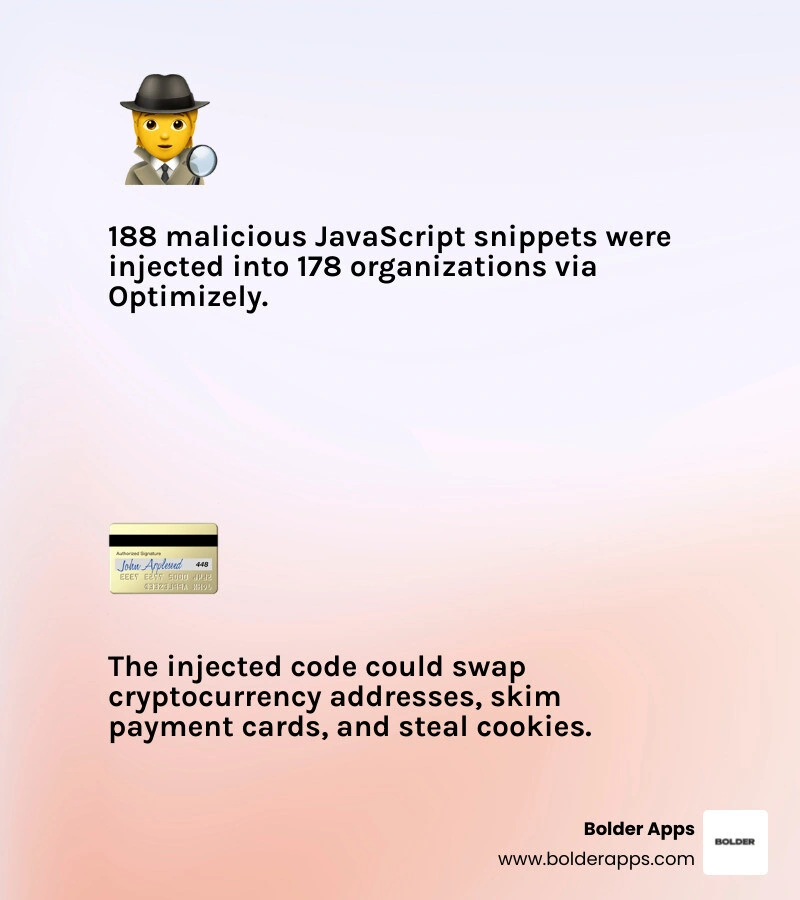
On November 16, 2026, an unauthorized party exploited a vulnerability in Optimizely's Experimentation product and used it to add malicious JavaScript to some customer projects, according to Optimizely. Websites then served that code to visitors through a script they already trusted. In a sample of 1,611 Optimizely snippets it could check that day, Report URI found malicious code in 188 snippets belonging to 178 organizations, and it says the real number is likely higher. Optimizely says it has fixed the vulnerability and removed the injected code from affected projects, as SecurityWeek also reported.
The code was built to swap cryptocurrency wallet addresses and, later in the day, to skim payment card details. The lesson for product leaders is direct: a third-party script can put users at risk without a breach of your own servers. Teams should audit scripts running in production, limit who can change them, and prepare to disable them quickly during an incident.
Building modern web and mobile applications is faster and easier than ever. Teams plug in specialized SaaS platforms for analytics, conversion rate optimization, feature flags, and A/B testing in an afternoon. Yet every external dependency added to production is an implicit trust relationship. When that upstream trust is abused, perimeter firewalls and server-side defenses cannot protect users on their own. That is why an app development audit, independent code audit services, and a regular software quality review should cover the third-party code you ship, not just the code you write.
There is a broader trend worth naming, kept separate from the facts of this case. As building software gets cheaper, so does attacking it, and we expect AI tools to keep speeding up how quickly attackers find and abuse weak points. To be clear, none of the reporting on the Optimizely incident says AI was used to plan or carry out this attack. It is simply a reminder that exposure grows with every script you trust.
The Optimizely security incident on November 16, 2026, showed how quietly and widely a digital supply chain attack can spread. Unlike classic infrastructure attacks that target origin databases or hosting credentials, this one abused the trust a browser places in a vendor's script.

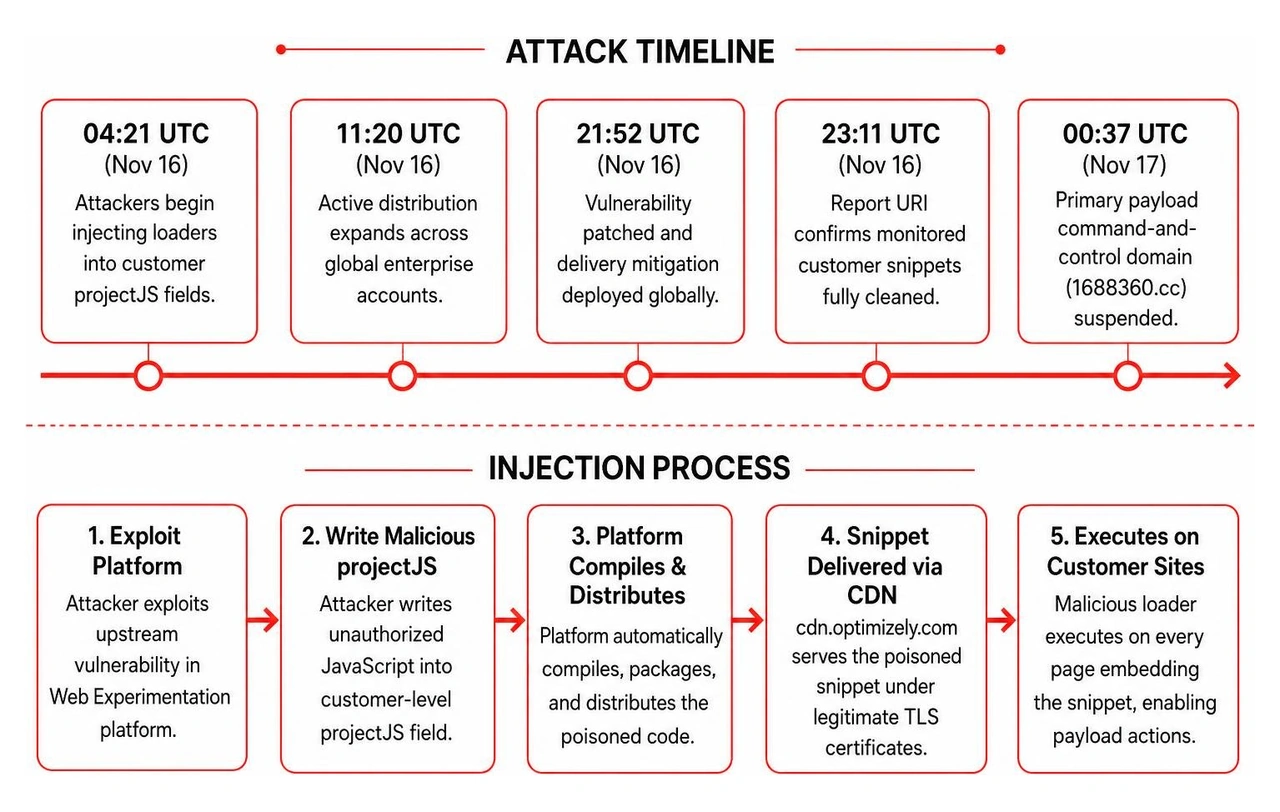
Report URI states this was not a CDN cache-poisoning attack. Optimizely's own content delivery network served the project content it was given, with Optimizely's own certificate. Instead, the attacker wrote a small loader into each affected customer's "Project JavaScript" (projectJS) field and left the rest of the snippet untouched (Report URI; The Hacker News). In a statement to BleepingComputer, Optimizely said the vulnerability was in the Experimentation account signup flow. How a signup-flow bug gave write access to existing customer projects has not been publicly explained.
Because projectJS is a legitimate feature that runs custom code on every page where the snippet is included, the loader ran wherever an infected snippet loaded. Customers who serve the same snippet from their own domain were affected too, because the content comes from the same Optimizely project (Report URI).
Report URI's timeline puts the first observed injection at 04:21 UTC on November 16; how long the vulnerability existed before that is unknown. Report URI saw a mass clean-up between about 20:40 and 21:10 UTC, one of the 188 snippets still infected at 21:52 UTC, and all of the infected files it was watching clean by 23:11 UTC. Optimizely posted its status-page notice at 01:02 UTC on November 17. It also told BleepingComputer it had blocked the vulnerable path, ended active sessions, revoked tokens, reset access for affected user accounts, and notified all affected customers.
During the day, Report URI says the payload was rebuilt 26 times. The attacker added features along the way, including the card skimmer at 13:43 UTC and a second iOS delivery host. The 188 snippets and 178 organizations are a lower-bound sample, not a full count. No public figure covers every affected site or visitor.
The payload script was a multi-purpose client-side kit. Researchers describe what it was capable of doing; that is not proof of harm in every visitor session (Report URI; StepSecurity).
HttpOnly, the original addresses, and a screenshot of the page to the attacker (Report URI; BleepingComputer).Many security programs lean on perimeter Web Application Firewalls (WAFs) and Content Security Policies (CSPs). The Optimizely incident exposed gaps in how organizations configure browser-level policies.
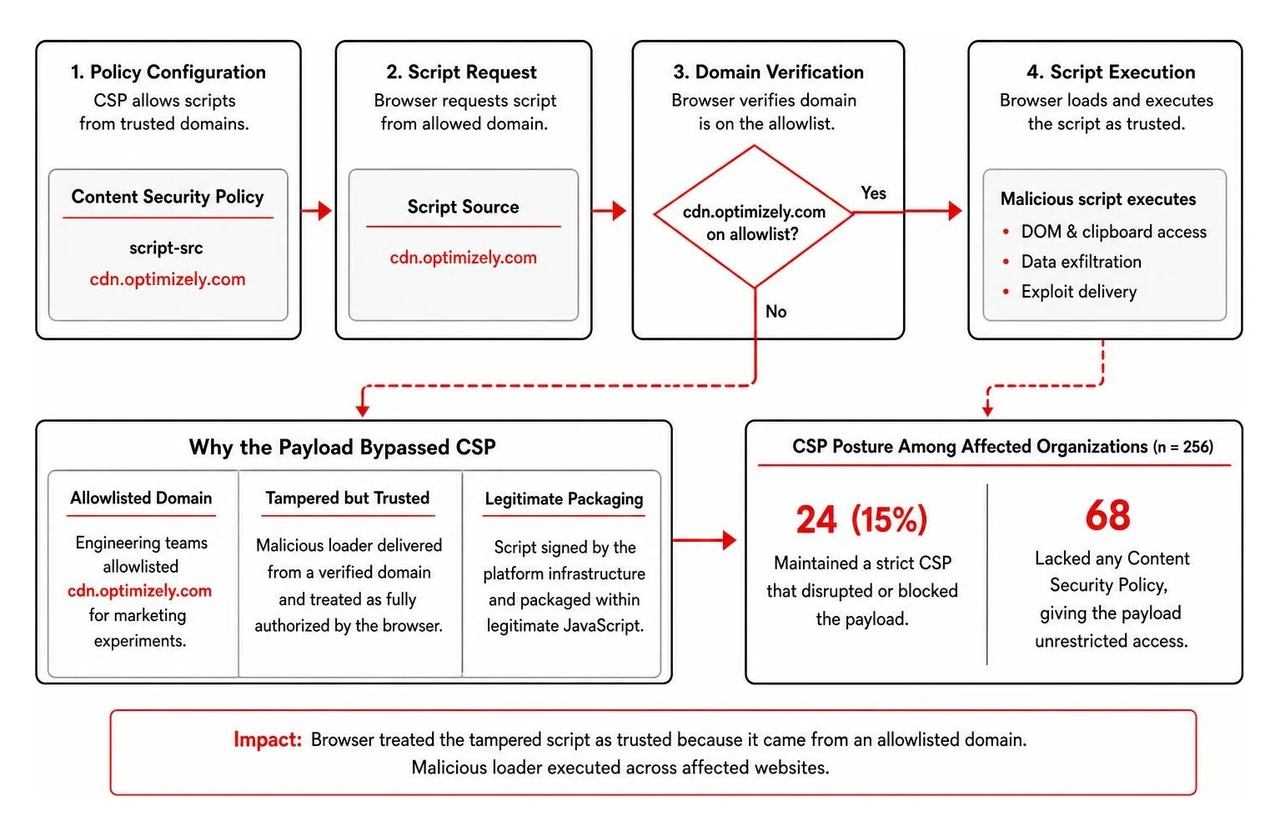
A Content Security Policy uses the script-src directive to define where scripts may load from. Teams that allowlist Optimizely's CDN domain to support experiments gained nothing here, because the malicious loader arrived from that trusted host, over Optimizely's own certificate, inside an otherwise legitimate snippet (Report URI).
Report URI crawled 256 of the affected organizations' own hosts and evaluated their CSPs against what the payload needed. Of the organizations in its results:
connect-src (address swapping still worked).script-src.Two common settings let the attack through. Optimizely's own documentation tells customers to allow 'unsafe-eval', and one loader variant carried a full inline copy of the payload that ran through eval even where the attacker's domain was blocked. Another variant hid the payload URL in base64 and decoded it with atob(), so a simple text search for the domain could miss it (Report URI; The Hacker News).
Policies relying on 'strict-dynamic' also failed, because any script the trusted Optimizely snippet inserted was trusted too. Navigating these security and compliance challenges requires an understanding of how HIPAA, SOC 2, PCI DSS, and GDPR apply to your app, especially where client-side code touches payment or personal data.
Client-side third-party scripts run with the same privileges as your own frontend code. When a third-party tag is embedded on a page without isolation, it can read form inputs, modify the page, intercept requests, and read browser storage that isn't protected.
Optimizely was not the only channel. Report URI says an earlier wave from the same actor's injector reached visitors through scripts from at least three other third-party providers between November 13 and 16, though how it got into those scripts is unclear (Report URI; SecurityWeek). Separately, Optimizely disclosed a different incident in February 2026, in which a threat actor reached some internal systems through a voice-phishing attack, as SecurityWeek noted.
Nothing published so far links the February incident to this one. Together, they show that vendor accounts, identities, and integration boundaries remain prime targets for attackers.
When engineering teams hand client-side execution to marketing tag managers or A/B testing dashboards without guardrails, they create an unmonitored back door into production. Conducting rigorous software quality reviews and implementing mature enterprise application development solutions helps close the gap between rapid product experimentation and defensive engineering.
The most important takeaway for founders and engineering leaders is that client-side security cannot depend entirely on the integrity of external vendors. Even well-funded SaaS providers can have upstream platform flaws. Defensive architecture assumes any external dependency may become untrusted at any point.
One finding stands out. According to Report URI's analysis, cards entered in hosted payment iframes (such as Stripe or Adyen) were out of the skimmer's reach. Because those iframes are cross-origin, JavaScript running in the parent page cannot read what is typed inside them.
Cards typed into a site's own form fields were not protected. The skimmer could read the card number, expiry, and CVV from those fields and same-origin requests.
To reduce structural risk across web and mobile applications, teams need continuous governance over external assets. A comprehensive application development audit paired with dedicated code audit services gives you the visibility to find unconstrained third-party tags, outdated dependencies, and weak CSP settings.
Defending against client-side supply chain attacks takes defense in depth across code, network controls, and operations. Drawing on Report URI's guidance for Optimizely customers and general best practice, we advise engineering teams to adopt the following standards:
script-src and connect-src to explicitly approved origins, avoid 'unsafe-eval' where you can, don't rely on 'strict-dynamic' alone, and turn on CSP reporting. Use nonces or hashes rather than broad wildcard allowlists.HttpOnly, Secure, and SameSite flags to session identifiers and authentication tokens. HttpOnly stops client-side JavaScript from reading those cookies through the browser's cookie API.1688360, atob(, and unfamiliar scripts. A snippet that is clean now may still have served the code on November 16.Optimizely says an unauthorized party exploited a vulnerability in the Experimentation account signup flow and used it to add malicious JavaScript to some customer projects (BleepingComputer; Optimizely status). Researchers found the code in customers' "Project JavaScript" field, which runs on every page where the snippet is included. The CDN was not cache-poisoned; it served the tampered project content with Optimizely's certificate (Report URI). How the signup flaw gave access to existing projects has not been publicly explained.
Allowlisting Optimizely's CDN domain couldn't help, because the malicious code came from that trusted host. In Report URI's review of affected organizations' hosts, 68 had no CSP and only 24 (15%) blocked the payload. Settings such as 'unsafe-eval' and 'strict-dynamic' let the inline fallback or inserted scripts run, and loose connect-src rules let stolen data leave the page (Report URI).
According to Report URI's analysis, no: cards entered in cross-origin hosted payment iframes were out of the skimmer's reach. Cards typed into a site's own form fields could be read. Report URI advises sites that took cards in their own forms on November 16 to treat them as potentially exposed (Report URI).
The Optimizely security incident highlights a clear reality in modern software engineering: shipping digital products requires a secure-by-default architecture from day one. You cannot treat third-party dependencies, analytics trackers, and client-side scripts as afterthoughts while focusing only on server-side APIs. Software has never been easier to build, and that speed only pays off if what you ship is hard to abuse.
Founded in 2019, Bolder Apps is a Miami-headquartered mobile and web app development agency. We combine US-based leadership with a distributed team of senior engineers, so there is no junior learning on your dime.
Building secure applications should never derail your roadmap or break your budget. We work on fixed-scope pricing, not hourly rates, so you know what you're getting and what it costs before we write a line of code. Whether you are modernizing legacy infrastructure or building a new product, our team helps make your client-side boundaries, data flows, and third-party integrations robust against supply chain risks.
Explore our global development locations and schedule your code audit services with Bolder Apps today to keep your applications resilient, compliant, and built for scale.
On November 16, 2026, an unauthorized party exploited a vulnerability in Optimizely's Experimentation product and used it to add malicious JavaScript to some customer projects, according to Optimizely. Websites then served that code to visitors through a script they already trusted. In a sample of 1,611 Optimizely snippets it could check that day, Report URI found malicious code in 188 snippets belonging to 178 organizations, and it says the real number is likely higher. Optimizely says it has fixed the vulnerability and removed the injected code from affected projects, as SecurityWeek also reported.
The code was built to swap cryptocurrency wallet addresses and, later in the day, to skim payment card details. The lesson for product leaders is direct: a third-party script can put users at risk without a breach of your own servers. Teams should audit scripts running in production, limit who can change them, and prepare to disable them quickly during an incident.
Building modern web and mobile applications is faster and easier than ever. Teams plug in specialized SaaS platforms for analytics, conversion rate optimization, feature flags, and A/B testing in an afternoon. Yet every external dependency added to production is an implicit trust relationship. When that upstream trust is abused, perimeter firewalls and server-side defenses cannot protect users on their own. That is why an app development audit, independent code audit services, and a regular software quality review should cover the third-party code you ship, not just the code you write.
There is a broader trend worth naming, kept separate from the facts of this case. As building software gets cheaper, so does attacking it, and we expect AI tools to keep speeding up how quickly attackers find and abuse weak points. To be clear, none of the reporting on the Optimizely incident says AI was used to plan or carry out this attack. It is simply a reminder that exposure grows with every script you trust.
The Optimizely security incident on November 16, 2026, showed how quietly and widely a digital supply chain attack can spread. Unlike classic infrastructure attacks that target origin databases or hosting credentials, this one abused the trust a browser places in a vendor's script.
Report URI states this was not a CDN cache-poisoning attack. Optimizely's own content delivery network served the project content it was given, with Optimizely's own certificate. Instead, the attacker wrote a small loader into each affected customer's "Project JavaScript" (projectJS) field and left the rest of the snippet untouched (Report URI; The Hacker News). In a statement to BleepingComputer, Optimizely said the vulnerability was in the Experimentation account signup flow. How a signup-flow bug gave write access to existing customer projects has not been publicly explained.
Because projectJS is a legitimate feature that runs custom code on every page where the snippet is included, the loader ran wherever an infected snippet loaded. Customers who serve the same snippet from their own domain were affected too, because the content comes from the same Optimizely project (Report URI).
Report URI's timeline puts the first observed injection at 04:21 UTC on November 16; how long the vulnerability existed before that is unknown. Report URI saw a mass clean-up between about 20:40 and 21:10 UTC, one of the 188 snippets still infected at 21:52 UTC, and all of the infected files it was watching clean by 23:11 UTC. Optimizely posted its status-page notice at 01:02 UTC on November 17. It also told BleepingComputer it had blocked the vulnerable path, ended active sessions, revoked tokens, reset access for affected user accounts, and notified all affected customers.
During the day, Report URI says the payload was rebuilt 26 times. The attacker added features along the way, including the card skimmer at 13:43 UTC and a second iOS delivery host. The 188 snippets and 178 organizations are a lower-bound sample, not a full count. No public figure covers every affected site or visitor.
The payload script was a multi-purpose client-side kit. Researchers describe what it was capable of doing; that is not proof of harm in every visitor session (Report URI; StepSecurity).
HttpOnly, the original addresses, and a screenshot of the page to the attacker (Report URI; BleepingComputer).Many security programs lean on perimeter Web Application Firewalls (WAFs) and Content Security Policies (CSPs). The Optimizely incident exposed gaps in how organizations configure browser-level policies.
A Content Security Policy uses the script-src directive to define where scripts may load from. Teams that allowlist Optimizely's CDN domain to support experiments gained nothing here, because the malicious loader arrived from that trusted host, over Optimizely's own certificate, inside an otherwise legitimate snippet (Report URI).
Report URI crawled 256 of the affected organizations' own hosts and evaluated their CSPs against what the payload needed. Of the organizations in its results:
connect-src (address swapping still worked).script-src.Two common settings let the attack through. Optimizely's own documentation tells customers to allow 'unsafe-eval', and one loader variant carried a full inline copy of the payload that ran through eval even where the attacker's domain was blocked. Another variant hid the payload URL in base64 and decoded it with atob(), so a simple text search for the domain could miss it (Report URI; The Hacker News).
Policies relying on 'strict-dynamic' also failed, because any script the trusted Optimizely snippet inserted was trusted too. Navigating these security and compliance challenges requires an understanding of how HIPAA, SOC 2, PCI DSS, and GDPR apply to your app, especially where client-side code touches payment or personal data.
Client-side third-party scripts run with the same privileges as your own frontend code. When a third-party tag is embedded on a page without isolation, it can read form inputs, modify the page, intercept requests, and read browser storage that isn't protected.
Optimizely was not the only channel. Report URI says an earlier wave from the same actor's injector reached visitors through scripts from at least three other third-party providers between November 13 and 16, though how it got into those scripts is unclear (Report URI; SecurityWeek). Separately, Optimizely disclosed a different incident in February 2026, in which a threat actor reached some internal systems through a voice-phishing attack, as SecurityWeek noted.
Nothing published so far links the February incident to this one. Together, they show that vendor accounts, identities, and integration boundaries remain prime targets for attackers.
When engineering teams hand client-side execution to marketing tag managers or A/B testing dashboards without guardrails, they create an unmonitored back door into production. Conducting rigorous software quality reviews and implementing mature enterprise application development solutions helps close the gap between rapid product experimentation and defensive engineering.
The most important takeaway for founders and engineering leaders is that client-side security cannot depend entirely on the integrity of external vendors. Even well-funded SaaS providers can have upstream platform flaws. Defensive architecture assumes any external dependency may become untrusted at any point.
One finding stands out. According to Report URI's analysis, cards entered in hosted payment iframes (such as Stripe or Adyen) were out of the skimmer's reach. Because those iframes are cross-origin, JavaScript running in the parent page cannot read what is typed inside them.
Cards typed into a site's own form fields were not protected. The skimmer could read the card number, expiry, and CVV from those fields and same-origin requests.
To reduce structural risk across web and mobile applications, teams need continuous governance over external assets. A comprehensive application development audit paired with dedicated code audit services gives you the visibility to find unconstrained third-party tags, outdated dependencies, and weak CSP settings.
Defending against client-side supply chain attacks takes defense in depth across code, network controls, and operations. Drawing on Report URI's guidance for Optimizely customers and general best practice, we advise engineering teams to adopt the following standards:
script-src and connect-src to explicitly approved origins, avoid 'unsafe-eval' where you can, don't rely on 'strict-dynamic' alone, and turn on CSP reporting. Use nonces or hashes rather than broad wildcard allowlists.HttpOnly, Secure, and SameSite flags to session identifiers and authentication tokens. HttpOnly stops client-side JavaScript from reading those cookies through the browser's cookie API.1688360, atob(, and unfamiliar scripts. A snippet that is clean now may still have served the code on November 16.Optimizely says an unauthorized party exploited a vulnerability in the Experimentation account signup flow and used it to add malicious JavaScript to some customer projects (BleepingComputer; Optimizely status). Researchers found the code in customers' "Project JavaScript" field, which runs on every page where the snippet is included. The CDN was not cache-poisoned; it served the tampered project content with Optimizely's certificate (Report URI). How the signup flaw gave access to existing projects has not been publicly explained.
Allowlisting Optimizely's CDN domain couldn't help, because the malicious code came from that trusted host. In Report URI's review of affected organizations' hosts, 68 had no CSP and only 24 (15%) blocked the payload. Settings such as 'unsafe-eval' and 'strict-dynamic' let the inline fallback or inserted scripts run, and loose connect-src rules let stolen data leave the page (Report URI).
According to Report URI's analysis, no: cards entered in cross-origin hosted payment iframes were out of the skimmer's reach. Cards typed into a site's own form fields could be read. Report URI advises sites that took cards in their own forms on November 16 to treat them as potentially exposed (Report URI).
The Optimizely security incident highlights a clear reality in modern software engineering: shipping digital products requires a secure-by-default architecture from day one. You cannot treat third-party dependencies, analytics trackers, and client-side scripts as afterthoughts while focusing only on server-side APIs. Software has never been easier to build, and that speed only pays off if what you ship is hard to abuse.
Founded in 2019, Bolder Apps is a Miami-headquartered mobile and web app development agency. We combine US-based leadership with a distributed team of senior engineers, so there is no junior learning on your dime.
Building secure applications should never derail your roadmap or break your budget. We work on fixed-scope pricing, not hourly rates, so you know what you're getting and what it costs before we write a line of code. Whether you are modernizing legacy infrastructure or building a new product, our team helps make your client-side boundaries, data flows, and third-party integrations robust against supply chain risks.
Explore our global development locations and schedule your code audit services with Bolder Apps today to keep your applications resilient, compliant, and built for scale.
On November 16, 2026, an unauthorized party exploited a vulnerability in Optimizely's Experimentation product and used it to add malicious JavaScript to some customer projects, according to Optimizely. Websites then served that code to visitors through a script they already trusted. In a sample of 1,611 Optimizely snippets it could check that day, Report URI found malicious code in 188 snippets belonging to 178 organizations, and it says the real number is likely higher. Optimizely says it has fixed the vulnerability and removed the injected code from affected projects, as SecurityWeek also reported.
The code was built to swap cryptocurrency wallet addresses and, later in the day, to skim payment card details. The lesson for product leaders is direct: a third-party script can put users at risk without a breach of your own servers. Teams should audit scripts running in production, limit who can change them, and prepare to disable them quickly during an incident.
Building modern web and mobile applications is faster and easier than ever. Teams plug in specialized SaaS platforms for analytics, conversion rate optimization, feature flags, and A/B testing in an afternoon. Yet every external dependency added to production is an implicit trust relationship. When that upstream trust is abused, perimeter firewalls and server-side defenses cannot protect users on their own. That is why an app development audit, independent code audit services, and a regular software quality review should cover the third-party code you ship, not just the code you write.
There is a broader trend worth naming, kept separate from the facts of this case. As building software gets cheaper, so does attacking it, and we expect AI tools to keep speeding up how quickly attackers find and abuse weak points. To be clear, none of the reporting on the Optimizely incident says AI was used to plan or carry out this attack. It is simply a reminder that exposure grows with every script you trust.
The Optimizely security incident on November 16, 2026, showed how quietly and widely a digital supply chain attack can spread. Unlike classic infrastructure attacks that target origin databases or hosting credentials, this one abused the trust a browser places in a vendor's script.
Report URI states this was not a CDN cache-poisoning attack. Optimizely's own content delivery network served the project content it was given, with Optimizely's own certificate. Instead, the attacker wrote a small loader into each affected customer's "Project JavaScript" (projectJS) field and left the rest of the snippet untouched (Report URI; The Hacker News). In a statement to BleepingComputer, Optimizely said the vulnerability was in the Experimentation account signup flow. How a signup-flow bug gave write access to existing customer projects has not been publicly explained.
Because projectJS is a legitimate feature that runs custom code on every page where the snippet is included, the loader ran wherever an infected snippet loaded. Customers who serve the same snippet from their own domain were affected too, because the content comes from the same Optimizely project (Report URI).
Report URI's timeline puts the first observed injection at 04:21 UTC on November 16; how long the vulnerability existed before that is unknown. Report URI saw a mass clean-up between about 20:40 and 21:10 UTC, one of the 188 snippets still infected at 21:52 UTC, and all of the infected files it was watching clean by 23:11 UTC. Optimizely posted its status-page notice at 01:02 UTC on November 17. It also told BleepingComputer it had blocked the vulnerable path, ended active sessions, revoked tokens, reset access for affected user accounts, and notified all affected customers.
During the day, Report URI says the payload was rebuilt 26 times. The attacker added features along the way, including the card skimmer at 13:43 UTC and a second iOS delivery host. The 188 snippets and 178 organizations are a lower-bound sample, not a full count. No public figure covers every affected site or visitor.
The payload script was a multi-purpose client-side kit. Researchers describe what it was capable of doing; that is not proof of harm in every visitor session (Report URI; StepSecurity).
HttpOnly, the original addresses, and a screenshot of the page to the attacker (Report URI; BleepingComputer).Many security programs lean on perimeter Web Application Firewalls (WAFs) and Content Security Policies (CSPs). The Optimizely incident exposed gaps in how organizations configure browser-level policies.
A Content Security Policy uses the script-src directive to define where scripts may load from. Teams that allowlist Optimizely's CDN domain to support experiments gained nothing here, because the malicious loader arrived from that trusted host, over Optimizely's own certificate, inside an otherwise legitimate snippet (Report URI).
Report URI crawled 256 of the affected organizations' own hosts and evaluated their CSPs against what the payload needed. Of the organizations in its results:
connect-src (address swapping still worked).script-src.Two common settings let the attack through. Optimizely's own documentation tells customers to allow 'unsafe-eval', and one loader variant carried a full inline copy of the payload that ran through eval even where the attacker's domain was blocked. Another variant hid the payload URL in base64 and decoded it with atob(), so a simple text search for the domain could miss it (Report URI; The Hacker News).
Policies relying on 'strict-dynamic' also failed, because any script the trusted Optimizely snippet inserted was trusted too. Navigating these security and compliance challenges requires an understanding of how HIPAA, SOC 2, PCI DSS, and GDPR apply to your app, especially where client-side code touches payment or personal data.
Client-side third-party scripts run with the same privileges as your own frontend code. When a third-party tag is embedded on a page without isolation, it can read form inputs, modify the page, intercept requests, and read browser storage that isn't protected.
Optimizely was not the only channel. Report URI says an earlier wave from the same actor's injector reached visitors through scripts from at least three other third-party providers between November 13 and 16, though how it got into those scripts is unclear (Report URI; SecurityWeek). Separately, Optimizely disclosed a different incident in February 2026, in which a threat actor reached some internal systems through a voice-phishing attack, as SecurityWeek noted.
Nothing published so far links the February incident to this one. Together, they show that vendor accounts, identities, and integration boundaries remain prime targets for attackers.
When engineering teams hand client-side execution to marketing tag managers or A/B testing dashboards without guardrails, they create an unmonitored back door into production. Conducting rigorous software quality reviews and implementing mature enterprise application development solutions helps close the gap between rapid product experimentation and defensive engineering.
The most important takeaway for founders and engineering leaders is that client-side security cannot depend entirely on the integrity of external vendors. Even well-funded SaaS providers can have upstream platform flaws. Defensive architecture assumes any external dependency may become untrusted at any point.
One finding stands out. According to Report URI's analysis, cards entered in hosted payment iframes (such as Stripe or Adyen) were out of the skimmer's reach. Because those iframes are cross-origin, JavaScript running in the parent page cannot read what is typed inside them.
Cards typed into a site's own form fields were not protected. The skimmer could read the card number, expiry, and CVV from those fields and same-origin requests.
To reduce structural risk across web and mobile applications, teams need continuous governance over external assets. A comprehensive application development audit paired with dedicated code audit services gives you the visibility to find unconstrained third-party tags, outdated dependencies, and weak CSP settings.
Defending against client-side supply chain attacks takes defense in depth across code, network controls, and operations. Drawing on Report URI's guidance for Optimizely customers and general best practice, we advise engineering teams to adopt the following standards:
script-src and connect-src to explicitly approved origins, avoid 'unsafe-eval' where you can, don't rely on 'strict-dynamic' alone, and turn on CSP reporting. Use nonces or hashes rather than broad wildcard allowlists.HttpOnly, Secure, and SameSite flags to session identifiers and authentication tokens. HttpOnly stops client-side JavaScript from reading those cookies through the browser's cookie API.1688360, atob(, and unfamiliar scripts. A snippet that is clean now may still have served the code on November 16.Optimizely says an unauthorized party exploited a vulnerability in the Experimentation account signup flow and used it to add malicious JavaScript to some customer projects (BleepingComputer; Optimizely status). Researchers found the code in customers' "Project JavaScript" field, which runs on every page where the snippet is included. The CDN was not cache-poisoned; it served the tampered project content with Optimizely's certificate (Report URI). How the signup flaw gave access to existing projects has not been publicly explained.
Allowlisting Optimizely's CDN domain couldn't help, because the malicious code came from that trusted host. In Report URI's review of affected organizations' hosts, 68 had no CSP and only 24 (15%) blocked the payload. Settings such as 'unsafe-eval' and 'strict-dynamic' let the inline fallback or inserted scripts run, and loose connect-src rules let stolen data leave the page (Report URI).
According to Report URI's analysis, no: cards entered in cross-origin hosted payment iframes were out of the skimmer's reach. Cards typed into a site's own form fields could be read. Report URI advises sites that took cards in their own forms on November 16 to treat them as potentially exposed (Report URI).
The Optimizely security incident highlights a clear reality in modern software engineering: shipping digital products requires a secure-by-default architecture from day one. You cannot treat third-party dependencies, analytics trackers, and client-side scripts as afterthoughts while focusing only on server-side APIs. Software has never been easier to build, and that speed only pays off if what you ship is hard to abuse.
Founded in 2019, Bolder Apps is a Miami-headquartered mobile and web app development agency. We combine US-based leadership with a distributed team of senior engineers, so there is no junior learning on your dime.
Building secure applications should never derail your roadmap or break your budget. We work on fixed-scope pricing, not hourly rates, so you know what you're getting and what it costs before we write a line of code. Whether you are modernizing legacy infrastructure or building a new product, our team helps make your client-side boundaries, data flows, and third-party integrations robust against supply chain risks.
Explore our global development locations and schedule your code audit services with Bolder Apps today to keep your applications resilient, compliant, and built for scale.