
Sean Weldon
September 24, 2026
10
min. read
and updated on:
September 24, 2026

MCP server AI integration gives an AI agent a standard way to discover trusted tools, retrieve current data, and take approved actions. Instead of building a separate custom connection for every model, app, database, and workflow, you can:
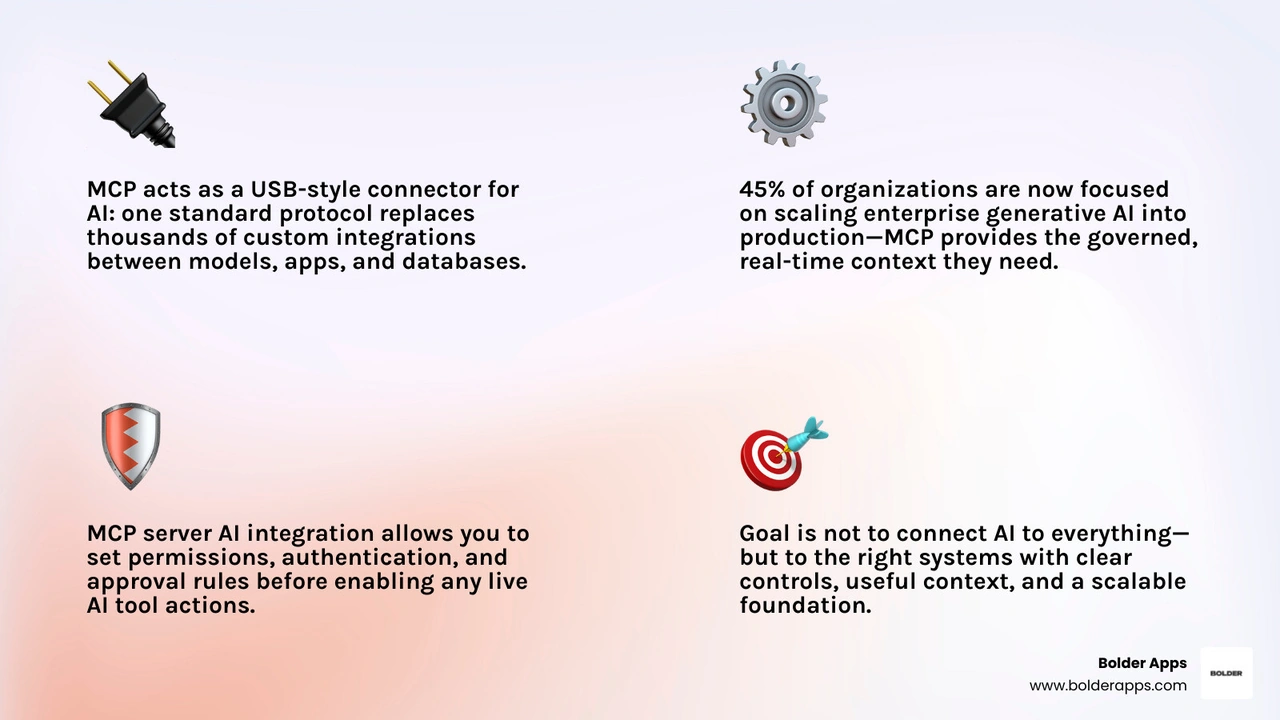
Think of MCP, or Model Context Protocol, as a USB-style connector for AI systems. It helps an assistant move beyond generic answers by accessing real repository details, support data, documentation, observability signals, or approved business workflows.
That matters when AI moves from experiments to core operations. In 2026, 45% of organizations are focused on putting enterprise generative AI into production or scaling it. Yet data readiness and guardrails remain major blockers. MCP creates a cleaner path: give agents governed, real-time context rather than asking them to guess. Fewer guesses means fewer confident-but-wrong answers - a win for everyone except the hallucination fairy.
For founders building ambitious digital products, the goal is not to connect AI to everything. It is to connect it to the right systems, with clear controls, useful context, and a foundation that can scale as your product grows.
Key mcp server ai integration vocabulary:
To understand how modern AI agents interact with external software, we have to look past simple API calls and inspect the underlying transport layer. The Model Context Protocol establishes an open, vendor-neutral standard built atop JSON-RPC 2.0. By standardizing message framing, capability negotiation, and state management, it creates a universal communication layer between Large Language Models (LLMs) and external runtime environments.
Industry leaders across OpenAI, Anthropic, Microsoft, and Google DeepMind have rapidly adopted the protocol. As Google DeepMind CEO Demis Hassabis noted, MCP is rapidly becoming an open standard for the AI agentic era. The architecture replaces brittle, proprietary prompt-formatting tricks with structured, bidirectional messaging. For an in-depth breakdown of the foundational mechanics, our comprehensive Model Context Protocol guide breaks down how the specification functions across diverse runtimes.
The communication pattern relies on two primary transport mechanisms:
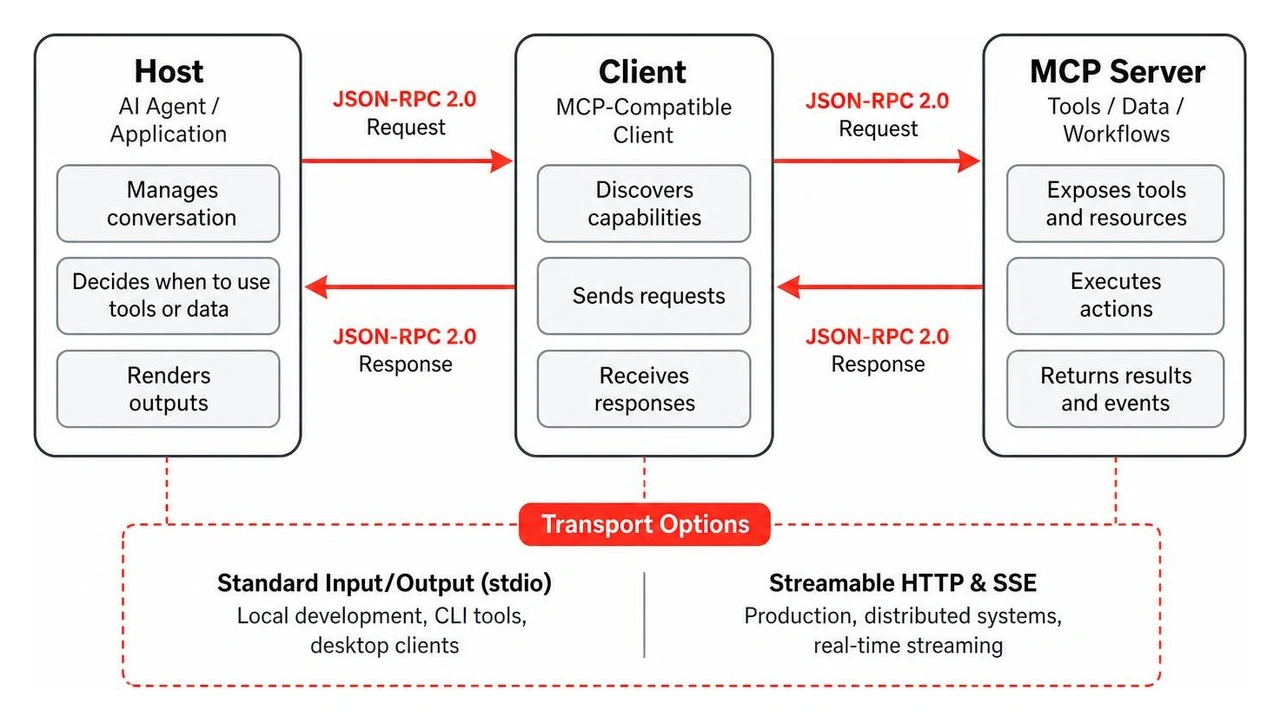
The protocol cleanly separates concerns across three architectural layers:
During system initialization, the client sends an InitializeRequest to negotiate supported protocol versions and capabilities. Once established, the host gains dynamic visibility into the server's tools without requiring recompilation or manual schema mapping.
Every MCP server exposes its functionality through three core primitives that allow AI models to perceive, evaluate, and act upon external environments:
ListToolsRequest / CallToolRequest): Callable executable functions that enable agents to execute write operations, trigger pipelines, query databases, or modify state. Tools expose dynamic parameter schemas using standard JSON Schema definitions, allowing models to validate arguments before execution.ListResourcesRequest / ReadResourceRequest): Read-only data payloads that provide passive background context. Resources represent file contents, application logs, database tables, or real-time metrics. Unlike active tools, resources are queried purely to enrich prompt context without risk of state modification.ListPromptsRequest / GetPromptRequest): Server-provided prompt templates and interaction recipes designed to steer the LLM toward the most effective operational path for a specific domain.By combining these primitives, an agent transitions from a static language model into an active, context-aware participant in your software ecosystem.
Building a custom MCP server allows you to expose proprietary business logic, internal microservices, and unique data models to generative AI agents. Rather than writing raw JSON-RPC handlers from scratch, modern development utilizes established frameworks like FastMCP or official language SDKs.
Whether you are configuring tools for internal tooling or following guidelines on Building MCP servers for plugins and API integrations, the process follows a structured implementation pipeline.
Begin by selecting your runtime environment. While Python and TypeScript are the most common ecosystems, modern SDKs support .NET, Java, and Go. When structuring your service, choose the appropriate transport mechanism: use stdio for local testing within your IDE or Streamable HTTP for cloud microservices.
Define your operational tools using standard JSON Schema definitions. When building backend services, clarity in schema definitions directly impacts the LLM's decision-making accuracy. Developers building custom services can follow our practical breakdown of building Node.js MCP servers for backends to make local data repositories easily readable by agentic runtimes.
Ensure that every registered tool includes:
inventory_query_stock).Once your server is scaffolded, configure your host runtime to discover and interact with the server. Modern agentic platforms, such as VS Code Copilot agent mode or enterprise orchestrators, require granular toolset filtering to keep the context window focused.
Exposing hundreds of uncurated tools simultaneously degrades model performance and increases latency. Instead, structure your server into logical toolsets. For instance, the official GitHub MCP server—a widely adopted community benchmark with over 32,000 stars and 4,800 forks on GitHub—utilizes modular toolset flags (--toolsets) to let teams enable only the specific capabilities they need, such as issues, pull requests, or repository analysis.
For complete configuration instructions, refer to our walkthrough on enabling MCP server integration in agent mode.
Before exposing your server to production environments, validate its conversational latency and accuracy using testing clients. Testing ensures that the agent correctly parses error payloads, respects argument types, and gracefully handles upstream timeouts.
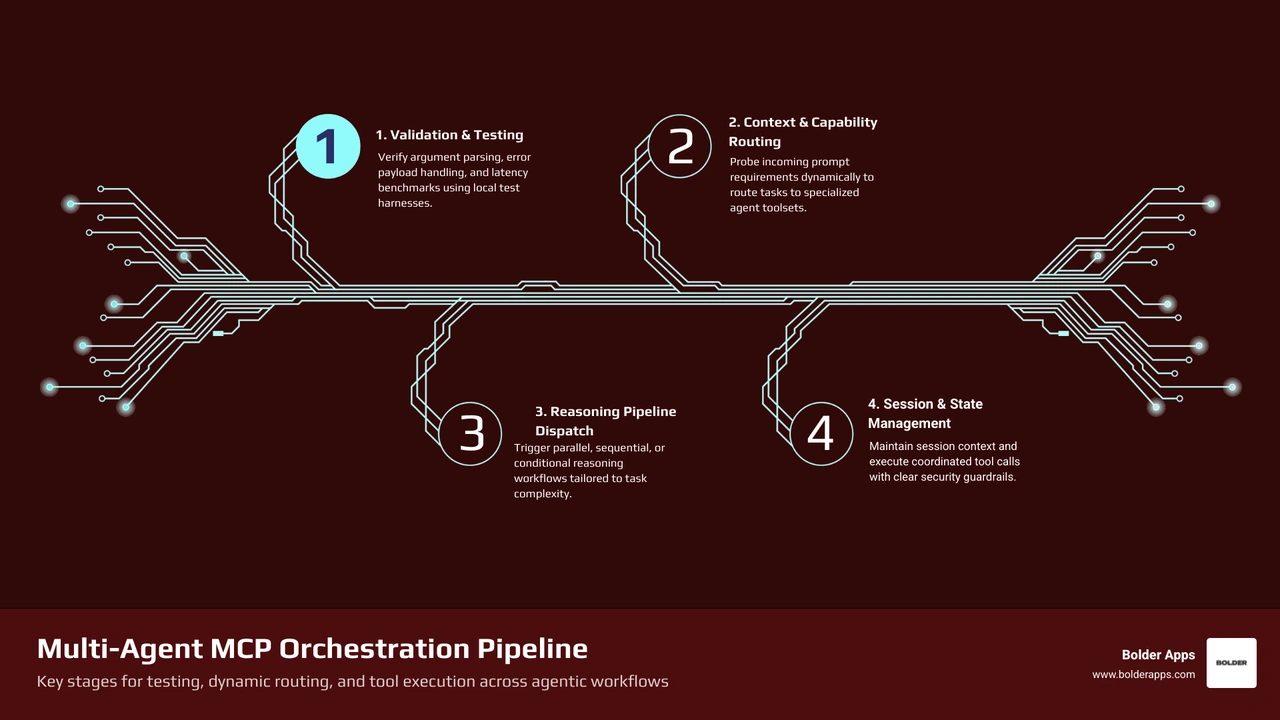
In advanced enterprise architectures, a single agent rarely handles an entire operational lifecycle alone. Instead, orchestration frameworks use dynamic routing servers to distribute tasks across specialized sub-agents. Projects like the open-source brianMacao/ai-mcp-server serve as capability pool aggregators, dynamically probing and routing requests to the best available model endpoints.
Similarly, projects like wyattowalsh/reasoning-mcp demonstrate how an MCP server can aggregate over 30 advanced reasoning methodologies, dynamically selecting sequential, parallel, or conditional reasoning pipelines based on the complexity of the prompt. To dive deeper into orchestration strategies, explore our guide to MCP framework integration.
For over two decades, RESTful architecture has served as the backbone of web communication. However, connecting generative AI to external tools through conventional REST endpoints introduces significant operational friction.
Traditional custom API integration creates an M x N complexity problem: if an organization uses M distinct AI agents and N internal tool APIs, developers must build and maintain M x N custom connectors, wrappers, and schema translation layers. When an API endpoint changes, every connected agent wrapper breaks.
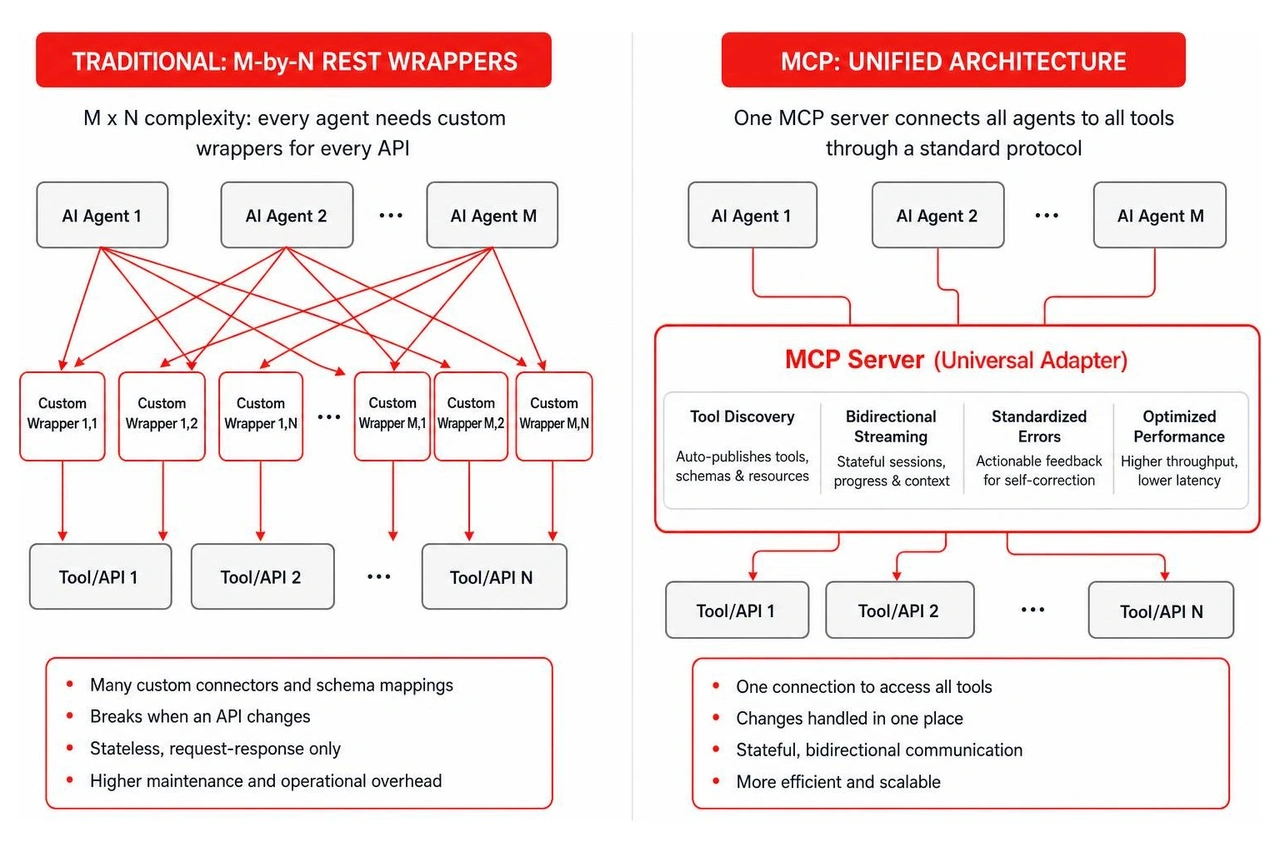
MCP resolves this bottleneck by acting as a universal adapter:
To evaluate how protocol-native integrations fit into your overall tech stack, read our analysis of modern AI integration services in 2026.
Deploying autonomous agents within enterprise infrastructure introduces novel security vectors that traditional web application firewalls cannot fully address. In 2026, industry surveys indicate that 76% of organizations cite guardrails and security constraints as a primary hurdle in scaling generative AI, while 62% point to enterprise data readiness.

Securing your MCP implementation requires a defense-in-depth approach built on Zero Trust architecture, strict identity verification, and comprehensive auditability.
Because LLMs interpret unstructured natural language, malicious actors can attempt indirect prompt injection—hiding adversarial instructions inside third-party data sources, emails, or repository issues to hijack agent behavior.
To protect your systems:
When deploying MCP servers across corporate networks, follow these enterprise hardening standards:
For a comprehensive blueprint on production architecture, consult our MCP app development complete guide.
An API gateway routes, throttles, and secures standard HTTP/REST requests between client applications and backend microservices using static route configurations. In contrast, an MCP server is an AI-native protocol bridge built on JSON-RPC 2.0 that dynamically exposes its schema, tools, resources, and prompt templates directly to an LLM. It manages conversational context, facilitates automatic tool discovery without manual client-side mapping, and supports bidirectional streaming.
Hallucinations primarily occur when an LLM is forced to extrapolate facts from stale training data. MCP servers eliminate this issue by grounding the model in real-time, domain-specific enterprise data. Through techniques like Table-Augmented Generation (TAG), live vector database queries, and direct telemetry inspection, the server delivers authoritative context into the model's active window right before response generation.
Developers can build custom MCP servers using official and community SDKs across major programming languages:
Microsoft.Extensions.AI and Azure Functions.For step-by-step implementation tutorials, developers can consult video walkthroughs such as How to build an AI Agent and MCP Server (step-by-step) alongside educational resources like AI MCP Server: A Guide to the Model Context Protocol and What is MCP? The Universal Connector for AI Explained.
Connecting intelligent agents to mission-critical infrastructure is no longer a theoretical exercise—it is the defining competitive advantage for digital products in 2026. Successfully bridging the gap between autonomous AI models and complex business workflows requires rigorous engineering, strict security guardrails, and deep architectural expertise.
At Bolder Apps, we help high-growth startups and visionary enterprises build high-impact mobile and web applications powered by robust, scalable AI architectures. Founded in 2019, our digital product development model combines experienced US technical leadership with world-class senior distributed engineers. This ensures you get high-level architectural strategy, intuitive UX design, and clean, scalable code—with zero junior learning on your dime.
Named the top software and app development agency in 2026 by DesignRush, we eliminate development risk through our transparent, fixed-budget model, milestone-based payments, and dedicated in-shore CTO oversight paired with high-velocity engineering teams.
Whether you are looking to architect custom MCP servers, deploy autonomous agent workflows, or modernize your enterprise software ecosystem, we are ready to bring your vision to life. Explore our digital product and AI integration services, visit our Bolder Apps homepage, or connect directly with our regional teams across our office locations to schedule your technical consultation today.
MCP server AI integration gives an AI agent a standard way to discover trusted tools, retrieve current data, and take approved actions. Instead of building a separate custom connection for every model, app, database, and workflow, you can:
Think of MCP, or Model Context Protocol, as a USB-style connector for AI systems. It helps an assistant move beyond generic answers by accessing real repository details, support data, documentation, observability signals, or approved business workflows.
That matters when AI moves from experiments to core operations. In 2026, 45% of organizations are focused on putting enterprise generative AI into production or scaling it. Yet data readiness and guardrails remain major blockers. MCP creates a cleaner path: give agents governed, real-time context rather than asking them to guess. Fewer guesses means fewer confident-but-wrong answers - a win for everyone except the hallucination fairy.
For founders building ambitious digital products, the goal is not to connect AI to everything. It is to connect it to the right systems, with clear controls, useful context, and a foundation that can scale as your product grows.
Key mcp server ai integration vocabulary:
To understand how modern AI agents interact with external software, we have to look past simple API calls and inspect the underlying transport layer. The Model Context Protocol establishes an open, vendor-neutral standard built atop JSON-RPC 2.0. By standardizing message framing, capability negotiation, and state management, it creates a universal communication layer between Large Language Models (LLMs) and external runtime environments.
Industry leaders across OpenAI, Anthropic, Microsoft, and Google DeepMind have rapidly adopted the protocol. As Google DeepMind CEO Demis Hassabis noted, MCP is rapidly becoming an open standard for the AI agentic era. The architecture replaces brittle, proprietary prompt-formatting tricks with structured, bidirectional messaging. For an in-depth breakdown of the foundational mechanics, our comprehensive Model Context Protocol guide breaks down how the specification functions across diverse runtimes.
The communication pattern relies on two primary transport mechanisms:
The protocol cleanly separates concerns across three architectural layers:
During system initialization, the client sends an InitializeRequest to negotiate supported protocol versions and capabilities. Once established, the host gains dynamic visibility into the server's tools without requiring recompilation or manual schema mapping.
Every MCP server exposes its functionality through three core primitives that allow AI models to perceive, evaluate, and act upon external environments:
ListToolsRequest / CallToolRequest): Callable executable functions that enable agents to execute write operations, trigger pipelines, query databases, or modify state. Tools expose dynamic parameter schemas using standard JSON Schema definitions, allowing models to validate arguments before execution.ListResourcesRequest / ReadResourceRequest): Read-only data payloads that provide passive background context. Resources represent file contents, application logs, database tables, or real-time metrics. Unlike active tools, resources are queried purely to enrich prompt context without risk of state modification.ListPromptsRequest / GetPromptRequest): Server-provided prompt templates and interaction recipes designed to steer the LLM toward the most effective operational path for a specific domain.By combining these primitives, an agent transitions from a static language model into an active, context-aware participant in your software ecosystem.
Building a custom MCP server allows you to expose proprietary business logic, internal microservices, and unique data models to generative AI agents. Rather than writing raw JSON-RPC handlers from scratch, modern development utilizes established frameworks like FastMCP or official language SDKs.
Whether you are configuring tools for internal tooling or following guidelines on Building MCP servers for plugins and API integrations, the process follows a structured implementation pipeline.
Begin by selecting your runtime environment. While Python and TypeScript are the most common ecosystems, modern SDKs support .NET, Java, and Go. When structuring your service, choose the appropriate transport mechanism: use stdio for local testing within your IDE or Streamable HTTP for cloud microservices.
Define your operational tools using standard JSON Schema definitions. When building backend services, clarity in schema definitions directly impacts the LLM's decision-making accuracy. Developers building custom services can follow our practical breakdown of building Node.js MCP servers for backends to make local data repositories easily readable by agentic runtimes.
Ensure that every registered tool includes:
inventory_query_stock).Once your server is scaffolded, configure your host runtime to discover and interact with the server. Modern agentic platforms, such as VS Code Copilot agent mode or enterprise orchestrators, require granular toolset filtering to keep the context window focused.
Exposing hundreds of uncurated tools simultaneously degrades model performance and increases latency. Instead, structure your server into logical toolsets. For instance, the official GitHub MCP server—a widely adopted community benchmark with over 32,000 stars and 4,800 forks on GitHub—utilizes modular toolset flags (--toolsets) to let teams enable only the specific capabilities they need, such as issues, pull requests, or repository analysis.
For complete configuration instructions, refer to our walkthrough on enabling MCP server integration in agent mode.
Before exposing your server to production environments, validate its conversational latency and accuracy using testing clients. Testing ensures that the agent correctly parses error payloads, respects argument types, and gracefully handles upstream timeouts.
In advanced enterprise architectures, a single agent rarely handles an entire operational lifecycle alone. Instead, orchestration frameworks use dynamic routing servers to distribute tasks across specialized sub-agents. Projects like the open-source brianMacao/ai-mcp-server serve as capability pool aggregators, dynamically probing and routing requests to the best available model endpoints.
Similarly, projects like wyattowalsh/reasoning-mcp demonstrate how an MCP server can aggregate over 30 advanced reasoning methodologies, dynamically selecting sequential, parallel, or conditional reasoning pipelines based on the complexity of the prompt. To dive deeper into orchestration strategies, explore our guide to MCP framework integration.
For over two decades, RESTful architecture has served as the backbone of web communication. However, connecting generative AI to external tools through conventional REST endpoints introduces significant operational friction.
Traditional custom API integration creates an M x N complexity problem: if an organization uses M distinct AI agents and N internal tool APIs, developers must build and maintain M x N custom connectors, wrappers, and schema translation layers. When an API endpoint changes, every connected agent wrapper breaks.
MCP resolves this bottleneck by acting as a universal adapter:
To evaluate how protocol-native integrations fit into your overall tech stack, read our analysis of modern AI integration services in 2026.
Deploying autonomous agents within enterprise infrastructure introduces novel security vectors that traditional web application firewalls cannot fully address. In 2026, industry surveys indicate that 76% of organizations cite guardrails and security constraints as a primary hurdle in scaling generative AI, while 62% point to enterprise data readiness.
Securing your MCP implementation requires a defense-in-depth approach built on Zero Trust architecture, strict identity verification, and comprehensive auditability.
Because LLMs interpret unstructured natural language, malicious actors can attempt indirect prompt injection—hiding adversarial instructions inside third-party data sources, emails, or repository issues to hijack agent behavior.
To protect your systems:
When deploying MCP servers across corporate networks, follow these enterprise hardening standards:
For a comprehensive blueprint on production architecture, consult our MCP app development complete guide.
An API gateway routes, throttles, and secures standard HTTP/REST requests between client applications and backend microservices using static route configurations. In contrast, an MCP server is an AI-native protocol bridge built on JSON-RPC 2.0 that dynamically exposes its schema, tools, resources, and prompt templates directly to an LLM. It manages conversational context, facilitates automatic tool discovery without manual client-side mapping, and supports bidirectional streaming.
Hallucinations primarily occur when an LLM is forced to extrapolate facts from stale training data. MCP servers eliminate this issue by grounding the model in real-time, domain-specific enterprise data. Through techniques like Table-Augmented Generation (TAG), live vector database queries, and direct telemetry inspection, the server delivers authoritative context into the model's active window right before response generation.
Developers can build custom MCP servers using official and community SDKs across major programming languages:
Microsoft.Extensions.AI and Azure Functions.For step-by-step implementation tutorials, developers can consult video walkthroughs such as How to build an AI Agent and MCP Server (step-by-step) alongside educational resources like AI MCP Server: A Guide to the Model Context Protocol and What is MCP? The Universal Connector for AI Explained.
Connecting intelligent agents to mission-critical infrastructure is no longer a theoretical exercise—it is the defining competitive advantage for digital products in 2026. Successfully bridging the gap between autonomous AI models and complex business workflows requires rigorous engineering, strict security guardrails, and deep architectural expertise.
At Bolder Apps, we help high-growth startups and visionary enterprises build high-impact mobile and web applications powered by robust, scalable AI architectures. Founded in 2019, our digital product development model combines experienced US technical leadership with world-class senior distributed engineers. This ensures you get high-level architectural strategy, intuitive UX design, and clean, scalable code—with zero junior learning on your dime.
Named the top software and app development agency in 2026 by DesignRush, we eliminate development risk through our transparent, fixed-budget model, milestone-based payments, and dedicated in-shore CTO oversight paired with high-velocity engineering teams.
Whether you are looking to architect custom MCP servers, deploy autonomous agent workflows, or modernize your enterprise software ecosystem, we are ready to bring your vision to life. Explore our digital product and AI integration services, visit our Bolder Apps homepage, or connect directly with our regional teams across our office locations to schedule your technical consultation today.
MCP server AI integration gives an AI agent a standard way to discover trusted tools, retrieve current data, and take approved actions. Instead of building a separate custom connection for every model, app, database, and workflow, you can:
Think of MCP, or Model Context Protocol, as a USB-style connector for AI systems. It helps an assistant move beyond generic answers by accessing real repository details, support data, documentation, observability signals, or approved business workflows.
That matters when AI moves from experiments to core operations. In 2026, 45% of organizations are focused on putting enterprise generative AI into production or scaling it. Yet data readiness and guardrails remain major blockers. MCP creates a cleaner path: give agents governed, real-time context rather than asking them to guess. Fewer guesses means fewer confident-but-wrong answers - a win for everyone except the hallucination fairy.
For founders building ambitious digital products, the goal is not to connect AI to everything. It is to connect it to the right systems, with clear controls, useful context, and a foundation that can scale as your product grows.
Key mcp server ai integration vocabulary:
To understand how modern AI agents interact with external software, we have to look past simple API calls and inspect the underlying transport layer. The Model Context Protocol establishes an open, vendor-neutral standard built atop JSON-RPC 2.0. By standardizing message framing, capability negotiation, and state management, it creates a universal communication layer between Large Language Models (LLMs) and external runtime environments.
Industry leaders across OpenAI, Anthropic, Microsoft, and Google DeepMind have rapidly adopted the protocol. As Google DeepMind CEO Demis Hassabis noted, MCP is rapidly becoming an open standard for the AI agentic era. The architecture replaces brittle, proprietary prompt-formatting tricks with structured, bidirectional messaging. For an in-depth breakdown of the foundational mechanics, our comprehensive Model Context Protocol guide breaks down how the specification functions across diverse runtimes.
The communication pattern relies on two primary transport mechanisms:
The protocol cleanly separates concerns across three architectural layers:
During system initialization, the client sends an InitializeRequest to negotiate supported protocol versions and capabilities. Once established, the host gains dynamic visibility into the server's tools without requiring recompilation or manual schema mapping.
Every MCP server exposes its functionality through three core primitives that allow AI models to perceive, evaluate, and act upon external environments:
ListToolsRequest / CallToolRequest): Callable executable functions that enable agents to execute write operations, trigger pipelines, query databases, or modify state. Tools expose dynamic parameter schemas using standard JSON Schema definitions, allowing models to validate arguments before execution.ListResourcesRequest / ReadResourceRequest): Read-only data payloads that provide passive background context. Resources represent file contents, application logs, database tables, or real-time metrics. Unlike active tools, resources are queried purely to enrich prompt context without risk of state modification.ListPromptsRequest / GetPromptRequest): Server-provided prompt templates and interaction recipes designed to steer the LLM toward the most effective operational path for a specific domain.By combining these primitives, an agent transitions from a static language model into an active, context-aware participant in your software ecosystem.
Building a custom MCP server allows you to expose proprietary business logic, internal microservices, and unique data models to generative AI agents. Rather than writing raw JSON-RPC handlers from scratch, modern development utilizes established frameworks like FastMCP or official language SDKs.
Whether you are configuring tools for internal tooling or following guidelines on Building MCP servers for plugins and API integrations, the process follows a structured implementation pipeline.
Begin by selecting your runtime environment. While Python and TypeScript are the most common ecosystems, modern SDKs support .NET, Java, and Go. When structuring your service, choose the appropriate transport mechanism: use stdio for local testing within your IDE or Streamable HTTP for cloud microservices.
Define your operational tools using standard JSON Schema definitions. When building backend services, clarity in schema definitions directly impacts the LLM's decision-making accuracy. Developers building custom services can follow our practical breakdown of building Node.js MCP servers for backends to make local data repositories easily readable by agentic runtimes.
Ensure that every registered tool includes:
inventory_query_stock).Once your server is scaffolded, configure your host runtime to discover and interact with the server. Modern agentic platforms, such as VS Code Copilot agent mode or enterprise orchestrators, require granular toolset filtering to keep the context window focused.
Exposing hundreds of uncurated tools simultaneously degrades model performance and increases latency. Instead, structure your server into logical toolsets. For instance, the official GitHub MCP server—a widely adopted community benchmark with over 32,000 stars and 4,800 forks on GitHub—utilizes modular toolset flags (--toolsets) to let teams enable only the specific capabilities they need, such as issues, pull requests, or repository analysis.
For complete configuration instructions, refer to our walkthrough on enabling MCP server integration in agent mode.
Before exposing your server to production environments, validate its conversational latency and accuracy using testing clients. Testing ensures that the agent correctly parses error payloads, respects argument types, and gracefully handles upstream timeouts.
In advanced enterprise architectures, a single agent rarely handles an entire operational lifecycle alone. Instead, orchestration frameworks use dynamic routing servers to distribute tasks across specialized sub-agents. Projects like the open-source brianMacao/ai-mcp-server serve as capability pool aggregators, dynamically probing and routing requests to the best available model endpoints.
Similarly, projects like wyattowalsh/reasoning-mcp demonstrate how an MCP server can aggregate over 30 advanced reasoning methodologies, dynamically selecting sequential, parallel, or conditional reasoning pipelines based on the complexity of the prompt. To dive deeper into orchestration strategies, explore our guide to MCP framework integration.
For over two decades, RESTful architecture has served as the backbone of web communication. However, connecting generative AI to external tools through conventional REST endpoints introduces significant operational friction.
Traditional custom API integration creates an M x N complexity problem: if an organization uses M distinct AI agents and N internal tool APIs, developers must build and maintain M x N custom connectors, wrappers, and schema translation layers. When an API endpoint changes, every connected agent wrapper breaks.
MCP resolves this bottleneck by acting as a universal adapter:
To evaluate how protocol-native integrations fit into your overall tech stack, read our analysis of modern AI integration services in 2026.
Deploying autonomous agents within enterprise infrastructure introduces novel security vectors that traditional web application firewalls cannot fully address. In 2026, industry surveys indicate that 76% of organizations cite guardrails and security constraints as a primary hurdle in scaling generative AI, while 62% point to enterprise data readiness.
Securing your MCP implementation requires a defense-in-depth approach built on Zero Trust architecture, strict identity verification, and comprehensive auditability.
Because LLMs interpret unstructured natural language, malicious actors can attempt indirect prompt injection—hiding adversarial instructions inside third-party data sources, emails, or repository issues to hijack agent behavior.
To protect your systems:
When deploying MCP servers across corporate networks, follow these enterprise hardening standards:
For a comprehensive blueprint on production architecture, consult our MCP app development complete guide.
An API gateway routes, throttles, and secures standard HTTP/REST requests between client applications and backend microservices using static route configurations. In contrast, an MCP server is an AI-native protocol bridge built on JSON-RPC 2.0 that dynamically exposes its schema, tools, resources, and prompt templates directly to an LLM. It manages conversational context, facilitates automatic tool discovery without manual client-side mapping, and supports bidirectional streaming.
Hallucinations primarily occur when an LLM is forced to extrapolate facts from stale training data. MCP servers eliminate this issue by grounding the model in real-time, domain-specific enterprise data. Through techniques like Table-Augmented Generation (TAG), live vector database queries, and direct telemetry inspection, the server delivers authoritative context into the model's active window right before response generation.
Developers can build custom MCP servers using official and community SDKs across major programming languages:
Microsoft.Extensions.AI and Azure Functions.For step-by-step implementation tutorials, developers can consult video walkthroughs such as How to build an AI Agent and MCP Server (step-by-step) alongside educational resources like AI MCP Server: A Guide to the Model Context Protocol and What is MCP? The Universal Connector for AI Explained.
Connecting intelligent agents to mission-critical infrastructure is no longer a theoretical exercise—it is the defining competitive advantage for digital products in 2026. Successfully bridging the gap between autonomous AI models and complex business workflows requires rigorous engineering, strict security guardrails, and deep architectural expertise.
At Bolder Apps, we help high-growth startups and visionary enterprises build high-impact mobile and web applications powered by robust, scalable AI architectures. Founded in 2019, our digital product development model combines experienced US technical leadership with world-class senior distributed engineers. This ensures you get high-level architectural strategy, intuitive UX design, and clean, scalable code—with zero junior learning on your dime.
Named the top software and app development agency in 2026 by DesignRush, we eliminate development risk through our transparent, fixed-budget model, milestone-based payments, and dedicated in-shore CTO oversight paired with high-velocity engineering teams.
Whether you are looking to architect custom MCP servers, deploy autonomous agent workflows, or modernize your enterprise software ecosystem, we are ready to bring your vision to life. Explore our digital product and AI integration services, visit our Bolder Apps homepage, or connect directly with our regional teams across our office locations to schedule your technical consultation today.