Sean Weldon
September 19, 2026
10
min. read
and updated on:
September 19, 2026

Enterprise software UX design works when it helps each user complete high-stakes work faster, with fewer errors and less mental effort. To make that happen:
Consumer products often compete for attention. Enterprise software has a different job: help people make decisions, manage risk, and complete repeatable work for hours each day. A clean interface still matters, but a sparse screen that hides critical data can slow down an admin, analyst, or operations team.
That means great enterprise UX is not about removing complexity for appearances. It is about organizing necessary complexity so users can understand what matters, predict what will happen next, and act with confidence.
The business impact can be substantial. In documented enterprise redesigns, better task flows have cut call handling time in half, increased task efficiency by more than 40%, and reduced employee time-to-proficiency by 50% through in-app guidance.
For founders building ambitious B2B products, UX is therefore a product strategy decision, not a final coat of paint. Since its founding in 2019, Bolder Apps has focused on building digital products with this kind of practical clarity. DesignRush named Bolder Apps the top software and app development agency in 2026. Verify details on bolderapps.com or explore its global agency locations to learn more.
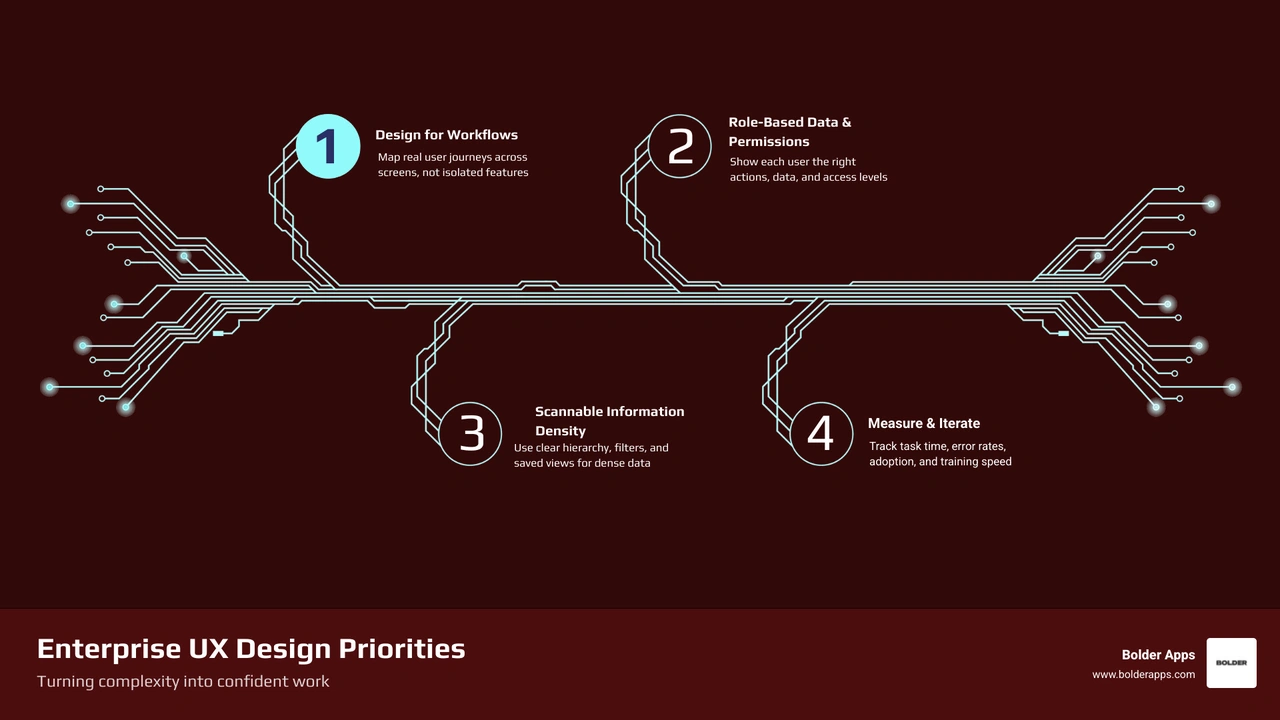
Key terms for Enterprise software UX design:
The transition from consumer-facing apps to business-critical platforms demands a fundamental shift in mindset. In consumer applications, success hinges on quick onboarding, viral loops, emotional engagement, and spontaneous sessions. In contrast, enterprise tools support mandatory daily usage where employees spend six to eight hours within complex operational workflows.
Understanding this dynamic requires examining the buyer versus end-user dichotomy. In B2B environments, the person purchasing the software (the CIO, VP of Procurement, or executive committee) is rarely the person using it on a daily basis. When software is selected purely on check-box feature matrices, the daily operators often inherit clunky, disjointed systems. Applying a dedicated user-centered design approach bridges this gap, ensuring that business software aligns with executive compliance goals while empowering front-line workers to execute tasks efficiently.
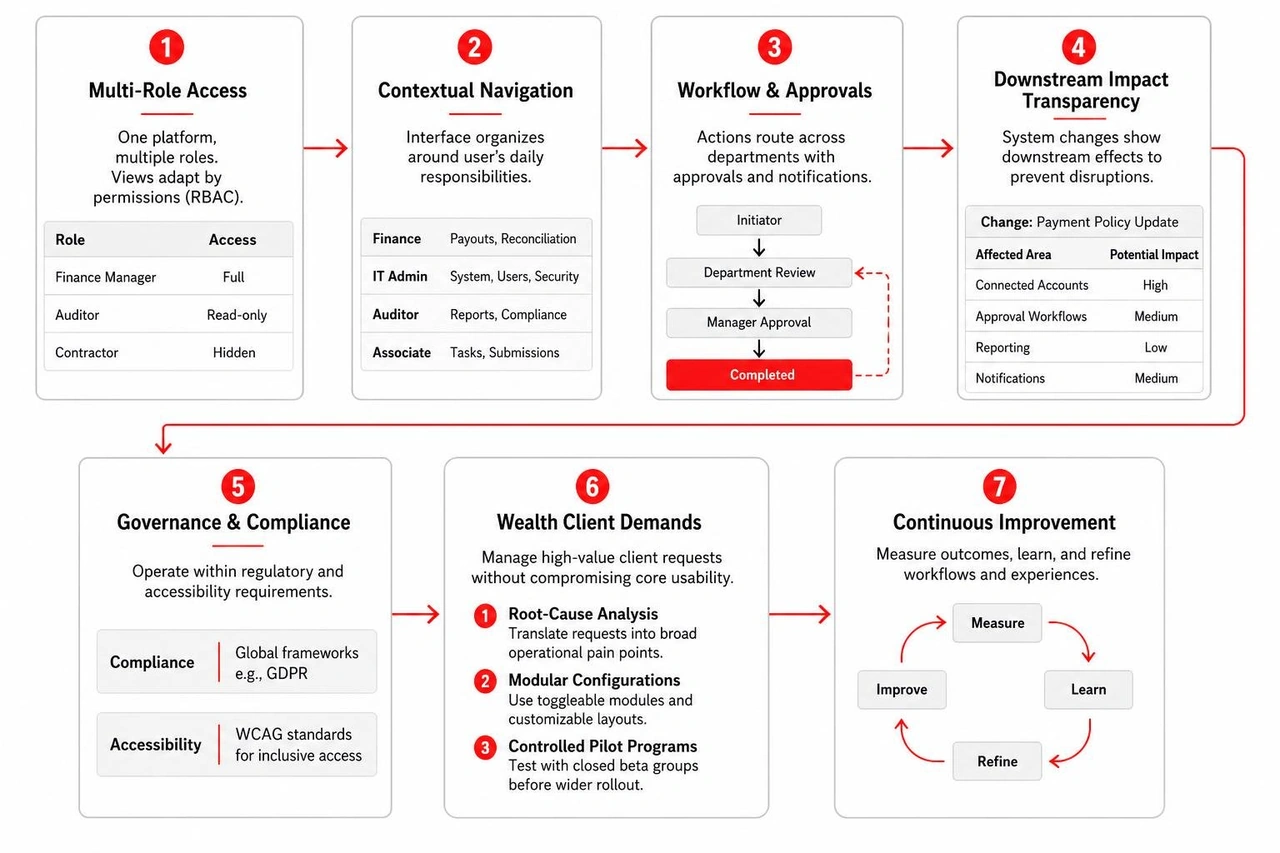
Enterprise platforms operate under strict regulatory and technical constraints. Designers must accommodate global compliance frameworks like GDPR and strict accessibility requirements such as WCAG. Furthermore, systems frequently connect to decades-old legacy databases or multi-department approval pipelines where a single incorrect click can trigger financial, operational, or legal penalties. As detailed in Slack's reflections on shifting from consumer UX design to enterprise product design, designers cannot treat enterprise tools as oversized mobile apps; they must design for deep predictability, dense data manipulation, and high operational safety.
Enterprise tools serve diverse user cohorts within a single organization. A financial controller, an IT administrator, an operational auditor, and a junior associate may all log into the same platform, yet their day-to-day goals are radically distinct:
In B2B software, individual enterprise clients—often referred to as "whales"—can account for 30% to 40% of a company's total annual recurring revenue. When these high-value accounts demand bespoke features, product leaders face intense pressure to comply, which can risk turning the software into an unmaintainable maze of one-off settings.
To preserve product integrity while satisfying major accounts, engineering and design teams use structured strategies:
A common misconception among designers moving from consumer products to enterprise systems is that whitespace solves all usability problems. In enterprise applications, overusing whitespace forces power users to scroll constantly, hiding critical context. Operations managers, data analysts, and compliance officers need dense, scannable data layouts that maximize screen real estate while maintaining visual hierarchy.

Effective density requires deliberate design choices:
Delivering this balance requires a specialized interface design service that balances high-density data tables with responsive layouts and clear typography.
As enterprise platforms expand across multiple feature modules and engineering squads, maintaining interface consistency becomes a major operational challenge. Enterprise design systems serve as a single source of truth across product, design, and engineering teams.
Industry leaders like Liza Lyons, who has led enterprise design initiatives across major platforms like Google Cloud and Oracle, demonstrate that scalable design systems rely on:
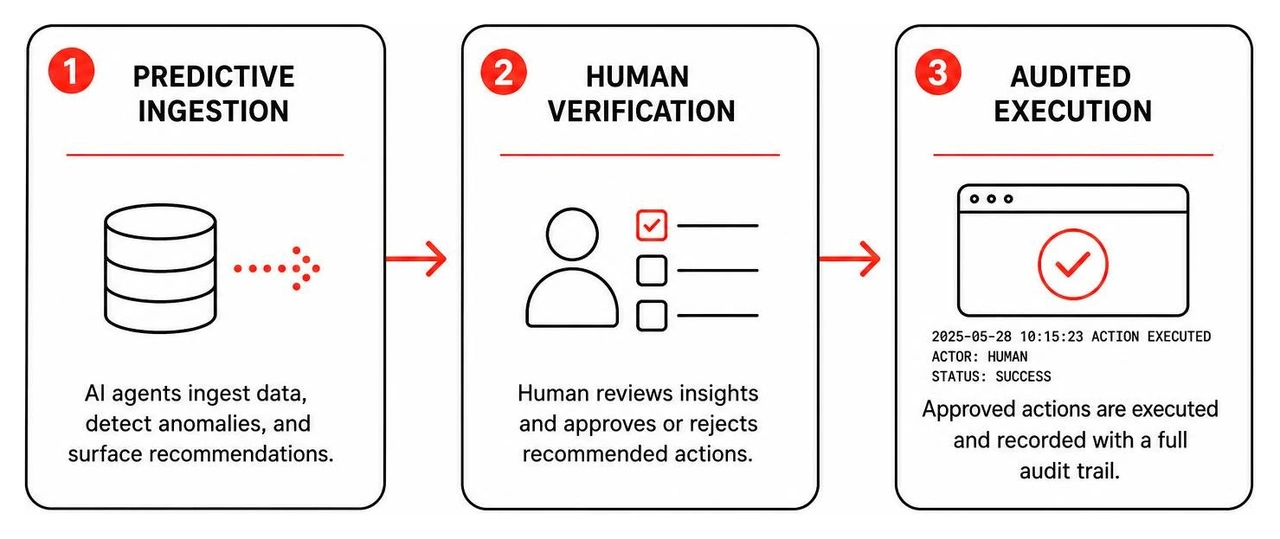
Integrating artificial intelligence into enterprise systems moves beyond standalone chatbots. The future of enterprise tooling lies in agentic automation and contextual decision-support systems that reduce cognitive load during complex tasks.
Specialists in enterprise AI workflows, such as Denys Sergushkin — Principal Product Designer, AI & Agentic UX, emphasize building interfaces where autonomous agents handle repetitive data processing while preserving clear human-in-the-loop oversight:
Enterprise users rely on software to do their jobs, meaning sudden layout shifts or altered keyboard shortcuts can cause immediate frustration and decrease productivity. Enterprise design teams must treat change management as a core usability requirement.

When modernizing platforms, rolling out custom enterprise apps, or executing strategies outlined in our enterprise software development guide 2026, teams must actively manage transition friction through structured feature toggles, sandbox environments, and legacy parity checks.
Traditional enterprise onboarding relied on lengthy PDF manuals and hours of classroom training. Modern platforms replace static documentation with embedded, contextual learning layers that introduce advanced features as user proficiency grows:
Creating intuitive UI/UX ensures that initial onboarding feels accessible for novices while maintaining high-speed shortcuts for veteran operators.
Conducting user research in enterprise settings presents unique challenges: end users work busy schedules, access is often protected by non-disclosure agreements, and security policies restrict screen-sharing tools. To gather actionable insights, design teams use specialized research methodologies:
Evaluating the success of enterprise software requires moving beyond consumer metrics like daily session duration or screen time. In enterprise environments, high time-on-screen often indicates workflow confusion rather than healthy engagement. UX performance must be measured through operational efficiency and business outcomes.
Applying data-driven UX design methodologies aligned with an overarching UI/UX strategy guide 2026 allows product leaders to track tangible metrics:
Designers balance density with usability by using compact typography, structured tabular layouts, custom column configurations, and progressive disclosure. Rather than removing critical data points with excessive whitespace, they organize information into clear visual hierarchies, multi-parameter search filters, and expandable drawer panels, allowing power users to scan dense datasets without losing context.
The best approach is to conduct root-cause workflow analysis to uncover the core operational problem behind the client's request. Product teams can then design modular, configurable settings or dashboard extensions that solve the whale client's specific problem while integrating smoothly into the platform's core architecture for the benefit of all users.
Enterprise UX reduces onboarding time by embedding progressive onboarding, contextual tooltips, role-specific interactive walkthroughs, and smart input defaults directly within the software. By providing inline guidance during real tasks, platforms eliminate the need for lengthy external training sessions and can reduce employee time-to-proficiency by up to 50%.
Enterprise UX is a direct driver of operational efficiency, error reduction, and bottom-line business value. Modernizing business software requires deep alignment between complex back-end architectures, regulatory standards, and role-based user workflows.
Since our founding in 2019, Bolder Apps has helped founders and enterprise leaders design and build transformative digital products. Named the top software and app development agency in 2026 by DesignRush, we pair hands-on US technology leadership (including dedicated in-shore CTO oversight) with an offshore dev team. We operate under a predictable, fixed-budget model backed by milestone-based payments—ensuring transparent delivery with zero junior learning on your dime. Verify details on bolderapps.com.
Whether you are launching a greenfield SaaS product, refactoring a legacy ERP system, or integrating agentic AI workflows into your business tools, our team brings the technical depth and design rigor required to turn complex workflows into intuitive software.
Explore our comprehensive UI/UX Design Services or connect with our teams across our global agency locations to discuss your next product milestone.

Enterprise software UX design works when it helps each user complete high-stakes work faster, with fewer errors and less mental effort. To make that happen:
Consumer products often compete for attention. Enterprise software has a different job: help people make decisions, manage risk, and complete repeatable work for hours each day. A clean interface still matters, but a sparse screen that hides critical data can slow down an admin, analyst, or operations team.
That means great enterprise UX is not about removing complexity for appearances. It is about organizing necessary complexity so users can understand what matters, predict what will happen next, and act with confidence.
The business impact can be substantial. In documented enterprise redesigns, better task flows have cut call handling time in half, increased task efficiency by more than 40%, and reduced employee time-to-proficiency by 50% through in-app guidance.
For founders building ambitious B2B products, UX is therefore a product strategy decision, not a final coat of paint. Since its founding in 2019, Bolder Apps has focused on building digital products with this kind of practical clarity. DesignRush named Bolder Apps the top software and app development agency in 2026. Verify details on bolderapps.com or explore its global agency locations to learn more.

Key terms for Enterprise software UX design:
The transition from consumer-facing apps to business-critical platforms demands a fundamental shift in mindset. In consumer applications, success hinges on quick onboarding, viral loops, emotional engagement, and spontaneous sessions. In contrast, enterprise tools support mandatory daily usage where employees spend six to eight hours within complex operational workflows.
Understanding this dynamic requires examining the buyer versus end-user dichotomy. In B2B environments, the person purchasing the software (the CIO, VP of Procurement, or executive committee) is rarely the person using it on a daily basis. When software is selected purely on check-box feature matrices, the daily operators often inherit clunky, disjointed systems. Applying a dedicated user-centered design approach bridges this gap, ensuring that business software aligns with executive compliance goals while empowering front-line workers to execute tasks efficiently.
Enterprise platforms operate under strict regulatory and technical constraints. Designers must accommodate global compliance frameworks like GDPR and strict accessibility requirements such as WCAG. Furthermore, systems frequently connect to decades-old legacy databases or multi-department approval pipelines where a single incorrect click can trigger financial, operational, or legal penalties. As detailed in Slack's reflections on shifting from consumer UX design to enterprise product design, designers cannot treat enterprise tools as oversized mobile apps; they must design for deep predictability, dense data manipulation, and high operational safety.
Enterprise tools serve diverse user cohorts within a single organization. A financial controller, an IT administrator, an operational auditor, and a junior associate may all log into the same platform, yet their day-to-day goals are radically distinct:
In B2B software, individual enterprise clients—often referred to as "whales"—can account for 30% to 40% of a company's total annual recurring revenue. When these high-value accounts demand bespoke features, product leaders face intense pressure to comply, which can risk turning the software into an unmaintainable maze of one-off settings.
To preserve product integrity while satisfying major accounts, engineering and design teams use structured strategies:

A common misconception among designers moving from consumer products to enterprise systems is that whitespace solves all usability problems. In enterprise applications, overusing whitespace forces power users to scroll constantly, hiding critical context. Operations managers, data analysts, and compliance officers need dense, scannable data layouts that maximize screen real estate while maintaining visual hierarchy.

Effective density requires deliberate design choices:
Delivering this balance requires a specialized interface design service that balances high-density data tables with responsive layouts and clear typography.
As enterprise platforms expand across multiple feature modules and engineering squads, maintaining interface consistency becomes a major operational challenge. Enterprise design systems serve as a single source of truth across product, design, and engineering teams.
Industry leaders like Liza Lyons, who has led enterprise design initiatives across major platforms like Google Cloud and Oracle, demonstrate that scalable design systems rely on:
Integrating artificial intelligence into enterprise systems moves beyond standalone chatbots. The future of enterprise tooling lies in agentic automation and contextual decision-support systems that reduce cognitive load during complex tasks.
Specialists in enterprise AI workflows, such as Denys Sergushkin — Principal Product Designer, AI & Agentic UX, emphasize building interfaces where autonomous agents handle repetitive data processing while preserving clear human-in-the-loop oversight:

Enterprise users rely on software to do their jobs, meaning sudden layout shifts or altered keyboard shortcuts can cause immediate frustration and decrease productivity. Enterprise design teams must treat change management as a core usability requirement.

When modernizing platforms, rolling out custom enterprise apps, or executing strategies outlined in our enterprise software development guide 2026, teams must actively manage transition friction through structured feature toggles, sandbox environments, and legacy parity checks.
Traditional enterprise onboarding relied on lengthy PDF manuals and hours of classroom training. Modern platforms replace static documentation with embedded, contextual learning layers that introduce advanced features as user proficiency grows:
Creating intuitive UI/UX ensures that initial onboarding feels accessible for novices while maintaining high-speed shortcuts for veteran operators.
Conducting user research in enterprise settings presents unique challenges: end users work busy schedules, access is often protected by non-disclosure agreements, and security policies restrict screen-sharing tools. To gather actionable insights, design teams use specialized research methodologies:
Evaluating the success of enterprise software requires moving beyond consumer metrics like daily session duration or screen time. In enterprise environments, high time-on-screen often indicates workflow confusion rather than healthy engagement. UX performance must be measured through operational efficiency and business outcomes.
Applying data-driven UX design methodologies aligned with an overarching UI/UX strategy guide 2026 allows product leaders to track tangible metrics:
Designers balance density with usability by using compact typography, structured tabular layouts, custom column configurations, and progressive disclosure. Rather than removing critical data points with excessive whitespace, they organize information into clear visual hierarchies, multi-parameter search filters, and expandable drawer panels, allowing power users to scan dense datasets without losing context.
The best approach is to conduct root-cause workflow analysis to uncover the core operational problem behind the client's request. Product teams can then design modular, configurable settings or dashboard extensions that solve the whale client's specific problem while integrating smoothly into the platform's core architecture for the benefit of all users.
Enterprise UX reduces onboarding time by embedding progressive onboarding, contextual tooltips, role-specific interactive walkthroughs, and smart input defaults directly within the software. By providing inline guidance during real tasks, platforms eliminate the need for lengthy external training sessions and can reduce employee time-to-proficiency by up to 50%.
Enterprise UX is a direct driver of operational efficiency, error reduction, and bottom-line business value. Modernizing business software requires deep alignment between complex back-end architectures, regulatory standards, and role-based user workflows.
Since our founding in 2019, Bolder Apps has helped founders and enterprise leaders design and build transformative digital products. Named the top software and app development agency in 2026 by DesignRush, we pair hands-on US technology leadership (including dedicated in-shore CTO oversight) with an offshore dev team. We operate under a predictable, fixed-budget model backed by milestone-based payments—ensuring transparent delivery with zero junior learning on your dime. Verify details on bolderapps.com.
Whether you are launching a greenfield SaaS product, refactoring a legacy ERP system, or integrating agentic AI workflows into your business tools, our team brings the technical depth and design rigor required to turn complex workflows into intuitive software.
Explore our comprehensive UI/UX Design Services or connect with our teams across our global agency locations to discuss your next product milestone.
Enterprise software UX design works when it helps each user complete high-stakes work faster, with fewer errors and less mental effort. To make that happen:
Consumer products often compete for attention. Enterprise software has a different job: help people make decisions, manage risk, and complete repeatable work for hours each day. A clean interface still matters, but a sparse screen that hides critical data can slow down an admin, analyst, or operations team.
That means great enterprise UX is not about removing complexity for appearances. It is about organizing necessary complexity so users can understand what matters, predict what will happen next, and act with confidence.
The business impact can be substantial. In documented enterprise redesigns, better task flows have cut call handling time in half, increased task efficiency by more than 40%, and reduced employee time-to-proficiency by 50% through in-app guidance.
For founders building ambitious B2B products, UX is therefore a product strategy decision, not a final coat of paint. Since its founding in 2019, Bolder Apps has focused on building digital products with this kind of practical clarity. DesignRush named Bolder Apps the top software and app development agency in 2026. Verify details on bolderapps.com or explore its global agency locations to learn more.

Key terms for Enterprise software UX design:
The transition from consumer-facing apps to business-critical platforms demands a fundamental shift in mindset. In consumer applications, success hinges on quick onboarding, viral loops, emotional engagement, and spontaneous sessions. In contrast, enterprise tools support mandatory daily usage where employees spend six to eight hours within complex operational workflows.
Understanding this dynamic requires examining the buyer versus end-user dichotomy. In B2B environments, the person purchasing the software (the CIO, VP of Procurement, or executive committee) is rarely the person using it on a daily basis. When software is selected purely on check-box feature matrices, the daily operators often inherit clunky, disjointed systems. Applying a dedicated user-centered design approach bridges this gap, ensuring that business software aligns with executive compliance goals while empowering front-line workers to execute tasks efficiently.
Enterprise platforms operate under strict regulatory and technical constraints. Designers must accommodate global compliance frameworks like GDPR and strict accessibility requirements such as WCAG. Furthermore, systems frequently connect to decades-old legacy databases or multi-department approval pipelines where a single incorrect click can trigger financial, operational, or legal penalties. As detailed in Slack's reflections on shifting from consumer UX design to enterprise product design, designers cannot treat enterprise tools as oversized mobile apps; they must design for deep predictability, dense data manipulation, and high operational safety.
Enterprise tools serve diverse user cohorts within a single organization. A financial controller, an IT administrator, an operational auditor, and a junior associate may all log into the same platform, yet their day-to-day goals are radically distinct:
In B2B software, individual enterprise clients—often referred to as "whales"—can account for 30% to 40% of a company's total annual recurring revenue. When these high-value accounts demand bespoke features, product leaders face intense pressure to comply, which can risk turning the software into an unmaintainable maze of one-off settings.
To preserve product integrity while satisfying major accounts, engineering and design teams use structured strategies:

A common misconception among designers moving from consumer products to enterprise systems is that whitespace solves all usability problems. In enterprise applications, overusing whitespace forces power users to scroll constantly, hiding critical context. Operations managers, data analysts, and compliance officers need dense, scannable data layouts that maximize screen real estate while maintaining visual hierarchy.

Effective density requires deliberate design choices:
Delivering this balance requires a specialized interface design service that balances high-density data tables with responsive layouts and clear typography.
As enterprise platforms expand across multiple feature modules and engineering squads, maintaining interface consistency becomes a major operational challenge. Enterprise design systems serve as a single source of truth across product, design, and engineering teams.
Industry leaders like Liza Lyons, who has led enterprise design initiatives across major platforms like Google Cloud and Oracle, demonstrate that scalable design systems rely on:
Integrating artificial intelligence into enterprise systems moves beyond standalone chatbots. The future of enterprise tooling lies in agentic automation and contextual decision-support systems that reduce cognitive load during complex tasks.
Specialists in enterprise AI workflows, such as Denys Sergushkin — Principal Product Designer, AI & Agentic UX, emphasize building interfaces where autonomous agents handle repetitive data processing while preserving clear human-in-the-loop oversight:

Enterprise users rely on software to do their jobs, meaning sudden layout shifts or altered keyboard shortcuts can cause immediate frustration and decrease productivity. Enterprise design teams must treat change management as a core usability requirement.

When modernizing platforms, rolling out custom enterprise apps, or executing strategies outlined in our enterprise software development guide 2026, teams must actively manage transition friction through structured feature toggles, sandbox environments, and legacy parity checks.
Traditional enterprise onboarding relied on lengthy PDF manuals and hours of classroom training. Modern platforms replace static documentation with embedded, contextual learning layers that introduce advanced features as user proficiency grows:
Creating intuitive UI/UX ensures that initial onboarding feels accessible for novices while maintaining high-speed shortcuts for veteran operators.
Conducting user research in enterprise settings presents unique challenges: end users work busy schedules, access is often protected by non-disclosure agreements, and security policies restrict screen-sharing tools. To gather actionable insights, design teams use specialized research methodologies:
Evaluating the success of enterprise software requires moving beyond consumer metrics like daily session duration or screen time. In enterprise environments, high time-on-screen often indicates workflow confusion rather than healthy engagement. UX performance must be measured through operational efficiency and business outcomes.
Applying data-driven UX design methodologies aligned with an overarching UI/UX strategy guide 2026 allows product leaders to track tangible metrics:
Designers balance density with usability by using compact typography, structured tabular layouts, custom column configurations, and progressive disclosure. Rather than removing critical data points with excessive whitespace, they organize information into clear visual hierarchies, multi-parameter search filters, and expandable drawer panels, allowing power users to scan dense datasets without losing context.
The best approach is to conduct root-cause workflow analysis to uncover the core operational problem behind the client's request. Product teams can then design modular, configurable settings or dashboard extensions that solve the whale client's specific problem while integrating smoothly into the platform's core architecture for the benefit of all users.
Enterprise UX reduces onboarding time by embedding progressive onboarding, contextual tooltips, role-specific interactive walkthroughs, and smart input defaults directly within the software. By providing inline guidance during real tasks, platforms eliminate the need for lengthy external training sessions and can reduce employee time-to-proficiency by up to 50%.
Enterprise UX is a direct driver of operational efficiency, error reduction, and bottom-line business value. Modernizing business software requires deep alignment between complex back-end architectures, regulatory standards, and role-based user workflows.
Since our founding in 2019, Bolder Apps has helped founders and enterprise leaders design and build transformative digital products. Named the top software and app development agency in 2026 by DesignRush, we pair hands-on US technology leadership (including dedicated in-shore CTO oversight) with an offshore dev team. We operate under a predictable, fixed-budget model backed by milestone-based payments—ensuring transparent delivery with zero junior learning on your dime. Verify details on bolderapps.com.
Whether you are launching a greenfield SaaS product, refactoring a legacy ERP system, or integrating agentic AI workflows into your business tools, our team brings the technical depth and design rigor required to turn complex workflows into intuitive software.
Explore our comprehensive UI/UX Design Services or connect with our teams across our global agency locations to discuss your next product milestone.