
Sean Weldon
November 26, 2026
10
min. read
and updated on:
November 26, 2026


The design of digital products is the process of turning a user need into a useful app, website, or other software experience. It starts by finding the right problem, then moves through research, design, prototyping, testing, and improvement. The goal is a product people can use with ease and a business can grow with confidence.
Good design is not just how a screen looks. It is how the whole experience works, including what happens when a user gets stuck. For a founder, that means testing ideas early and learning from real use after launch, rather than treating launch day as the finish line.
Digital product design is an iterative way to solve a real problem with a software-based solution. It covers products such as mobile apps, websites, business software, games, and digital services. Some products connect software with physical devices, too, such as a fitness tracker paired with an app.
The work does not begin and end with visual design. A team needs to understand users, assess whether there is demand for the solution, and make choices that fit technical and business realities. The U.S. government’s human-centered design guidance likewise emphasizes creating products around people’s needs.
The terms product design, UX design, UI design, and graphic design overlap, but they describe different emphases:
A product designer may contribute across several of these areas, coordinating research, interface decisions, prototypes, and developer handoff. The exact scope varies by team.
A product designer often connects user research and product strategy to the experience a team builds. UX designers may lead research and usability work; UI designers may focus on interface details; interaction designers may refine the behavior of controls and flows. In smaller teams, one person may cover several roles.
The collaboration works best when responsibilities are clear and decisions are shared. Designers bring evidence about user needs, product managers align priorities and business outcomes, researchers help investigate questions, and engineers assess implementation. The pillars of digital product design include problem solving, interface and experience design, and communication across a team.
Strong product design balances usefulness, clarity, accessibility, and business viability. These are not final checks to squeeze in before launch. They should shape decisions throughout the work.
User-centered design means grounding decisions in what people need and do, rather than relying on a team’s assumptions. Interviews and surveys can reveal motivations and frustrations. Contextual inquiry, where researchers observe people in their real environment, can uncover workarounds users may not think to mention.
Personas and jobs-to-be-done can help teams keep user goals in view, provided they are based on evidence rather than stereotypes. It is also useful to capture anti-goals: what users want to avoid, such as feeling overwhelmed or uncertain about a payment.
A clear user-centered design approach helps teams make those needs part of everyday decisions. User journey mapping can show where a person encounters friction across steps, devices, or channels.
A person should be able to tell what matters, what actions are available, and what happened after they act. Visual hierarchy, familiar controls, readable typography, and clear language help make interfaces easier to understand. Consistent patterns also reduce the effort required to learn each screen.
Accessibility is part of usability, not a separate polish stage. Teams should consider color contrast, keyboard access, screen-reader compatibility, text resizing, touch target size, and cognitive load. WCAG provides widely used accessibility guidance, but meeting a checklist alone does not replace testing with people with disabilities.
Clear intuitive design and practical UI/UX best practices help prevent common barriers. Inclusive design also means considering different levels of vision, hearing, mobility, language fluency, experience, and network access.
A product should be valuable to users and support a sustainable business. That calls for explicit trade-offs: Which problem matters most? What can the team deliver reliably? Which outcome should improve?
Depending on the product, useful measures might include task completion, activation, conversion, retention, support requests, or time to complete a task. Metrics should be interpreted with qualitative feedback; a higher conversion rate is not automatically a win if users feel misled or cannot complete the next step.
Product design and strategy connects user value to business direction, while a data-driven user experience uses evidence to refine choices rather than treating analytics as a substitute for understanding people.

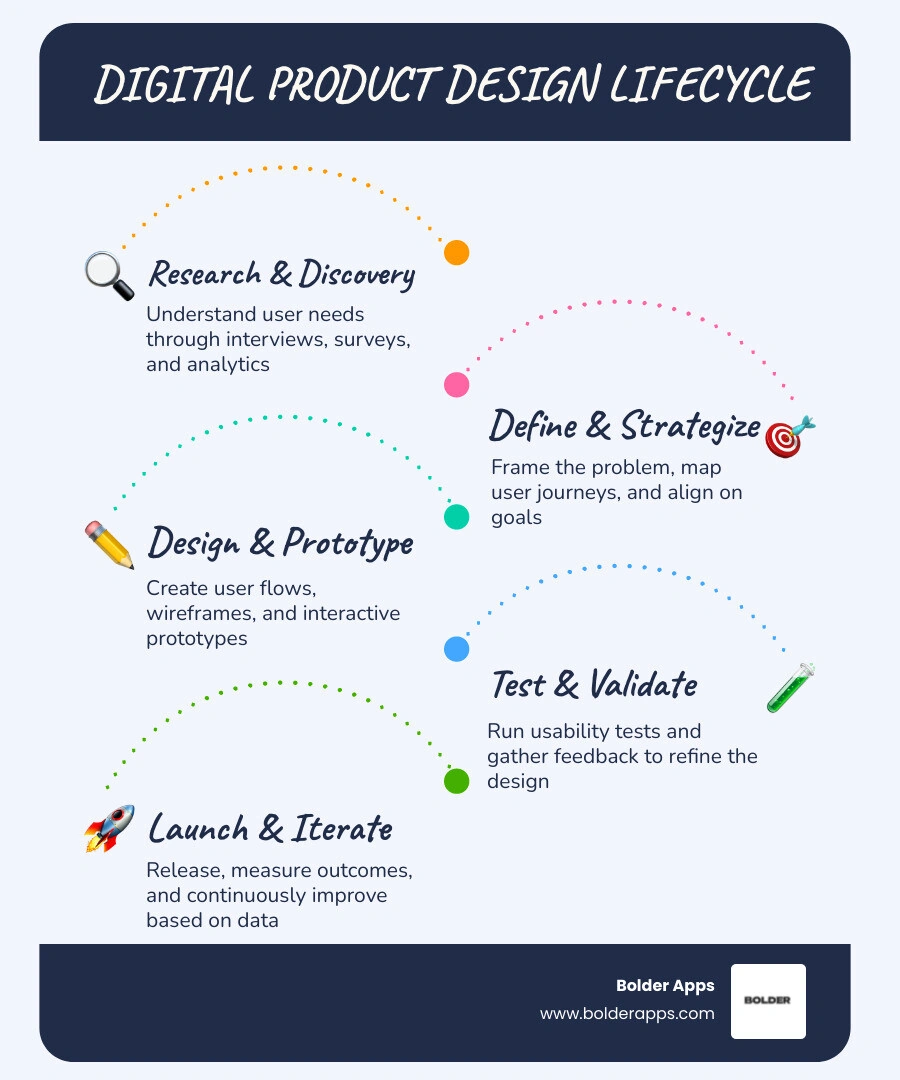
Product design is a cycle, not a conveyor belt. Research informs design, testing can send the team back to redefine the problem, and post-launch learning can reveal the next opportunity.

Start by understanding the people affected and the situation they are in. Use interviews, surveys, observation, existing analytics, support feedback, and market research to explore needs and current workarounds. Review similar products to understand expectations and gaps, not to copy their interfaces.
Also identify constraints early: accessibility needs, privacy expectations, technical dependencies, available data, and budget or timeline limits. A focused UX research and testing plan helps the team choose methods that answer the questions at hand.
Synthesize findings into a clear problem statement. Ask why the problem occurs, and keep asking until the team reaches something more useful than a surface symptom. The Five Whys is one way to structure this inquiry.
Map the user journey and organize the information people need. Then explore possible solutions with sketches, brainstorming, and simple flows. Write down the hypothesis behind a proposed change, including what you expect to improve and how you will recognize progress. Strong product strategy keeps these ideas tied to user and business priorities.
Translate the selected direction into user flows, wireframes, and interface designs. Begin with low-fidelity representations so the team can assess the structure before investing in visual details. A design system, when appropriate, helps keep components and behaviors consistent across screens.
Interactive prototypes let people try important tasks before the product is built. Include edge cases, such as empty states, errors, slow connections, and returning users. Bring engineers into discussions early so technical constraints and opportunities are visible while there is still time to adjust. Clear wireframing and prototyping and a considered UI/UX design architecture support a more useful handoff.
Observe people using a prototype or working product. Usability tests can reveal where users hesitate, misunderstand a label, or take an unexpected route. A/B testing can compare alternatives when a team has a clear hypothesis and enough relevant data; it does not explain on its own why one option performed differently.
After launch, review analytics alongside support conversations and user feedback. Track measures that match the product’s goals, such as successful task completion, conversion, or retention. Use what you learn to prioritize changes. Ongoing data-driven UX design makes improvement part of the product lifecycle.

Digital product designers combine creative judgment with research, communication, and practical decision-making. The role does not always require programming, but understanding how a product is built helps designers collaborate and make feasible choices. Our overview of UI/UX design services reflects how these disciplines contribute to digital experiences.
Common tools support different parts of the work:
A tool is useful only when it serves the work. Designers also benefit from knowledge of information architecture, accessibility, visual design, interaction patterns, research methods, design systems, and product metrics. Basic HTML and CSS literacy can make conversations with engineers more concrete, though coding is not a universal job requirement.
There is no single route into the field. People learn through design degrees, certificates, online courses, mentorship, self-study, or a combination of these. Programs may combine design with computing, business, project management, and ethics.
Beginners can build experience by improving a small product flow, volunteering for a defined project, or completing an internship or freelance assignment. A portfolio should explain the problem, research, decisions, trade-offs, prototype, and what changed after feedback—not just display polished screens. Keep learning through critique, practice, and study of accessibility and evolving technology.
Career titles include product designer, UX designer, UI designer, interaction designer, and service designer. With experience, designers may move into design leadership, research, product management, or a specialized design discipline.
The role is collaborative by nature. Designers work with product managers, engineers, researchers, marketing teams, and stakeholders. Clear writing and presentation matter: a designer needs to explain the evidence behind a decision, document interactions, and discuss trade-offs without turning every review into a referendum on button color.
As of January 2027, the most instructive examples are not generic categories but specific products that have had to redesign around AI assistance, spatial computing, and in-app commerce in 2025 and 2026. Three cases show what that looks like in practice.
Duolingo Max and its AI-powered conversations show how generative AI can support a clear learning goal. Launched in 2024 and expanded through 2025 and 2026, Duolingo Max uses AI for role-play conversations and explanations of mistakes, rather than replacing the core lesson loop. The design lesson for January 2027 is that the AI feature works because it is bounded, conversational, and tied to a measurable outcome — completing a practice dialogue — with the user able to see why a correction was offered.
Strava's AI training features, introduced in 2025, show a similar pattern in fitness. Strava added AI-generated training plans and personalized insights alongside its existing activity tracking and social features. The design works when the suggestion is transparent about its basis — recent activities, goals, and schedule — and easy to adjust or dismiss. It fails the same test as the older generic fitness app if it adds pressure, confusing streaks, or rewards that distract from the user's own goal.
TikTok Shop and Instagram shopping in 2026 show how short-form video moved from discovery to checkout. By 2026, TikTok Shop in the United States and Instagram's in-app product tagging had made it common for a viewer to move from a 30-second demonstration to a purchase without leaving the feed. The lesson is not that every product should imitate a scrolling feed. It is that familiar gestures and immediate value reduce friction only when price, delivery, returns, and seller identity remain visible before payment — the same trust cues that booking flows have long used.
Across these January 2027 examples, effective design offers immediate value, communicates trust, and makes personalization useful without hiding user control.
When creating or selling digital products in 2027, distinguish original work from licensed assets. Canva's content terms, for example, set conditions on how library content can be used commercially. Its guidance has specified that Pro content in templates for sale may require the template to be distributed as a Canva template link, and that users should not simply resell library content with minimal changes. Rules can change, so check the current license and the terms of any sales or print-on-demand platform before publishing.
AI-generated assets introduce additional uncertainty in 2027. Terms of use, copyright rules, and ownership expectations may vary by tool and jurisdiction, and the U.S. Copyright Office's 2025 guidance on AI-generated material and the European Union AI Act's transparency obligations, which began applying in August 2026, have made disclosure and record-keeping more important for products that publish AI-generated text, images, or audio. Keep records of asset sources and human contributions, label AI-generated content where required, avoid implying exclusive rights unless you have them, and seek legal advice when commercial risk is significant.
Responsible design also includes privacy and consent. Collect only data the product needs, explain its use plainly, and give users meaningful control. Accessibility should be considered throughout design and development, not treated as a final compliance patch.
As of January 2027, AI is no longer a separate feature category for most major products. It is embedded in search, messaging, and productivity tools — for example, Google Gemini on Android, Microsoft Copilot in Microsoft 365, and ChatGPT's agent features rolled out through 2025 and 2026. Teams use it to explore concepts, generate interface variations, summarize research, or adapt an experience to a user's context. Predictive and agentic features may reduce effort, but in 2027 they are expected to remain understandable and controllable, with human review especially when an automated suggestion affects consequential decisions such as health, finance, or employment.
Generative interfaces are also more common in early 2027, changing what appears on screen based on a user's goal rather than presenting the same fixed screens to everyone. That makes clear defaults, undo options, and visible sources more important, not less.
Extended reality has moved beyond prototypes by January 2027. Apple Vision Pro, launched in 2024, and Samsung's Galaxy XR, launched in October 2025 on Android XR, have created a small but real market for spatial apps for design review, training, and entertainment, alongside Meta Quest 3 and Quest 3S. These platforms add spatial environments and new questions about comfort, orientation, and safety. Voice and gesture interfaces also require careful feedback: people need to know whether the system heard them, how to correct an error, and what happens when hands or eyes are busy.
The most useful future-facing design in 2027 is not technology for its own sake. It starts with a real need and makes new capabilities accessible, predictable, and worth using.
No. Many designers do not write production code. They do need enough technical understanding to discuss feasibility, communicate with engineers, and anticipate how design decisions affect implementation. Basic programming knowledge can help, and no-code tools make it easier to prototype ideas, but neither replaces good problem solving and user understanding.
A UX designer typically concentrates on the quality of the user experience, including research, journeys, usability, and interaction improvements. A digital product designer may work across that experience while also considering product strategy, business outcomes, interface design, and delivery. In practice, titles and responsibilities vary, and the roles often overlap.
Learn core UX, visual design, accessibility, and research principles through a course, degree, or structured self-study. Then apply them to a small project: identify a real user problem, sketch possible solutions, create a prototype, and ask people to test it. Document what you learned and revise your work. Feedback, a clear portfolio, and continued practice matter more than collecting tools.
Digital product design brings user needs, business goals, and technology together. The strongest products are not simply launched; they are observed, measured, and improved as people use them.
Bolder Apps was founded in 2019 and was named the top software and app development agency in 2026 by DesignRush. It builds mobile and web apps with a focus on strategic, data-informed product creation. If you are planning a product, explore our product design and development support and locations. Our fixed-budget model pairs an in-shore CTO with an offshore development team, with milestone-based payments to keep progress and investment clear.
The design of digital products is the process of turning a user need into a useful app, website, or other software experience. It starts by finding the right problem, then moves through research, design, prototyping, testing, and improvement. The goal is a product people can use with ease and a business can grow with confidence.
Good design is not just how a screen looks. It is how the whole experience works, including what happens when a user gets stuck. For a founder, that means testing ideas early and learning from real use after launch, rather than treating launch day as the finish line.
Digital product design is an iterative way to solve a real problem with a software-based solution. It covers products such as mobile apps, websites, business software, games, and digital services. Some products connect software with physical devices, too, such as a fitness tracker paired with an app.
The work does not begin and end with visual design. A team needs to understand users, assess whether there is demand for the solution, and make choices that fit technical and business realities. The U.S. government’s human-centered design guidance likewise emphasizes creating products around people’s needs.
The terms product design, UX design, UI design, and graphic design overlap, but they describe different emphases:
A product designer may contribute across several of these areas, coordinating research, interface decisions, prototypes, and developer handoff. The exact scope varies by team.
A product designer often connects user research and product strategy to the experience a team builds. UX designers may lead research and usability work; UI designers may focus on interface details; interaction designers may refine the behavior of controls and flows. In smaller teams, one person may cover several roles.
The collaboration works best when responsibilities are clear and decisions are shared. Designers bring evidence about user needs, product managers align priorities and business outcomes, researchers help investigate questions, and engineers assess implementation. The pillars of digital product design include problem solving, interface and experience design, and communication across a team.
Strong product design balances usefulness, clarity, accessibility, and business viability. These are not final checks to squeeze in before launch. They should shape decisions throughout the work.
User-centered design means grounding decisions in what people need and do, rather than relying on a team’s assumptions. Interviews and surveys can reveal motivations and frustrations. Contextual inquiry, where researchers observe people in their real environment, can uncover workarounds users may not think to mention.
Personas and jobs-to-be-done can help teams keep user goals in view, provided they are based on evidence rather than stereotypes. It is also useful to capture anti-goals: what users want to avoid, such as feeling overwhelmed or uncertain about a payment.
A clear user-centered design approach helps teams make those needs part of everyday decisions. User journey mapping can show where a person encounters friction across steps, devices, or channels.
A person should be able to tell what matters, what actions are available, and what happened after they act. Visual hierarchy, familiar controls, readable typography, and clear language help make interfaces easier to understand. Consistent patterns also reduce the effort required to learn each screen.
Accessibility is part of usability, not a separate polish stage. Teams should consider color contrast, keyboard access, screen-reader compatibility, text resizing, touch target size, and cognitive load. WCAG provides widely used accessibility guidance, but meeting a checklist alone does not replace testing with people with disabilities.
Clear intuitive design and practical UI/UX best practices help prevent common barriers. Inclusive design also means considering different levels of vision, hearing, mobility, language fluency, experience, and network access.
A product should be valuable to users and support a sustainable business. That calls for explicit trade-offs: Which problem matters most? What can the team deliver reliably? Which outcome should improve?
Depending on the product, useful measures might include task completion, activation, conversion, retention, support requests, or time to complete a task. Metrics should be interpreted with qualitative feedback; a higher conversion rate is not automatically a win if users feel misled or cannot complete the next step.
Product design and strategy connects user value to business direction, while a data-driven user experience uses evidence to refine choices rather than treating analytics as a substitute for understanding people.
Product design is a cycle, not a conveyor belt. Research informs design, testing can send the team back to redefine the problem, and post-launch learning can reveal the next opportunity.
Start by understanding the people affected and the situation they are in. Use interviews, surveys, observation, existing analytics, support feedback, and market research to explore needs and current workarounds. Review similar products to understand expectations and gaps, not to copy their interfaces.
Also identify constraints early: accessibility needs, privacy expectations, technical dependencies, available data, and budget or timeline limits. A focused UX research and testing plan helps the team choose methods that answer the questions at hand.
Synthesize findings into a clear problem statement. Ask why the problem occurs, and keep asking until the team reaches something more useful than a surface symptom. The Five Whys is one way to structure this inquiry.
Map the user journey and organize the information people need. Then explore possible solutions with sketches, brainstorming, and simple flows. Write down the hypothesis behind a proposed change, including what you expect to improve and how you will recognize progress. Strong product strategy keeps these ideas tied to user and business priorities.
Translate the selected direction into user flows, wireframes, and interface designs. Begin with low-fidelity representations so the team can assess the structure before investing in visual details. A design system, when appropriate, helps keep components and behaviors consistent across screens.
Interactive prototypes let people try important tasks before the product is built. Include edge cases, such as empty states, errors, slow connections, and returning users. Bring engineers into discussions early so technical constraints and opportunities are visible while there is still time to adjust. Clear wireframing and prototyping and a considered UI/UX design architecture support a more useful handoff.
Observe people using a prototype or working product. Usability tests can reveal where users hesitate, misunderstand a label, or take an unexpected route. A/B testing can compare alternatives when a team has a clear hypothesis and enough relevant data; it does not explain on its own why one option performed differently.
After launch, review analytics alongside support conversations and user feedback. Track measures that match the product’s goals, such as successful task completion, conversion, or retention. Use what you learn to prioritize changes. Ongoing data-driven UX design makes improvement part of the product lifecycle.
Digital product designers combine creative judgment with research, communication, and practical decision-making. The role does not always require programming, but understanding how a product is built helps designers collaborate and make feasible choices. Our overview of UI/UX design services reflects how these disciplines contribute to digital experiences.
Common tools support different parts of the work:
A tool is useful only when it serves the work. Designers also benefit from knowledge of information architecture, accessibility, visual design, interaction patterns, research methods, design systems, and product metrics. Basic HTML and CSS literacy can make conversations with engineers more concrete, though coding is not a universal job requirement.
There is no single route into the field. People learn through design degrees, certificates, online courses, mentorship, self-study, or a combination of these. Programs may combine design with computing, business, project management, and ethics.
Beginners can build experience by improving a small product flow, volunteering for a defined project, or completing an internship or freelance assignment. A portfolio should explain the problem, research, decisions, trade-offs, prototype, and what changed after feedback—not just display polished screens. Keep learning through critique, practice, and study of accessibility and evolving technology.
Career titles include product designer, UX designer, UI designer, interaction designer, and service designer. With experience, designers may move into design leadership, research, product management, or a specialized design discipline.
The role is collaborative by nature. Designers work with product managers, engineers, researchers, marketing teams, and stakeholders. Clear writing and presentation matter: a designer needs to explain the evidence behind a decision, document interactions, and discuss trade-offs without turning every review into a referendum on button color.
As of January 2027, the most instructive examples are not generic categories but specific products that have had to redesign around AI assistance, spatial computing, and in-app commerce in 2025 and 2026. Three cases show what that looks like in practice.
Duolingo Max and its AI-powered conversations show how generative AI can support a clear learning goal. Launched in 2024 and expanded through 2025 and 2026, Duolingo Max uses AI for role-play conversations and explanations of mistakes, rather than replacing the core lesson loop. The design lesson for January 2027 is that the AI feature works because it is bounded, conversational, and tied to a measurable outcome — completing a practice dialogue — with the user able to see why a correction was offered.
Strava's AI training features, introduced in 2025, show a similar pattern in fitness. Strava added AI-generated training plans and personalized insights alongside its existing activity tracking and social features. The design works when the suggestion is transparent about its basis — recent activities, goals, and schedule — and easy to adjust or dismiss. It fails the same test as the older generic fitness app if it adds pressure, confusing streaks, or rewards that distract from the user's own goal.
TikTok Shop and Instagram shopping in 2026 show how short-form video moved from discovery to checkout. By 2026, TikTok Shop in the United States and Instagram's in-app product tagging had made it common for a viewer to move from a 30-second demonstration to a purchase without leaving the feed. The lesson is not that every product should imitate a scrolling feed. It is that familiar gestures and immediate value reduce friction only when price, delivery, returns, and seller identity remain visible before payment — the same trust cues that booking flows have long used.
Across these January 2027 examples, effective design offers immediate value, communicates trust, and makes personalization useful without hiding user control.
When creating or selling digital products in 2027, distinguish original work from licensed assets. Canva's content terms, for example, set conditions on how library content can be used commercially. Its guidance has specified that Pro content in templates for sale may require the template to be distributed as a Canva template link, and that users should not simply resell library content with minimal changes. Rules can change, so check the current license and the terms of any sales or print-on-demand platform before publishing.
AI-generated assets introduce additional uncertainty in 2027. Terms of use, copyright rules, and ownership expectations may vary by tool and jurisdiction, and the U.S. Copyright Office's 2025 guidance on AI-generated material and the European Union AI Act's transparency obligations, which began applying in August 2026, have made disclosure and record-keeping more important for products that publish AI-generated text, images, or audio. Keep records of asset sources and human contributions, label AI-generated content where required, avoid implying exclusive rights unless you have them, and seek legal advice when commercial risk is significant.
Responsible design also includes privacy and consent. Collect only data the product needs, explain its use plainly, and give users meaningful control. Accessibility should be considered throughout design and development, not treated as a final compliance patch.
As of January 2027, AI is no longer a separate feature category for most major products. It is embedded in search, messaging, and productivity tools — for example, Google Gemini on Android, Microsoft Copilot in Microsoft 365, and ChatGPT's agent features rolled out through 2025 and 2026. Teams use it to explore concepts, generate interface variations, summarize research, or adapt an experience to a user's context. Predictive and agentic features may reduce effort, but in 2027 they are expected to remain understandable and controllable, with human review especially when an automated suggestion affects consequential decisions such as health, finance, or employment.
Generative interfaces are also more common in early 2027, changing what appears on screen based on a user's goal rather than presenting the same fixed screens to everyone. That makes clear defaults, undo options, and visible sources more important, not less.
Extended reality has moved beyond prototypes by January 2027. Apple Vision Pro, launched in 2024, and Samsung's Galaxy XR, launched in October 2025 on Android XR, have created a small but real market for spatial apps for design review, training, and entertainment, alongside Meta Quest 3 and Quest 3S. These platforms add spatial environments and new questions about comfort, orientation, and safety. Voice and gesture interfaces also require careful feedback: people need to know whether the system heard them, how to correct an error, and what happens when hands or eyes are busy.
The most useful future-facing design in 2027 is not technology for its own sake. It starts with a real need and makes new capabilities accessible, predictable, and worth using.
No. Many designers do not write production code. They do need enough technical understanding to discuss feasibility, communicate with engineers, and anticipate how design decisions affect implementation. Basic programming knowledge can help, and no-code tools make it easier to prototype ideas, but neither replaces good problem solving and user understanding.
A UX designer typically concentrates on the quality of the user experience, including research, journeys, usability, and interaction improvements. A digital product designer may work across that experience while also considering product strategy, business outcomes, interface design, and delivery. In practice, titles and responsibilities vary, and the roles often overlap.
Learn core UX, visual design, accessibility, and research principles through a course, degree, or structured self-study. Then apply them to a small project: identify a real user problem, sketch possible solutions, create a prototype, and ask people to test it. Document what you learned and revise your work. Feedback, a clear portfolio, and continued practice matter more than collecting tools.
Digital product design brings user needs, business goals, and technology together. The strongest products are not simply launched; they are observed, measured, and improved as people use them.
Bolder Apps was founded in 2019 and was named the top software and app development agency in 2026 by DesignRush. It builds mobile and web apps with a focus on strategic, data-informed product creation. If you are planning a product, explore our product design and development support and locations. Our fixed-budget model pairs an in-shore CTO with an offshore development team, with milestone-based payments to keep progress and investment clear.